1
Better models, faster conversion
Desktop workflows can access stronger conversion models and a tighter processing path, helping sheet music, MIDI, and MusicXML tasks finish faster with more precise recognition.
 Melogen Desktop for Mac and Windows
Create a focused desktop workspace for the messy middle of music prep.

Why desktop
Melogen Desktop is built for heavier music tasks where model quality, conversion speed, local file control, and source collection matter more than a quick one-off upload.
Use the desktop version when you want faster conversion, cleaner outputs, better file management, and extra desktop-only capabilities.

Desktop workflows can access stronger conversion models and a tighter processing path, helping sheet music, MIDI, and MusicXML tasks finish faster with more precise recognition.
The app gives desktop users extra product benefits, early workflow improvements, and local-first conveniences that do not fit neatly into the web version.
Keep MIDI, MusicXML, enhanced audio, downloaded files, and reviewed source material in one Mac-side workspace instead of hunting through browser downloads.
Use the desktop downloader to collect supported cloud-music sources into local files before conversion, enhancement, trimming, or analysis.
Workflow
The desktop app is the Mac-side front door for music preparation. Use it to collect sources, inspect what was found, export what you are allowed to process, then keep moving in MelogenAI.
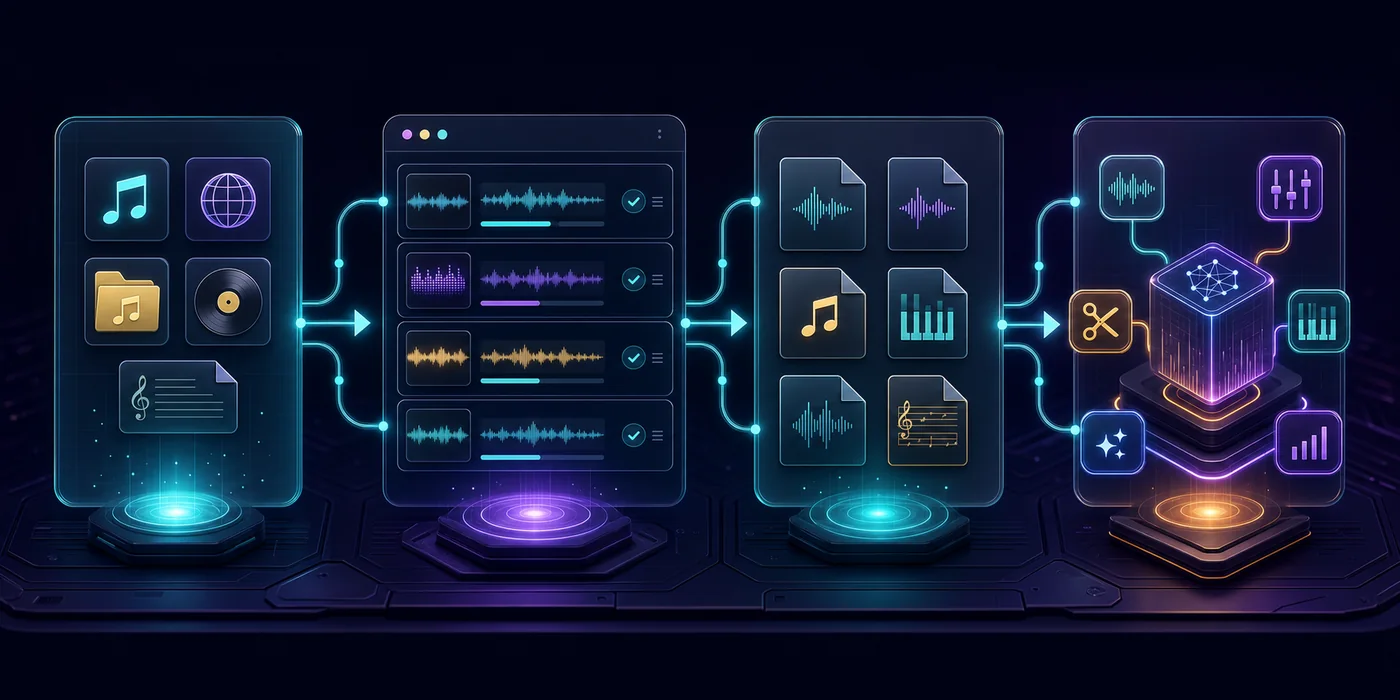
Paste a playlist, album, video, audio URL, or bring in a local file, score PDF, or image from your Mac.
Check parsed tracks, source status, and available items before you start saving or converting anything.
Save permitted media and converted outputs to your Mac for editing, rehearsal, listening, or archive work.
Open the right follow-up tool for sheet-to-MIDI, MusicXML, audio enhancement, trimming, or structural analysis.
Who it helps
Melogen Desktop is useful when the job is bigger than one upload form but smaller than a full production suite.
Bring music links, playlist pages, album references, and local audio into one visible queue before deciding what belongs in the project.
Less tab-hopping before editing, arranging, or publishing.
Move from score PDFs, images, recordings, and examples toward MIDI, MusicXML, trimmed audio, or analysis when the source is suitable.
A clearer route from material to practice-ready output.
Use the Mac workspace for local files and permitted media, then continue to trimming, enhancement, conversion, or DAW handoff.
Fewer repeated uploads and fewer lost files.
Keep source review, track selection, retry status, and export decisions visible instead of burying the workflow in terminal output.
More control without turning every task into a script.
What it handles
The app is designed around the source-to-file workflow: collect, inspect, select, export, convert, and hand off to MelogenAI tools.

Paste music URLs and let Melogen Desktop inspect playlist, album, video, and tab-style sources before you choose what to keep.
Best for review-first workflows
Save owned, licensed, public, or otherwise permitted media into a local queue with per-item status instead of a black-box action.
Clear boundary, visible status
Review parsed items, skip noise, and keep only the tracks or files that belong in your actual task list.
Useful for large playlists and album pages
Prepare common music and audio file outputs for editing, archiving, rehearsal, or DAW handoff.
MP3, WAV, MIDI, MusicXML, and related workflows
Bring sheet music, PDFs, and score images into the Melogen ecosystem, then continue toward MIDI or MusicXML when the source is suitable.
Connects desktop work with MelogenAI score tools
Move downloaded or imported files into MelogenAI tools for trimming, enhancement, analysis, and other production tasks.
A desktop front door for web and local tools
Use direct internet when sources are reachable, and keep TUN or system proxy setups available for unstable or blocked networks.
No proxy needed when source sites are reachable
Move between the desktop app and the MelogenAI website with the same product ecosystem and account context.
Desktop prep, web AI follow-up
Creator comments
A more personal look at the score, audio, file-management, and cloud-to-local workflows Melogen Desktop is designed to support.

Maya Chen
@maya.midistudio
I used to bounce between a browser upload, Finder, and a notation app. Now I keep the scan, MIDI export, and MusicXML follow-up in one Mac workspace.
Score-to-MIDI user / Piano lesson prep

Leo Park
@leopark.audio
For rough demos, the useful part is not just conversion. It is having the downloaded file, enhanced version, and analysis path lined up without hunting through folders.
Music producer / Demo cleanup

Elena Ruiz
@elenascores
When a rehearsal score arrives as a PDF, I can prep it on the desktop first, then move into MIDI or MusicXML work with much less context switching.
Choir arranger / MusicXML editing

Noah Rivera
@noahrivmusic
The biggest win is that generated files do not disappear into a downloads mess. I can keep versions together before sending anything into another Melogen tool.
Indie songwriter / Local file management

Riley Stone
@rileystone.wav
I use the desktop app as the staging area before enhancement. It is easier to compare the damaged source, repaired file, and next analysis step side by side.
Audio restoration user / Damaged audio repair

Sofia Martins
@sofia.playlists
The downloader is the reason I open the Mac app first. I can bring supported cloud music into a local queue, then decide what needs trimming or analysis.
Playlist collector / Cloud-to-local music prep
FAQ
It is a Mac music toolbox for collecting music sources, reviewing parsed tracks, organizing local files, exporting permitted media, converting audio, and continuing into MelogenAI web tools.
No. Melogen Desktop is for parsing sources, managing tasks, and saving or converting media that you own, license, have permission to use, or are otherwise allowed to process.
The desktop app is better for source collection, local files, queue review, track selection, and Mac-side handoff. The web tools remain the right place for cloud AI tasks such as sheet-to-MIDI, MusicXML, enhancement, trimming, and analysis.
Mac v2.1.3 is available as an Apple Silicon arm64 DMG. Windows users can choose the Windows tab to download the current installer.
Yes, when the source websites are reachable from your network. If a source is blocked, unstable, or rate-limited from the current network, TUN or system proxy mode can still be useful.
Yes. Choose Windows from the platform tabs to download the current Windows installer, or stay on Mac for the Apple Silicon DMG.
Start on desktop
Choose the Mac or Windows installer, add a source or local file, review the queue, and continue into MelogenAI when the task needs MIDI, MusicXML, trimming, enhancement, or analysis.