How to Read Guitar Tabs: Symbols, Rhythm, and Practice
Learn how to read guitar tabs with string lines, fret numbers, rhythm cues, common symbols, practice checks, and a Melogen tab workflow.
 Zhang Guo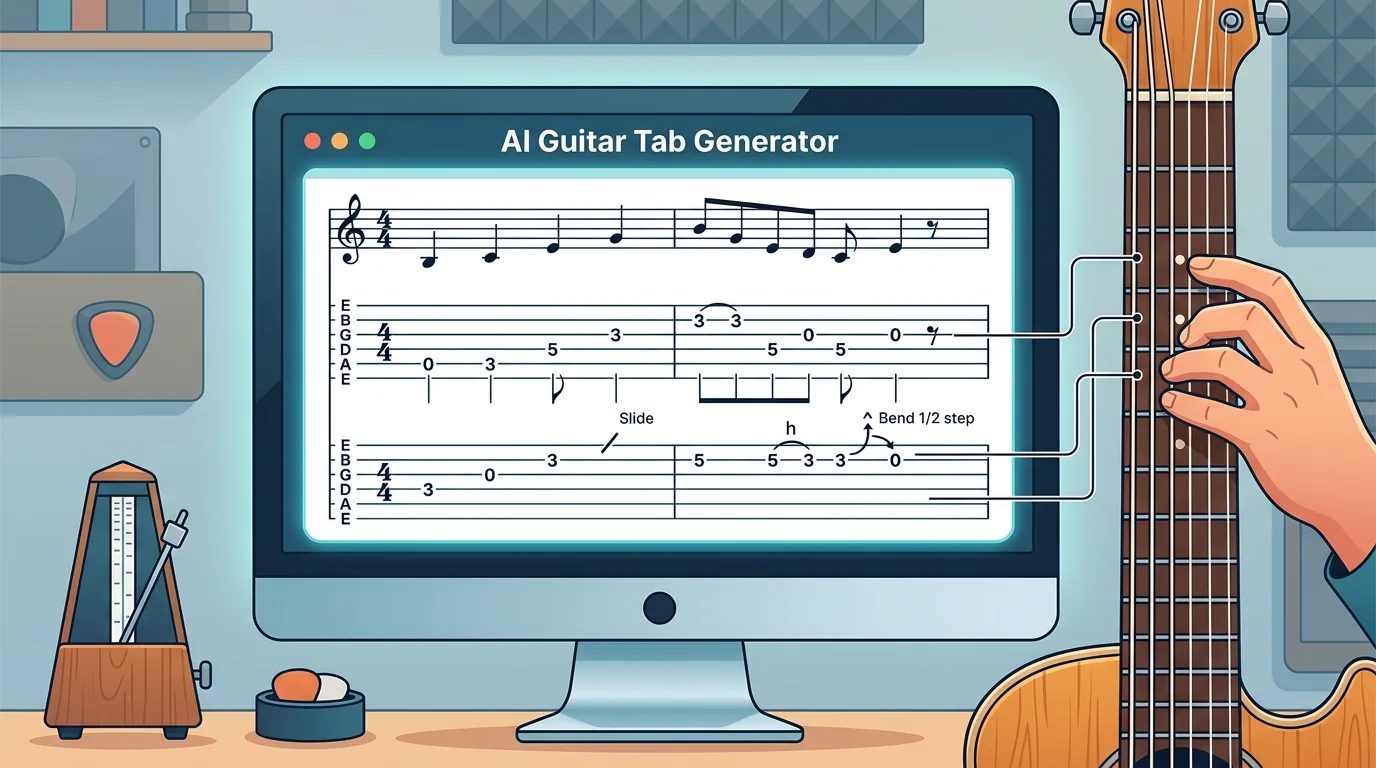
Turn a static score into editable MIDI
Contents
If you want to learn how to read guitar tabs, start with the grid: tabs are read from left to right, with each horizontal line representing one guitar string and each number telling you which fret to play. A 0 means open string. A 3 means third fret. Stacked numbers mean you play the notes together as a chord.
The part that trips up most beginners is not the numbers. It is the extra layer around them: string order, rhythm, and symbols like h, p, /, x, and b. This guide keeps the job practical. You will learn the tab grid first, then the common symbols, then a practice loop that turns a tab into something you can actually play.
Start with the six string lines
A standard guitar tab has six horizontal lines. They usually match standard guitar tuning from highest-pitched string at the top to lowest-pitched string at the bottom:
| Tab line | Standard tuning note | How to think about it |
|---|---|---|
| Top line | high E | Thinnest string, closest to the floor when you hold the guitar |
| Second line | B | The next thinner treble string |
| Third line | G | Middle treble string |
| Fourth line | D | Lower middle string |
| Fifth line | A | Bass-side string |
| Bottom line | low E | Thickest string, closest to your face when you hold the guitar |
That top-to-bottom layout feels backward at first because the highest-pitched string is drawn on top. Do not fight it. Put your guitar in playing position, name the high E string, then look at the top tab line. Do the same for the low E string and the bottom tab line. Once those two anchors make sense, the four middle lines stop floating.
Map written notes onto the instrument or workflow
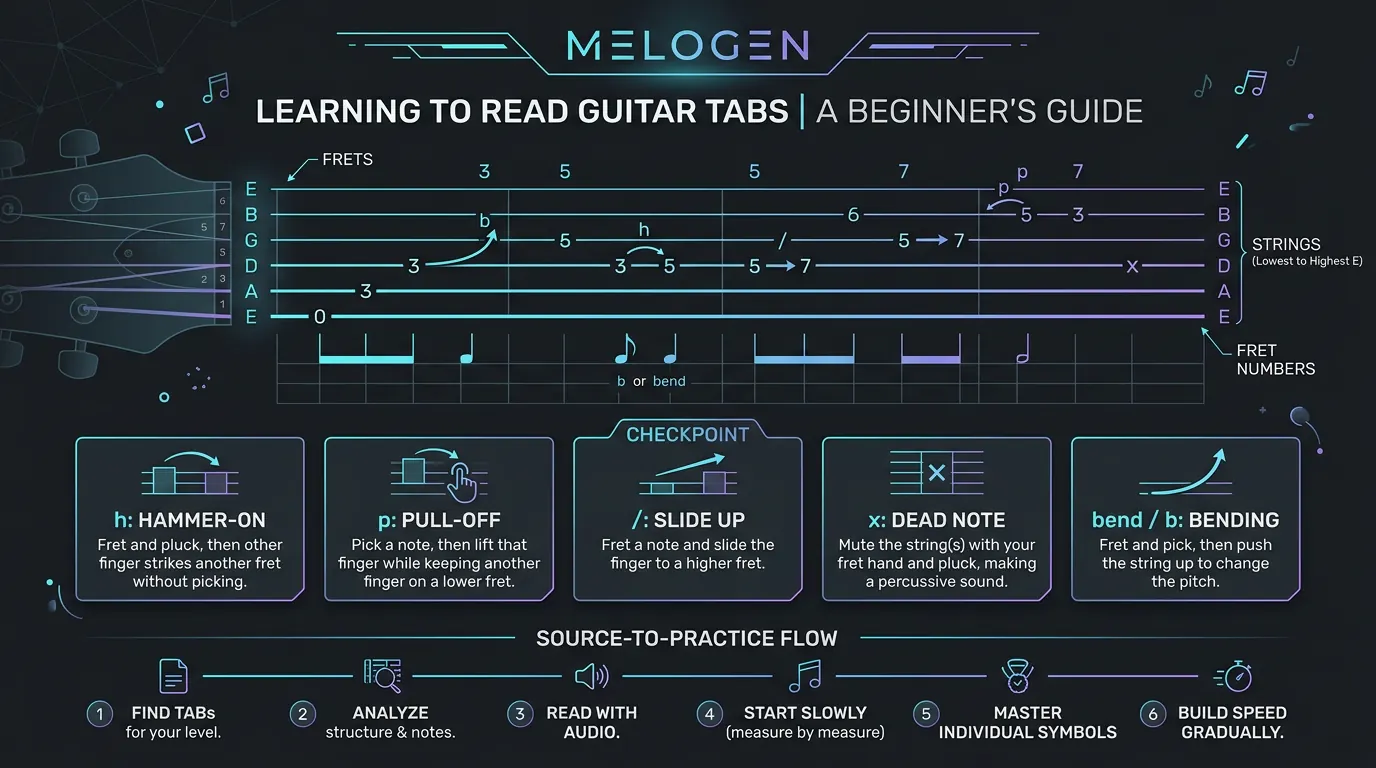
After the string line, read the fret number. The number tells you where your finger goes on that string. A few examples cover most beginner tabs:
0means play the string open.3means press the third fret on that string.5/7means slide from fret 5 to fret 7.7h9means pick fret 7, then hammer on to fret 9.9p7means pick fret 9, then pull off to fret 7.xmeans mute or rake the string for a dead-note sound.
If numbers are stacked vertically, play them together. That is a chord or double-stop. If they are separated horizontally, play them in sequence. This is the core mental model: vertical means together, horizontal means time passing.
| Signal | What to read first | Why it matters | Beginner action |
|---|---|---|---|
| String line | Which string carries the number | Keeps your fretting hand from jumping to the wrong string | Say the string name before playing |
| Fret number | Where to press | Gives the physical location | Place one finger, then pick once |
| Vertical stack | Whether notes align | Tells you if it is a chord | Strum only the strings with numbers |
| Symbol | What articulation changes | Adds the guitar-specific movement | Practice the symbol slowly by itself |
| Rhythm source | Tab stems, standard notation, or the recording | Prevents correct notes from landing in the wrong time | Count or listen before speeding up |
Read rhythm before chasing technique
Some tabs show rhythm clearly. Others only show fret placement. That matters because a tab can tell you to play 0-3-5, but it may not tell you whether those notes are eighth notes, a triplet, or a syncopated riff unless the tab includes stems, rhythmic notation, or audio.
Use this order when a tab feels confusing:
- Clap or tap the rhythm from the recording.
- Speak the fret numbers in time.
- Play only the picking hand on muted strings.
- Add the fretting hand slowly.
- Increase speed only after the pulse feels stable.
This is slower than guessing, but it saves time. Most beginner tab mistakes are not "I do not know what 5 means." They are "I know where 5 is, but I do not know when it happens."
Understand where supporting formats or references help
TAB is excellent for location. Standard notation is better at pitch, rhythm, and musical context. Audio gives you phrasing and feel. A good guitar workflow uses all three when they are available.
If you are learning a riff, TAB may be the fastest path because it tells you the string and fret directly. If you are learning a melody from a score, the broader guide on how to read guitar sheet music explains the standard-notation side: staff position, rhythm, fretboard mapping, and position choices. If you are still memorizing the instrument, the electric guitar string notes chart is a useful companion because it keeps string order and first-position notes clear.
The practical distinction is simple:
| Source | Best use | Weak spot |
|---|---|---|
| Guitar TAB | String and fret placement | Rhythm can be incomplete |
| Standard notation | Pitch, rhythm, and phrasing | It may not show the easiest guitar position |
| Recording or demo | Timing, feel, and articulation | It does not tell you exact fret choices by itself |
| Generated first pass | Fast orientation from a song or audio file | Still needs listening, cleanup, and musical judgment |
Use Melogen as a bridge from source to practice
Melogen fits when your starting point is a song, audio file, or YouTube link and you need a readable first-pass tab. The current AI Guitar Tab Generator product page describes a browser-based workflow that turns songs, audio files, and YouTube links into readable guitar tabs for riffs, chords, and lead parts. The local product copy also lists MP3, WAV, M4A, FLAC, and YouTube links as supported sources.
That makes the tool useful for orientation. It can help you get from "I want to learn this part" to "I have a tab-shaped reference I can inspect." It does not remove the need to listen, slow the part down, and correct details with your ear and fingers.

Use Melogen this way:
- Upload the audio file or paste the supported video link.
- Generate a first-pass tab for the main riff, lead line, or chord-plus-tab view.
- Compare the result with the original audio.
- Mark any bars where rhythm, string choice, or articulation feels off.
- Practice those bars slowly instead of treating the first pass as final.
Build a first-week practice loop
You do not need a huge theory plan to start reading guitar tabs. You need a loop you can repeat without guessing.
- Day 1: Name the six tab lines from top to bottom and play open strings only.
- Day 2: Read single numbers on one string, then say the fret number before you play.
- Day 3: Practice stacked numbers as small chords or double-stops.
- Day 4: Isolate one symbol, such as
h,p,/,x, orb, and practice it slowly. - Day 5: Tap the rhythm before adding the fretting hand.
- Day 6: Use a recording, TAB, and your ear together instead of trusting one source alone.
- Day 7: Generate or find a simple tab, then mark the two bars that need the most cleanup.
The catch: speed hides sloppy reading. If you cannot count it slowly, you do not really own it yet.
Generate a guitar-first reference before you refine the part
Use Melogen AI Guitar Tab Generator when your source is a song, audio file, or YouTube link and you need a playable first pass before detailed cleanup.
The practical takeaway
Learning how to read guitar tabs comes down to a small sequence: string line, fret number, symbol, rhythm source, then practice tempo. When you keep that order, the page stops looking like a code and starts behaving like a map of where your hands should go.
Before you move on, check one short tab with this checklist:
- Can you name the string for each number?
- Can you tell whether notes are single notes or stacked chords?
- Can you explain each symbol before you play it?
- Can you count or hear the rhythm source?
- Can you play one bar slowly without losing the pulse?
If the answer is yes, start practicing. If the answer is no, do not restart the whole song. Pick the smallest confusing bar and fix that first.
About the author
Zhang Guo
Composer - AI Product Manager
AI product manager and digital marketing consultant with a background in music. Creativity is the bridge between rhythm and logic, where musical intuition and mathematical precision can coexist in every meaningful product decision.
Follow on X