Spotify Keeps Logging Me Out: Fixes for All Devices
Fix Spotify logging out on mobile, desktop, and web with a safe account-first checklist, app cleanup steps, and playlist recovery tips.
 Zhang Guo
Turn a static score into editable MIDI
Contents
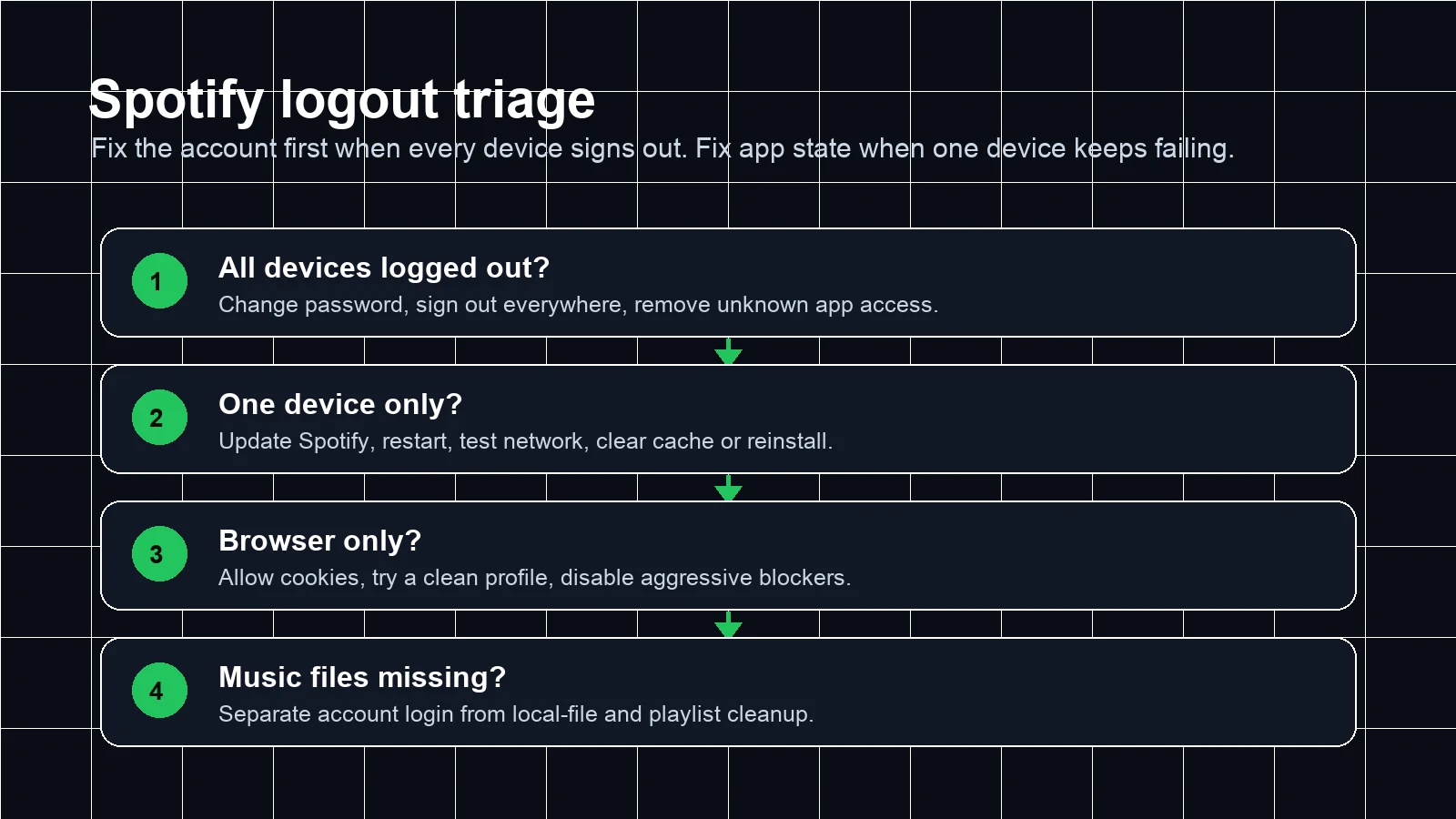
If your search is "Spotify keeps logging me out," do not start by reinstalling every app. First decide whether the problem is account-wide or device-specific. If every phone, computer, tablet, and web session signs out at once, treat it as an account/session issue and secure the account first. If only one device keeps dropping you back to the login screen, work through app, cache, storage, browser, or network fixes.
The useful order is simple: secure account, refresh sessions, clean one device, then restore your music workflow. That keeps you from deleting downloads, playlists, or local files before you know what actually failed.
Quick triage: account issue or device issue?
Use this table before changing settings. It is faster than guessing from memory.
| What you see | Most likely area | Start here |
|---|---|---|
| Spotify logged you out of all devices at once | Account session or security refresh | Change password and sign out everywhere |
| One phone or laptop keeps logging out | App state, cache, storage, or network | Update Spotify, restart, clear cache, then reinstall |
| Web player logs out but the app stays signed in | Browser cookies, extensions, or profile state | Test a clean browser profile and allow Spotify cookies |
| Login works, but playlists or local files feel wrong | Library, downloads, local files, or app permissions | Fix login first, then rebuild music-file access |
Secure the account first when every device signs out
Spotify's official log-out support page includes a "Sign out everywhere" option for logging out of mobile, tablet, web player, and desktop at once. It also notes that partner devices may need access removed separately through your apps page. That makes it the right anchor when your problem is larger than one phone.
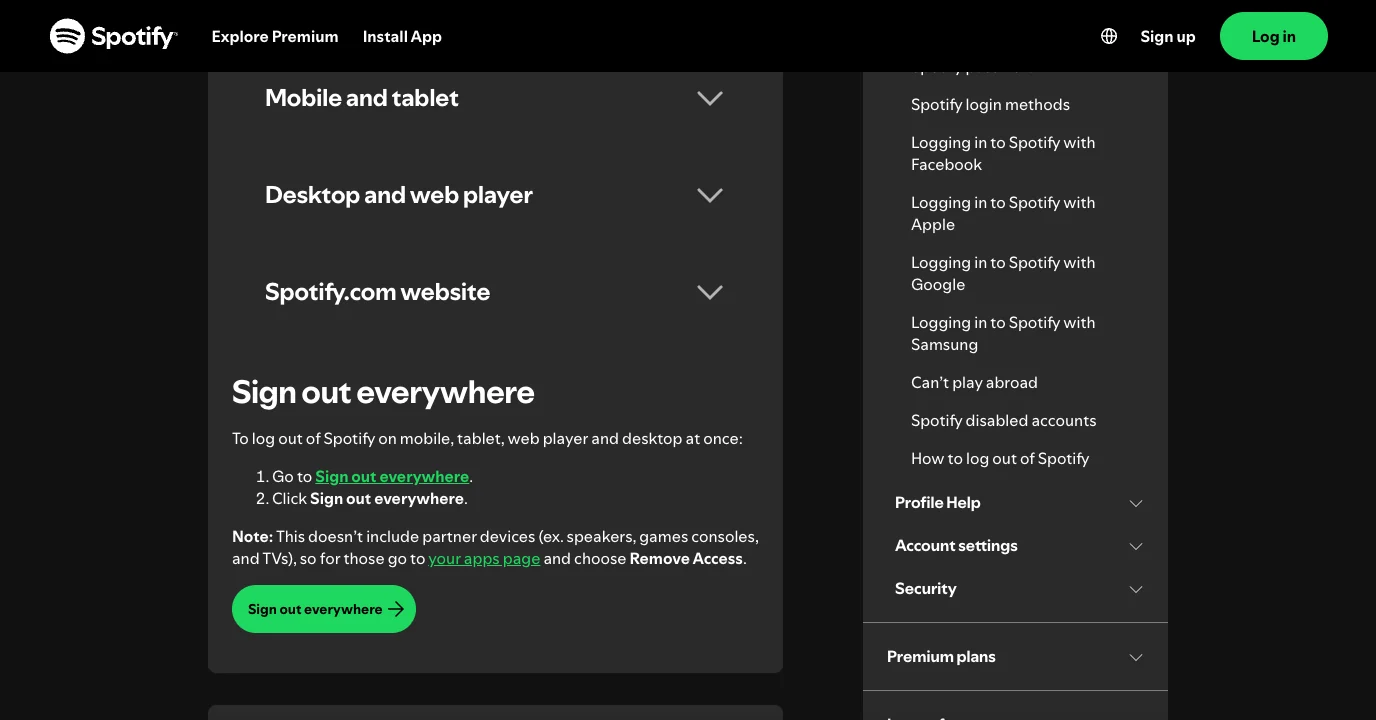
Use this account-first sequence:
- Reset or change your Spotify password from Spotify's official account path.
- Use Sign out everywhere to refresh old sessions.
- Remove app access you do not recognize.
- Sign back in on one trusted device first.
- After that device stays signed in, add your other devices back one at a time.
Spotify's reset password support page is the safest place to start when you cannot trust the current session. If the email, password, plan, or account details look changed, use Spotify's hacked account help instead of experimenting with third-party tools.
Do not enter your Spotify password into converter pages, downloader pages, playlist tools, or browser extensions just because they promise to fix login. A repeated logout can be annoying. A leaked account is worse.
Fix one device that keeps logging out
If Spotify stays signed in everywhere except one device, the account is probably not the main issue. Work from low-risk fixes to heavier ones.
| Step | Why it helps | What to watch |
|---|---|---|
| Restart Spotify and the device | Clears a temporary app/session state | Does not delete music or settings |
| Update Spotify | Fixes app-version bugs and login-flow changes | Use the official app store or Spotify installer |
| Test another network | Separates Wi-Fi, VPN, proxy, and captive portal issues | Turn VPN off during the test |
| Clear cache or storage | Removes stale playback and app data | Downloads may need to be rebuilt |
| Reinstall Spotify | Gives the app a clean local state | Use this after the easier checks |
Spotify's storage information page explains that Spotify uses device storage for temporary and downloaded content, and its reinstall support page gives the official clean-install route. That is the better order: understand storage first, then reinstall if the device still fails.
On mobile, also check that your system date/time is automatic, that Spotify has permission to use the network, and that low-data or battery restrictions are not aggressively closing the app. On desktop, check whether another security app, VPN, or network filter is breaking the login session after Spotify opens.
Fix browser and web player logout loops
When the Spotify web player signs out but the desktop or mobile app stays stable, focus on the browser.
Start with a clean test:
- Open a private window or a fresh browser profile.
- Sign in to Spotify once.
- Keep cookies enabled for
spotify.com. - Disable extensions that modify privacy, scripts, redirects, or audio playback.
- If the clean profile works, the problem is probably an extension, cookie rule, or old browser state.
Do not clear every saved browser item across all sites unless you need to. A targeted test is cleaner: one browser profile, one Spotify login, no extensions, no VPN. If that works, re-enable your normal setup one piece at a time.
Restore playlists, downloads, and local files after login is stable
Once Spotify stops logging out, check your music workflow in this order:
| Area | What to verify | Why it matters |
|---|---|---|
| Playlists | Make sure saved playlists and folders still appear | Login fixes can hide sync issues until you reopen the library |
| Downloads | Re-download offline content if the app storage was cleared | Cache cleanup can remove local downloaded playback files |
| Local files | Re-enable the folder or device permission | Local files depend on device access, not just account login |
| Connected devices | Reconnect speakers, consoles, cars, and TVs carefully | Partner devices may not be covered by Sign out everywhere |
If your real goal is getting personal audio, demos, purchased files, or rehearsal clips back into Spotify, read the add local files to Spotify guide after the login issue is fixed. If the issue is playlist playback rather than account access, the Spotify crossfade settings guide covers transitions and listening flow.
Where Melogen fits after the account is fixed
Melogen cannot manage your Spotify account, recover a Spotify password, or keep Spotify signed in. It becomes useful after the account is stable and you are preparing music files you are allowed to edit: a rehearsal bounce, a purchased audio file, a voice memo, or a demo export that needs a clean start and ending before you add it back to a playlist.

Use the Melogen Music Trimmer when your own file has dead air, a rough tail, or an awkward fade before you bring it into a listening playlist. Keep that boundary clear: fix Spotify login in Spotify, then clean your own audio files in Melogen.
Prepare cleaner clips after Spotify is stable
Use Melogen Music Trimmer for audio files you are allowed to edit, then add the cleaner listening copy back into your music workflow.
FAQs
Why did Spotify log me out of all devices?
It can happen after a session refresh, password or account-security change, app access change, or a broader account issue. If every device signs out together, start by changing the password, signing out everywhere, and removing unknown app access.
Should I reinstall Spotify first?
Only if the problem is limited to one device or the lighter fixes fail. If all devices were logged out, reinstalling one app does not solve the account/session problem.
Does clearing Spotify cache delete playlists?
Clearing cache should not delete cloud playlists from your account, but it can remove local temporary files and downloads on that device. Check downloads and local files after the login problem is stable.
Why does Spotify web player keep logging me out?
The web player depends on browser cookies, profile state, privacy extensions, and network rules. Test a clean browser profile with cookies enabled before changing your Spotify account again.
Can Melogen fix Spotify account login?
No. Use Spotify's official account and support pages for login, password, and session problems. Melogen helps only with your own audio files after the account side is stable.
The practical takeaway
Spotify logout problems are easiest to fix when you separate account security from local app state. All devices logging out means account-first: password, sign out everywhere, app access, then one trusted login. One device logging out means device-first: update, restart, network, cache, reinstall. Once Spotify is stable, rebuild downloads, local files, and owned-audio workflows carefully instead of rushing into converter shortcuts.
About the author
Zhang Guo
Composer - AI Product Manager
AI product manager and digital marketing consultant with a background in music. Creativity is the bridge between rhythm and logic, where musical intuition and mathematical precision can coexist in every meaningful product decision.
Follow on X