Can I Upload AI Music to SoundCloud Safely in 2026
Can I upload AI music to SoundCloud? Check generator licenses, track rights, audio files, metadata, profile uploads, and distribution rules before publishing.
 Zhang Guo
Turn a static score into editable MIDI
Contents
Can I upload AI music to SoundCloud? Sometimes—but uploading a track to your SoundCloud profile is not the same as getting it approved for monetization or distribution through SoundCloud for Artists. Before publishing, confirm that you control the music, samples, vocals, artwork, and commercial rights granted by the AI tool.
The safe workflow is rights first, audio preparation second, and platform submission last. A generator's download button is not proof that every use is allowed, and a successful profile upload is not a guarantee that the same track can be monetized or delivered to other streaming services.
Know Which SoundCloud Route You Are Using
Start by naming the action you actually want to take. “Upload to SoundCloud” can describe several different workflows, each with its own gate.
| Route | What it does | Main question to answer first |
|---|---|---|
| SoundCloud profile upload | Publishes a track on your SoundCloud page | Do you have permission to upload every part of the track? |
| SoundCloud monetization | Attempts to earn from eligible plays | Does the track meet monetization, ownership, and AI-source rules? |
| SoundCloud for Artists distribution | Delivers a release to other music services | Does the release satisfy the distributor's current content and documentation rules? |
| Private sharing | Makes a track available through a limited link | Does your license permit sharing, even if the track is not public? |
SoundCloud's Uploading FAQs say that you should upload only material for which you have the necessary rights. Privacy settings change who can hear the file; they do not create permission that the license did not grant.
If you are deciding whether SoundCloud is the right platform in the first place, the Melogen comparison of SoundCloud vs Spotify for musicians explains the difference between quick creator uploads and formal release distribution.
Check the AI Generator License Before Exporting
Read the generator's current terms for the plan and date on which you created the track. AI music services can assign different rights to free and paid accounts, and terms can change. Save the terms, invoice, plan name, and creation date with the project so you can show which license applied.
Ask these questions before you upload:
- Does the plan allow commercial use, or only personal use?
- Do you own the output, receive a license to it, or receive no exclusive rights?
- Are attribution or disclosure required?
- Does the service restrict distribution, monetization, Content ID, or fingerprinting?
- Were uploaded lyrics, vocals, samples, or reference audio yours to use?
- Can the provider reuse similar output for other users?
SoundCloud's DAW and AI integrations guidance illustrates why the provider matters. SoundCloud describes different rights for different partner tools: some let creators retain copyright, while others require a paid license or permission before monetization or distribution. Do not assume that one integration's rule applies to every AI generator.
This article is practical publishing guidance, not legal advice. If ownership, voice likeness, or sample clearance is disputed, get qualified legal guidance before release.
Clear the Music, Samples, Vocals, and Artwork
An AI-generated instrumental can still contain source-risk beyond the final audio file. Audit each layer separately.
- Lyrics: Use lyrics you wrote, commissioned, or licensed. Do not paste copyrighted lyrics into a generator and assume the new performance clears them.
- Samples and reference audio: Keep records for any loop, uploaded track, stem, or prompt reference. A transformed sample can still require permission.
- Voices: Do not imitate or clone a recognizable artist without authorization. Voice rights and publicity rules vary by place.
- Composition: Similarity to an existing melody or hook can create a dispute even when no sample file was imported.
- Artwork: Cover art needs its own usage rights. An audio license does not automatically cover an image.
- Collaborators: Agree on splits and credits before release, especially when one person prompted, another edited, and another supplied vocals.
SoundCloud's guidance on uploading work created by someone else says that buying or downloading a track is not enough; explicit permission may still be required. Apply the same discipline to source material used inside an AI workflow.
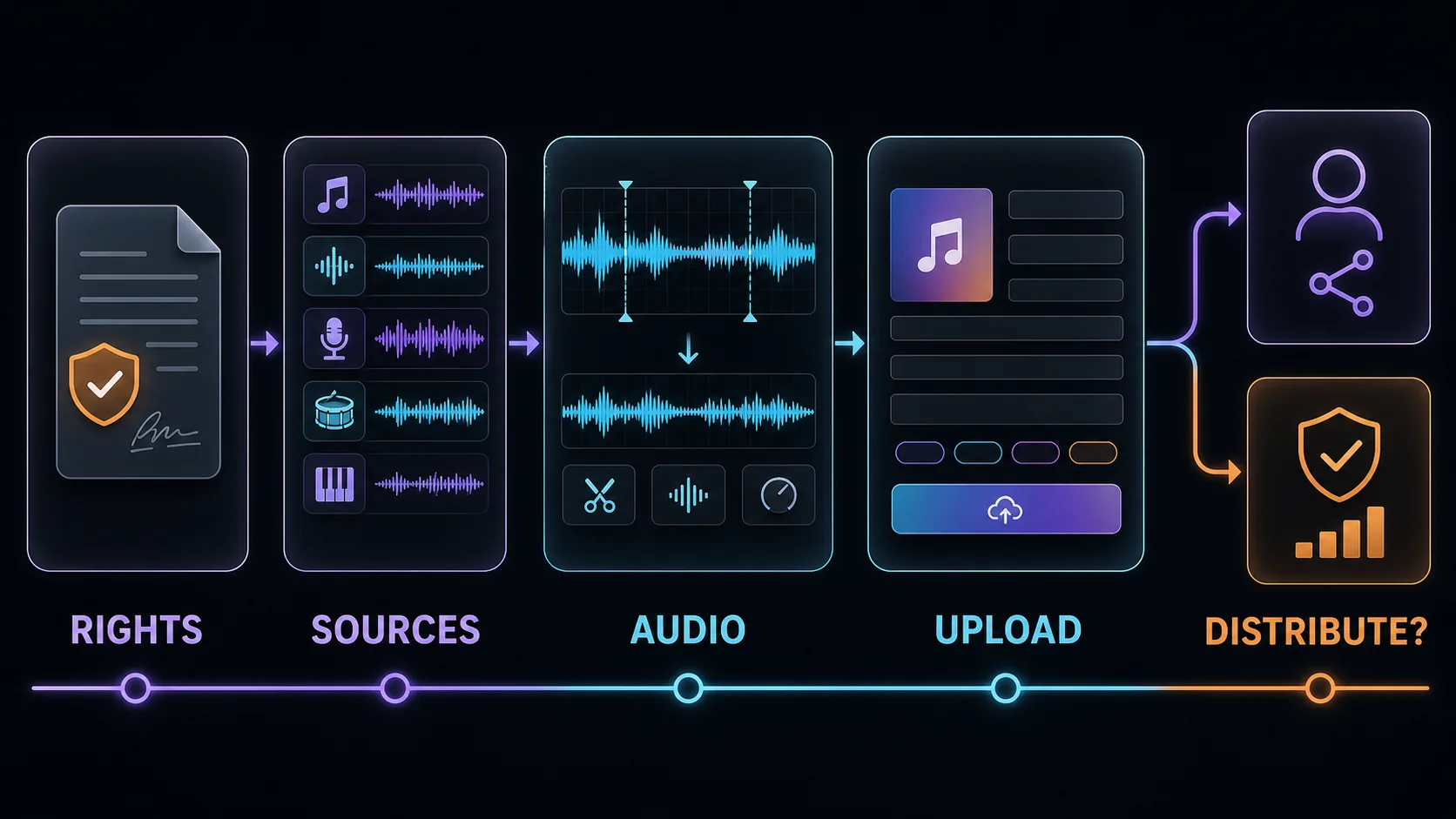
Prepare the Audio File for SoundCloud
Once rights are clear, prepare a clean master rather than uploading the first generator preview. SoundCloud's upload requirements accept common formats including WAV, FLAC, AIFF, ALAC, MP3, AAC, Ogg Vorbis, and M4A. The same guidance recommends a lossless source, stereo audio, at least 16-bit/44.1 kHz, and roughly 0.5 to 1 dBFS of headroom to reduce clipping risk during transcoding.
Run a final listening check for:
- Long silence before the first sound or after the ending.
- Clicks, abrupt cuts, clipping, or unexpected generator artifacts.
- A loudness jump between the intro and the main section.
- Incorrect sample rate, channel layout, or file extension.
- Accidental spoken prompt fragments, count-ins, or watermarks.
Melogen's Music Trimmer can cut starts and endings, apply simple fades, and export an owned local file as MP3 or WAV in the browser. It does not determine copyright, remove platform restrictions, or distribute the track.
Clean the file before the upload
Trim excess silence and create a clean MP3 or WAV export from audio you are allowed to edit, then return to SoundCloud for the platform-specific checks.
Upload the Track and Complete the Metadata
SoundCloud's track, EP, and album upload guide covers the publishing controls available during an upload. Use them carefully rather than treating metadata as an afterthought.
For a single track:
- Upload the clean master from your own source folder.
- Use a clear title and artist name.
- Add the correct genre, tags, description, and credits.
- Choose public or private availability deliberately.
- Select the license that matches the rights you actually control.
- Add artwork you created or licensed.
- Keep downloads disabled if your license permits streaming but not file downloads.
- Preview the published page and listen to the transcoded result.
Accurate metadata helps listeners understand the work and helps you document who contributed. If the generator's terms require attribution or AI disclosure, include it in a readable place. Do not label the track as fully human-made if that would violate a platform rule, collaborator agreement, or local disclosure requirement.
Treat Distribution and Monetization as Separate Gates
A profile upload that plays correctly is not evidence that the release will pass SoundCloud for Artists distribution. Distribution sends music into other services and can trigger additional ownership, metadata, quality, and fraud checks.
SoundCloud's current distribution rejection guidance includes a dedicated AI Content section. It describes stricter treatment for generative-AI releases in the distribution and monetization route, including the role of approved SoundCloud AI integration partners. It also explains that Content ID and other fingerprinting programs can require exclusive rights.
That distinction creates a practical rule:
- Do not promise yourself or a collaborator that a SoundCloud profile upload guarantees distribution.
- Do not enroll non-exclusive AI output in fingerprinting systems unless the applicable licenses explicitly allow it.
- Do not submit a release through SoundCloud for Artists until you have checked the latest AI-content wording on the official rejection page.
- Keep licenses and source records ready in case the review team asks for documentation.
Platform rules can change faster than a blog post. Recheck the official page on the day you submit a release, especially if the track is intended for monetization or delivery to Spotify, Apple Music, YouTube Music, or other stores.
What to Do if the Track Is Blocked or Rejected
First identify which gate failed. A copyright block on a profile upload is different from a metadata or policy rejection in distribution.
Use this recovery sequence:
- Read the exact notice and save a copy.
- Match the notice to the relevant route: upload, monetization, fingerprinting, or distribution.
- Check whether a sample, melody, vocal, artwork asset, or metadata field caused the issue.
- Gather the generator license, source licenses, collaborator permissions, and export records.
- Correct factual metadata or technical file problems.
- Appeal only when you can document the rights; do not repeatedly resubmit the same unresolved file.
If the generator license does not allow the intended use, changing the filename or editing a few seconds will not repair the permission problem. Create a new track under terms that fit the release, replace the restricted asset, or choose a non-commercial private workflow when that is actually allowed.
Frequently Asked Questions
Does SoundCloud allow AI-generated music?
There is no useful one-word answer for every route. A profile upload, monetization, and SoundCloud for Artists distribution have different checks. You still need permission for every source asset, and SoundCloud's current distribution guidance applies additional restrictions to generative-AI content.
Do I need to label a track as AI-generated?
Check the generator terms, SoundCloud's current rules, collaborator agreements, and laws that apply to you. Even where a specific label is not mandated, honest credits can reduce confusion about vocals, composition, and production roles.
Can I monetize music made with a free AI plan?
Only if the free plan's license explicitly grants the commercial rights needed for that use and the monetization route accepts the content. Many services reserve broader commercial rights for paid plans, so verify the plan that was active when the track was created.
Can I use Content ID for AI music?
Do not assume so. Fingerprinting programs often require exclusive rights, while some AI tools grant non-exclusive licenses or allow similar outputs for other users. Check both the generator license and the platform's enrollment requirements.
Can Melogen upload my track to SoundCloud?
No. Melogen does not publish or distribute music to SoundCloud. It can help prepare an audio file you already have permission to edit, such as trimming silence or exporting a clean local clip before you upload it yourself.
The Practical Takeaway
You can consider uploading AI music to SoundCloud only after the rights and route are clear. Save the generator license, clear every source asset, prepare a clean master, complete honest metadata, and distinguish a profile upload from monetization or distribution approval.
The most reliable decision is not “AI music is allowed” or “AI music is banned.” It is: this specific track, created under this specific license, is or is not eligible for this specific SoundCloud workflow. Make that determination before the upload button—not after a rejection.
About the author
Zhang Guo
Composer - AI Product Manager
AI product manager and digital marketing consultant with a background in music. Creativity is the bridge between rhythm and logic, where musical intuition and mathematical precision can coexist in every meaningful product decision.
Follow on X