Classical Guitar Music Notation for Better Reading
Learn classical guitar music notation marks, right-hand fingering, positions, barre signs, harmonics, and a practical reading workflow.
 Zhang Guo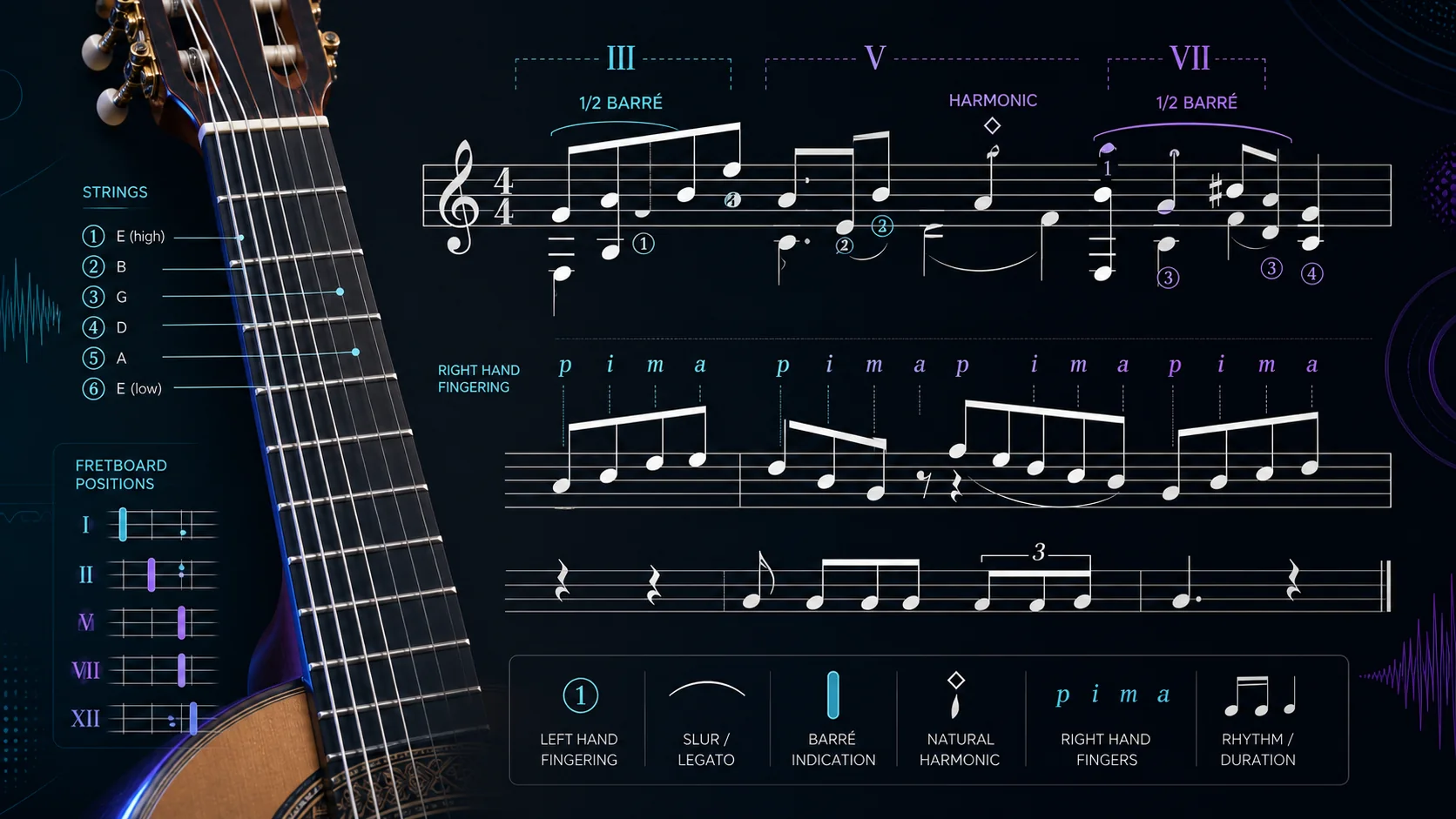
Turn a static score into editable MIDI
Contents
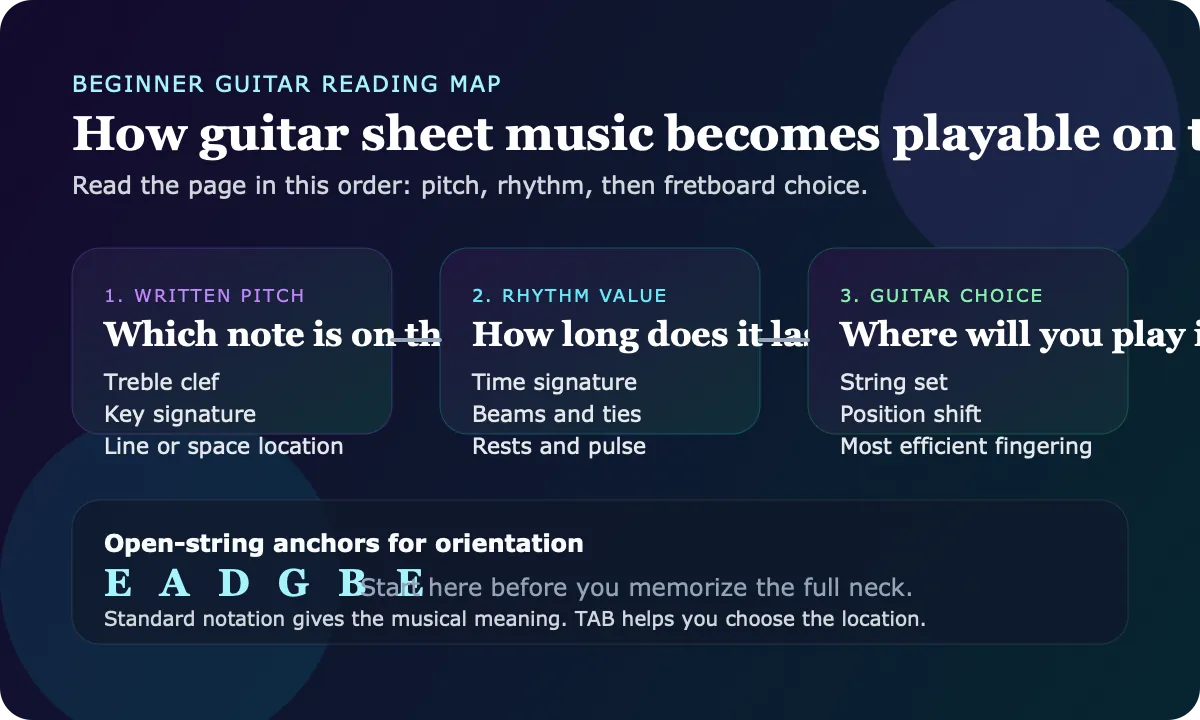
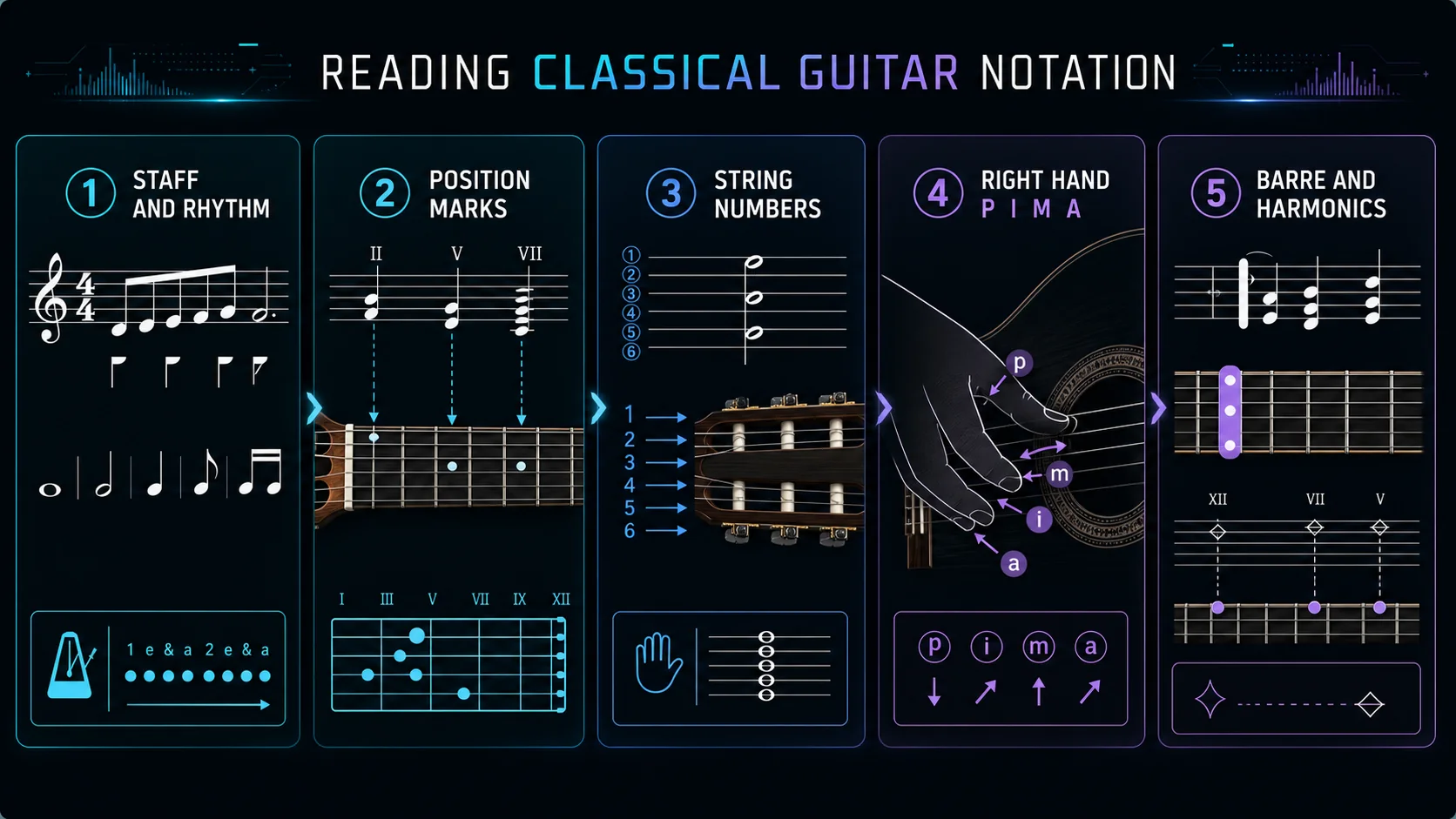
Classical guitar music notation is standard staff notation with extra guitar-specific directions layered on top. The staff tells you pitch and rhythm. The guitar markings tell you where to play, which string to use, which finger should pluck, when to barre, and when a special sound such as a harmonic is intended.
The useful reading order is simple: read the musical sentence first, then read the guitar logistics. If you chase every fingering mark before you understand the rhythm and phrase, the page becomes a puzzle instead of a practice plan.
Start with the notation layers
Classical guitar notation usually combines ordinary music symbols with a second layer of guitar guidance. That second layer is not decorative. It solves the instrument-specific problem: the same written pitch can often be played in more than one place on the neck.
| Marking layer | What it tells you | What to check first | Practice consequence |
|---|---|---|---|
| Staff, clef, and rhythm | The written pitch and timing | Treble clef, key signature, time signature, bar grouping | Count the line before choosing the hand shape |
| Roman numerals | The fretboard position | I, II, V, VII, XII, or another position cue | Keep the left hand in the intended region |
| Circled numbers | The string choice | 1 through 6, from highest E to lowest E | Avoid choosing a pitch on the wrong string color |
| Left-hand fingering | The fretting finger | 1, 2, 3, 4 near notes or passages | Plan shifts and extensions before tempo work |
| Right-hand fingering | The plucking finger | p, i, m, a | Keep tone and alternation consistent |
| Barre and harmonic signs | A special technique | C, B, half-barre, diamond harmonic noteheads, or harmonic text | Slow down and isolate the physical move |
If you are still building the standard staff map, read how to read guitar sheet music before treating classical markings as a separate system. This guide assumes you can identify basic pitch and rhythm, then adds the guitar-specific layer.
Use position marks before guessing fingerings
Roman numerals such as I, II, V, VII, and XII usually point to fretboard position. They do not mean "play only one fret." They tell you where the left hand should live while you read the passage.
This matters because classical guitar notation often cares about tone color and phrase shape, not just pitch. A note on the second string can sound warmer or more connected than the same pitch on the first string. A position mark narrows those choices so the line stays playable.
Use this order when a position mark appears:
- Find the written notes on the staff.
- Locate the position region named by the Roman numeral.
- Check any string numbers that confirm the intended color.
- Choose left-hand fingers that avoid unnecessary shifts.
- Only then bring the line up to tempo.
The common mistake is to treat position marks as optional hints. In easy music, you may get away with that. In classical repertoire, ignoring them often creates awkward jumps, broken slurs, or a phrase that changes color for no musical reason.
Separate string numbers from finger numbers
Classical guitar scores can use two number systems at once. Circled numbers usually identify strings. Plain numbers usually identify left-hand fingers. Confusing the two is one of the fastest ways to make a simple bar feel impossible.
String numbers run from 1 to 6, with string 1 as the high E string and string 6 as the low E string. Left-hand fingers run from 1 to 4, with the index finger as 1 and the little finger as 4.
| If you see | Read it as | Why it matters |
|---|---|---|
| Circled 2 | Play on the B string | The composer or editor wants that string color |
| Plain 2 | Use the middle finger | The left-hand shape or shift has been planned |
| Roman V | Stay around fifth position | The hand location is the priority |
| 0 | Open string | Check sustain and avoid muting too early |
When a score gives both string and finger markings, trust the combination first. It usually exists because there is more than one technically possible answer, but only one answer keeps the phrase smooth.
Read p i m a as tone planning, not decoration
Right-hand letters come from the traditional finger names: p for thumb, i for index, m for middle, and a for ring. They are most visible in arpeggios, tremolo patterns, voice separation, and passages where tone balance matters.
The letters are not only about speed. They also tell you how the musical voices are being assigned. The thumb may carry a bass line while i, m, and a shape the upper notes. If you change the pattern casually, the rhythm may survive but the tone and phrasing can change.
For a new passage, isolate the right hand before you add full left-hand pressure:
- Tap the p i m a pattern on open strings.
- Say the rhythm while moving the fingers.
- Add the left hand only after the pattern is stable.
- Listen for even tone, not just correct notes.
If your source is audio rather than notation, Melogen's AI Guitar Tab Generator can help create a guitar-first reference from MP3, WAV, M4A, FLAC, or a YouTube link. Use that as a starting view of chords, riffs, and melodic lines, then make the classical fingering decisions yourself.

Treat barre and harmonics as technique flags
Barre marks tell you that one finger needs to hold more than one string. You may see C, B, a bracket, a Roman numeral, or wording that implies a full or partial barre. The important reading habit is to decide the barre before the beat arrives. If you discover it late, the hand clamps down and the phrase loses time.
Harmonics are different. They tell you to touch the string lightly at a node instead of pressing it normally. Harmonic notation can use diamond noteheads, small circles, text, or position clues. Always check whether the score is asking for natural harmonics, artificial harmonics, or a notated sounding pitch.
Use a small checklist when either technique appears:
| Technique flag | First question | Slow practice move |
|---|---|---|
| Full barre | Which fret and how many strings? | Place the barre silently, then add only the notes that need pressure |
| Half barre | Which strings are covered? | Angle the index finger and release unused tension |
| Natural harmonic | Which string and node? | Touch lightly, pluck cleanly, then lift if needed |
| Artificial harmonic | Which stopped note and touch point? | Practice the left-hand stop before adding the right-hand touch |
Barre and harmonic marks are easy to miss because they look smaller than notes. In practice, they can control the whole bar.
Move from notation into practice
Once the notation layers are clear, the next job is to turn the page into a repeatable practice loop. Start with the cleanest source you have. If it is a PDF or image score, check that staff lines, noteheads, fingerings, and string numbers are readable before using any conversion or reference workflow.
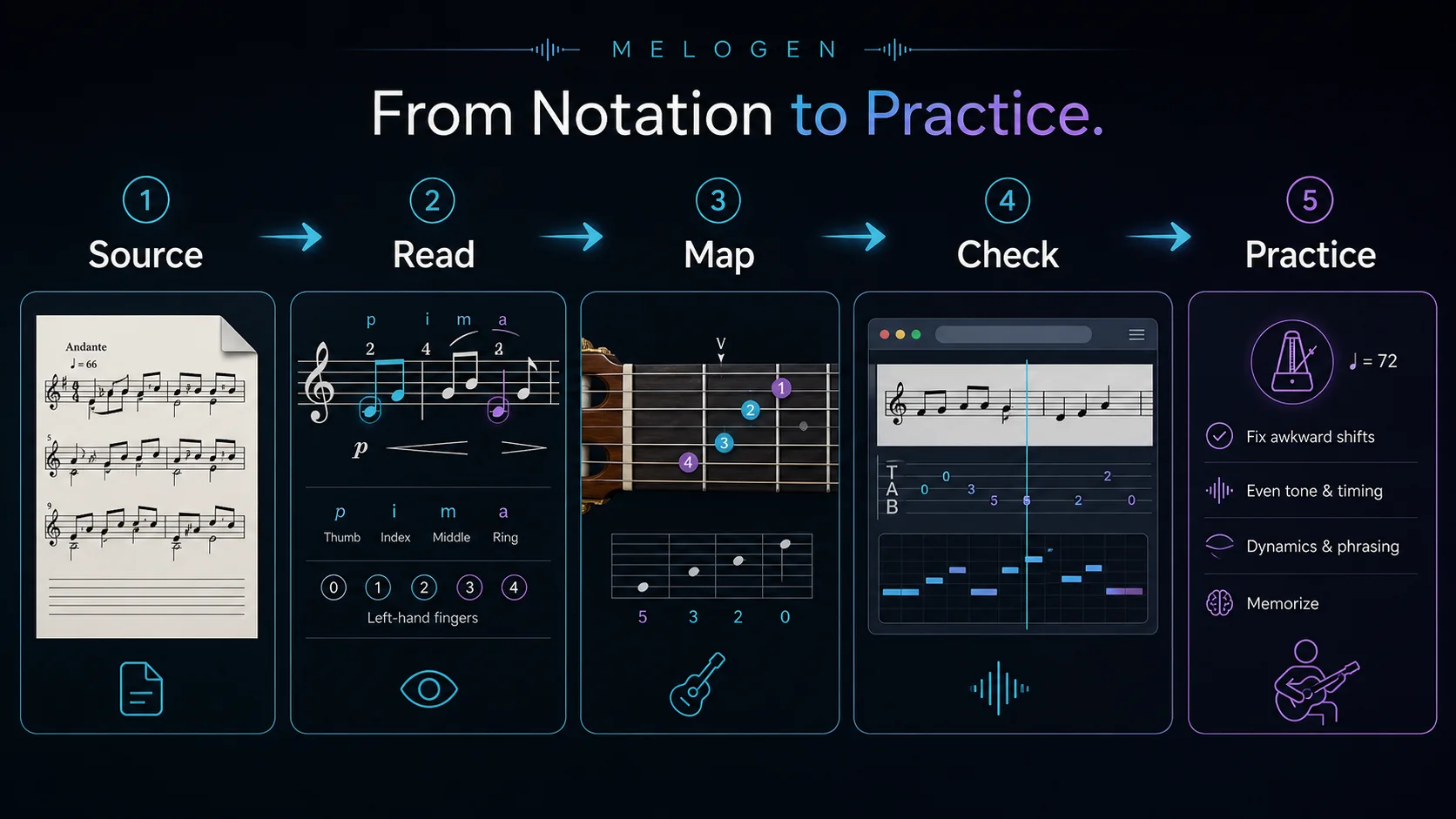
Use this loop:
- Read the rhythm and phrase shape without the guitar.
- Mark position shifts and string choices.
- Practice the left hand silently at shift points.
- Practice p i m a patterns on open strings.
- Add barre or harmonic moves in isolation.
- Use a reference only after you understand the written plan.
- Record or export a short pass, then fix the bars that actually break.
For scanned notation, Melogen Sheet2MIDI can help you create a first-pass MIDI reference from visible sheet music. For audio-first guitar work, the AI Guitar Tab Generator is the better starting point. The difference matters: sheet input asks you to preserve written notation, while audio input asks you to infer a playable guitar view.
If the bigger question is format handoff, the guide to converting sheet music to MIDI explains scan quality and cleanup decisions. If you need a wider symbol reference beyond guitar-specific marks, use the sheet music symbols guide.
Create a playable guitar reference faster
Use Melogen AI Guitar Tab Generator for audio or YouTube sources, or Sheet2MIDI when your source is a clean printed score. Either way, keep the final fingering choices musical.
The practical takeaway
Classical guitar music notation is easiest when you read it in layers. The staff gives you pitch and rhythm. Position marks, string numbers, fingerings, p i m a letters, barre signs, and harmonics tell you how to make that music playable on the guitar.
Before practicing a new page, check:
- Can you count the rhythm before touching the instrument?
- Do you know the intended position region?
- Are circled string numbers and plain finger numbers separated?
- Is the right-hand pattern stable on open strings?
- Did you isolate any barre or harmonic before playing the full bar?
- Are you using software as a reference bridge, not as a replacement for musical judgment?
That order keeps the notation readable and the guitar choices intentional.
About the author
Zhang Guo
Composer - AI Product Manager
AI product manager and digital marketing consultant with a background in music. Creativity is the bridge between rhythm and logic, where musical intuition and mathematical precision can coexist in every meaningful product decision.
Follow on X