How to Convert Sheet Music to Music Box Strips at Home
Learn how to convert sheet music to a music box by creating MIDI, simplifying the melody, testing its note range, and preparing a printable strip.
 Zhang Guo
Turn a static score into editable MIDI
Contents
If you are learning how to convert sheet music to music box strips, first turn the score into editable MIDI, then reduce that MIDI to the exact notes and spacing supported by your music-box mechanism. Finally, import the simplified melody into a paper-strip editor, preview it, print the strip, punch the holes, and test it on the real mechanism.
The important part is the middle step. A piano score can use many pitches at once, long sustains, fast repetitions, and a wide range. A paper-strip music box has a fixed note grid and a mechanical limit on how quickly the same note can repeat. You are arranging the score for a small instrument, not merely changing its file format.
What You Need Before You Start
Gather these four things before editing:
- A clear PDF, JPG, or PNG of the sheet music you are allowed to use.
- The note chart or paper strip supplied with your music-box mechanism.
- A MIDI file created from the score or entered manually.
- A paper-strip editor that matches your mechanism's note layout.
Check the physical note grid first. Two mechanisms with the same number of notes can still use different pitch sets. The labels printed on your supplied strip or listed by the manufacturer are more reliable than assuming that every 15-note, 20-note, or 30-note box follows one universal scale.
For a first project, choose a short melody with a narrow range and a clear single-note line. Dense piano music, large jumps, rapid repeated notes, and thick chords require more arranging.
Step 1: Turn the Sheet Music Into Editable MIDI
If you already have a correct MIDI file, skip to the next step. Otherwise, open Melogen Sheet2MIDI and upload a clean score image or PDF. The current browser workflow accepts JPG, PNG, and PDF sources and produces MIDI that you can continue editing.

This conversion gives you note events, not a finished music-box arrangement. Listen through the MIDI and fix obvious recognition errors before simplifying it. Check the melody's pitch, bar order, pickup notes, repeats, and tempo. If a whole staff is wrong, improve the source scan and convert it again. If only a few notes are wrong, correct them in a MIDI or notation editor.
The full sheet music to MIDI workflow covers source quality and recognition cleanup in more detail. For this project, stop once the main melody plays correctly and is easy to edit.
Step 2: Choose the Music Box Note Scale
Write down every pitch available on your mechanism. Then compare that set with the melody in your MIDI file.
You do not need the original key to survive unchanged. You need the melody to fit the mechanism while keeping its recognizable contour. Try these fixes in order:
- Transpose the whole melody. Move every note up or down by the same interval until most notes fit the available grid.
- Move isolated notes by an octave. This can keep the pitch class while bringing an outlier into range.
- Replace a nonessential note. Choose a nearby supported pitch when one passing note still falls outside the grid.
- Rewrite the phrase. If several important notes remain unavailable, simplify the line rather than forcing random substitutes.
Use your ears after each change. A mathematically close note can still weaken a cadence or change the character of a phrase. The goal is a convincing miniature arrangement, not a note-for-note copy that the mechanism cannot play.
If octave labels and MIDI numbers are slowing you down, the music note numbers guide provides a practical map between note names, keyboard positions, and MIDI values.
Step 3: Reduce the Score to a Playable Melody
Start with the highest or most recognizable melodic line. Mute accompaniment tracks and listen to the result by itself. If the tune still makes sense, you have a workable foundation.
Then simplify using this order:
- Keep melody notes that define the phrase.
- Remove doubled notes from left- and right-hand piano parts.
- Drop sustained bass notes that cannot be represented by a punched strip.
- Convert thick chords into one note, a broken pattern, or a sparse two-note accent only if the mechanism supports it.
- Shorten ornaments that create crowded holes without improving recognition.
- Preserve rests and phrase endings so the tune can breathe.
Do not fill every beat. Paper-strip music boxes often sound clearer when the arrangement is lighter than the source. Empty space also reduces mechanical collisions between repeated notes.
| Problem in the source score | Music-box-friendly decision |
|---|---|
| Melody plus full piano accompaniment | Keep the melody; add only a few structural bass or harmony notes |
| Chord with three or more notes | Use the melody note, arpeggiate slowly, or remove the chord |
| Note outside the mechanism's range | Transpose, octave-shift, substitute carefully, or rewrite the phrase |
| Fast trill or repeated pitch | Keep fewer attacks with more space between them |
| Long tied note | Use one attack and let the listener perceive the phrase through timing |
| Multiple repeated sections | Arrange one clean section first, then duplicate only after testing |
Step 4: Import the MIDI Into a Music Box Editor
The Music Box Maniacs editor is one public option for this handoff. Its current Create page supports MIDI import with track preview, several note scales for DIY paper-strip boxes, and export options that include PDF. Choose the scale that matches your actual mechanism rather than a larger online-only range.
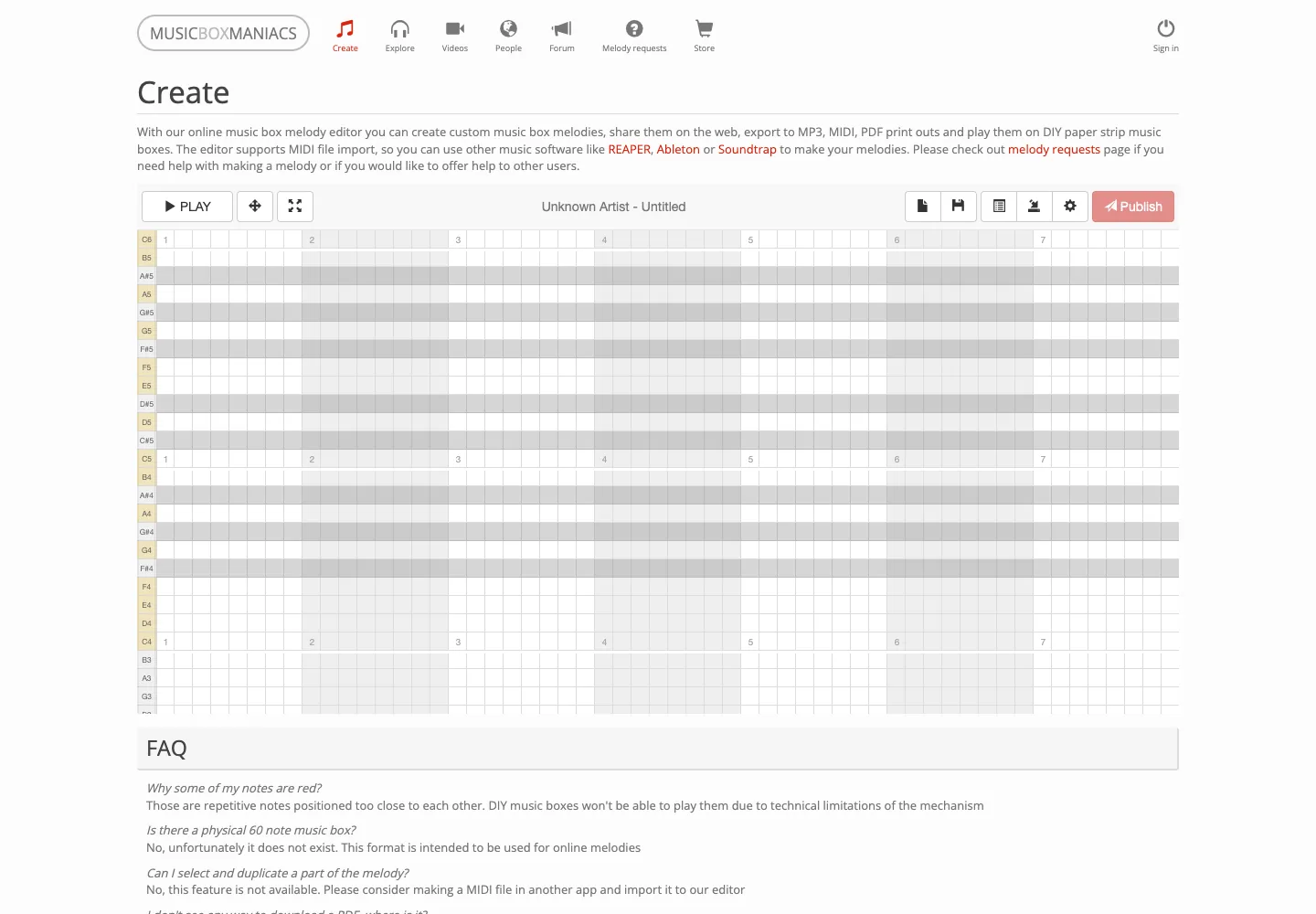
After import, inspect every note against the grid. Do not assume a successful import means the arrangement is physically playable. Look for these warning signs:
- Notes moved to an unsupported row.
- Several tracks imported when you only need the melody.
- Repeated holes placed too close together on the same pitch.
- A phrase shifted into the wrong octave.
- A tempo that creates an impractically long or crowded strip.
Music Box Maniacs marks repeated notes that are too close for a DIY mechanism. Treat that warning as an arranging problem: remove one attack, lengthen the gap, or redistribute the phrase. Turning the crank more slowly does not increase the physical distance between two holes already punched too close together.
Step 5: Preview, Print, and Punch a Short Test
Preview the arrangement in the editor, but test the physical result before preparing the whole song. Export or print only the opening phrase, using the paper size and scale specified for your strip.
When printing, avoid “fit to page” scaling unless the editor explicitly requires it. A resized grid can move holes away from the mechanism's note tracks. Compare a printed ruler or alignment mark with the expected dimensions before punching.
Then complete a short test:
- Cut and join the paper exactly as your strip system requires.
- Punch the first phrase carefully at the center of each marked position.
- Feed the strip in the correct direction.
- Turn the crank at a steady pace.
- Mark wrong pitches, crowded repetitions, and awkward pauses on the MIDI draft.
- Revise the file, re-export, and test again before committing to a long strip.
This test catches problems that a screen preview cannot: imprecise punching, paper drift, strip thickness, mechanism resistance, and the musical effect of hand-cranked timing.
Create an editable melody from your sheet music
Use Melogen Sheet2MIDI to turn a clean PDF or score image into MIDI, then arrange that MIDI for your music box's exact note grid.
Troubleshooting Common Music Box Conversion Problems
The melody uses notes my music box does not have
Transpose the entire melody first. If only one or two notes remain outside the scale, move them by an octave or replace them with nearby supported notes that preserve the phrase. If an important motif still does not fit, choose a different excerpt or rewrite the phrase for the instrument.
The imported MIDI is full of chords and extra tracks
Return to your MIDI editor and create a new single-track version containing only the melody. Importing a reduced file is faster and safer than deleting hundreds of unwanted notes inside the strip editor.
Repeated notes are marked as too close
Remove alternate attacks, slow the musical rhythm by adding grid space, or change one repeated note into a nearby harmony note if it still sounds intentional. The problem is physical spacing on the strip, not merely playback tempo.
The paper strip plays the wrong pitch
Confirm that the editor's scale exactly matches the mechanism and that the strip is feeding in the correct orientation. Also verify that the printed page was not scaled by the printer. If the mismatch affects every note by the same interval, you may have chosen the wrong scale or transposition.
The strip sounds empty after I remove the accompaniment
Add only the notes that define harmony or rhythm. A bass note at a phrase boundary or a slow broken interval can add support without recreating a full piano texture. Test after every small addition; a simple arrangement usually reads more clearly on a mechanical box.
Frequently Asked Questions
Can any sheet music be converted to a music box?
Any score can inspire an arrangement, but not every score can be transferred note for note. The available pitches, strip length, repeat-note spacing, and number of simultaneous notes all limit the result. Short, singable melodies adapt most easily.
Do I need MIDI to make a paper-strip music box tune?
No. You can enter notes manually in a compatible editor. MIDI is useful when the melody already exists in sheet music because it reduces re-entry and makes transposition, track removal, and timing edits easier.
Should I use MIDI or MusicXML for this workflow?
Use MIDI for the handoff to a music-box editor because the target is note timing on a fixed grid. MusicXML is better when you need to preserve notation structure and continue score editing. The MIDI vs MusicXML comparison explains the difference.
How long should my first music box strip be?
Start with one phrase, roughly four to eight bars depending on tempo and note density. A short test is enough to verify scale, print size, hole spacing, and musical clarity before you spend time punching a complete song.
Can a paper-strip music box play chords?
Some mechanisms can sound multiple notes at one strip position, but dense chords may be difficult to punch cleanly or may overload a simple arrangement. Keep the melody dominant and add harmony sparingly after the single-note version works.
The Practical Takeaway
The reliable way to convert sheet music to a music box is to treat it as an arrangement pipeline: score to editable MIDI, MIDI to a mechanism-specific pitch grid, and digital preview to a short physical test.
Start with a clear score, keep the melody, simplify aggressively, respect the exact note chart, and solve repeated-note spacing before printing a full strip. Once one short phrase plays correctly on the real mechanism, the rest of the song becomes a repeatable editing job rather than an expensive guessing exercise.
About the author
Zhang Guo
Composer - AI Product Manager
AI product manager and digital marketing consultant with a background in music. Creativity is the bridge between rhythm and logic, where musical intuition and mathematical precision can coexist in every meaningful product decision.
Follow on X