Jazz Music Notation for Chords, Swing, and Charts
Learn jazz music notation basics for chord symbols, swing feel, slash notation, form cues, and when MIDI or MusicXML cleanup helps.
 Zhang Guo
Turn a static score into editable MIDI
Contents
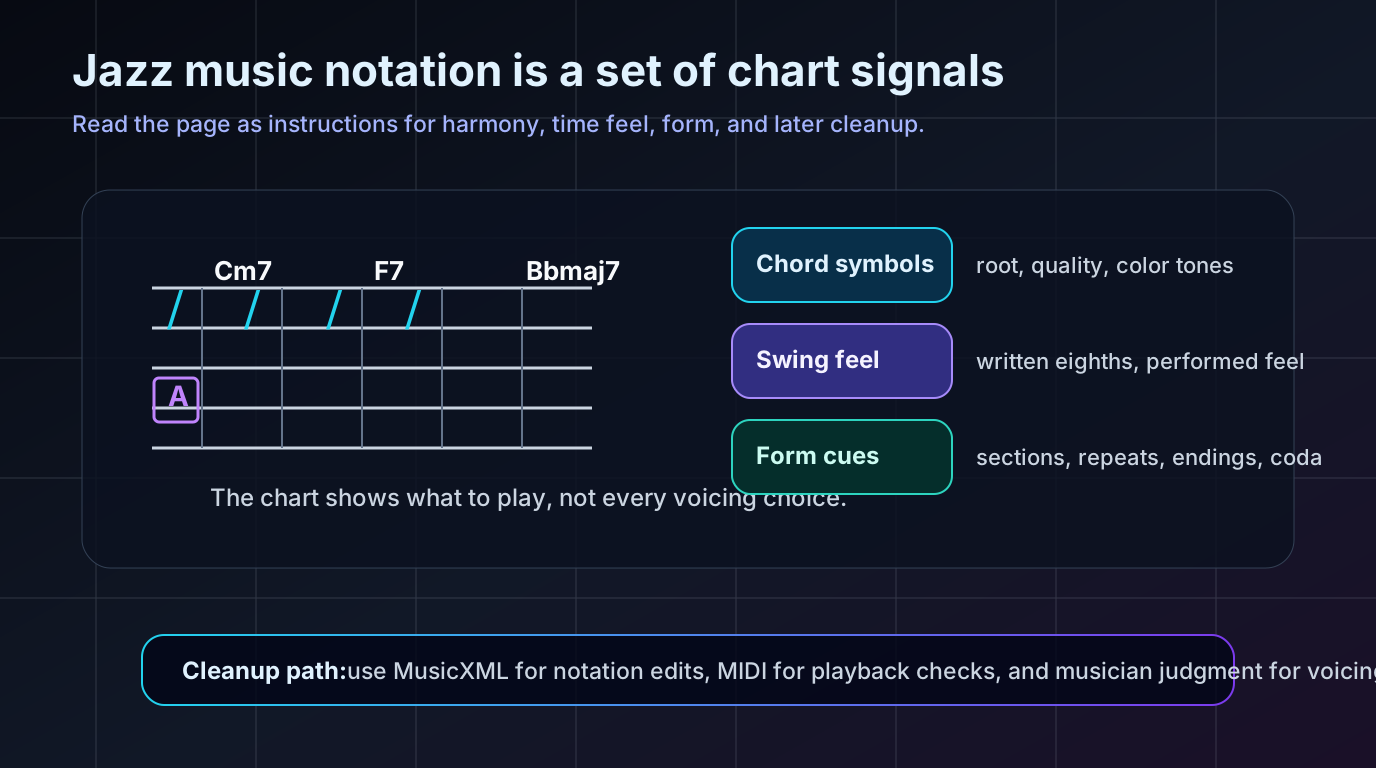
Jazz music notation is not a separate language from standard notation. It is standard notation with extra performance instructions: chord symbols, slash notation, swing feel, rehearsal marks, repeats, endings, and style cues that tell the player how much freedom the page is giving them.
If a classical piano score tells you almost every note, a jazz chart often gives you the musical job. It may show a melody, the harmony, a rhythmic hit, a form map, and a warning that the eighth notes should swing. The player still chooses voicings, comping rhythm, articulation, register, and how closely to follow the written page.
Start with what the chart is asking you to do
The first question is not "where are all the notes?" It is "what kind of chart am I reading?"
A jazz lead sheet may give one melody staff with chord symbols above it. A big-band chart may write the ensemble hits exactly but leave some rhythm-section comping open. A small-group chart may use slash notation for several bars because the player is expected to keep time and outline the harmony. A transcription may be much more exact because it is trying to preserve a recorded performance.
That difference changes how you practice:
| Chart type | What is written | What the player supplies |
|---|---|---|
| Lead sheet | Melody, chord symbols, form marks | Voicings, comping, bass motion, fills |
| Rhythm chart | Chords, slashes, hits, cues | Groove, time feel, accompaniment texture |
| Ensemble chart | Written lines and section figures | Style, articulation, blend, dynamics |
| Transcription | More exact notes and rhythms | Interpretation and technical execution |
If you need the narrower piano version of this idea, the related guide on lead sheets for piano explains how melody and chord symbols become a playable keyboard texture. This article stays broader: how jazz notation works across charts, rhythm sections, and score cleanup.
Read chord symbols before you decorate them
Chord symbols are the center of most jazz notation. They tell you the root, quality, and color of the harmony, but they rarely dictate one exact voicing.
Start by separating the parts:
| Symbol | Plain meaning | What to decide next |
|---|---|---|
| Cm7 | C minor seventh | Shell voicing, guide tones, register |
| F7 | F dominant seventh | Resolution direction and color tones |
| Bbmaj7 | B-flat major seventh | Smooth top note and spacing |
| Dm7b5 | D half-diminished seventh | Voice-leading into G7 or minor harmony |
| G7alt | Altered dominant color | Which altered tones fit the line |
The mistake is treating every symbol as a full vertical stack. A pianist, guitarist, arranger, or producer may use only the third and seventh in one bar, a rootless voicing in another, or a fuller voicing at a cadence. The symbol names the harmonic function. The musician chooses the voicing that fits the register, ensemble, and groove.
This is why jazz charts can look sparse but still contain a lot of information. A single chord symbol can imply voice-leading, tension, release, bass motion, and style. Learn the symbol first, then add taste.
Treat swing notation as a performance instruction
Swing is one of the first places jazz notation stops being literal. Many charts write straight eighth notes but expect a swung interpretation. Sometimes the chart says "swing," sometimes it shows a small triplet-equivalence mark, and sometimes the style is assumed by the chart context.
Do not reduce swing to a fixed math ratio. At a slow tempo, the long-short feel may be obvious. At faster tempos, the eighths often even out. In a modern chart, the composer may write a specific rhythmic figure because they want that exact attack. The notation gives you the starting point, but the style tells you how rigidly to read it.
Use this quick check:
- Look for a style marking at the top of the chart.
- Check whether eighth notes are meant to swing or stay straight.
- Find written ensemble hits that should stay precise.
- Listen for whether the rhythm section feels laid back, on top, or even.
- Keep the melody phrasing clearer than the comping texture.
Follow slash notation, hits, and form cues
Slash notation usually means "keep playing through this harmony." It does not mean "play anything." The chord symbols, tempo, style, and ensemble cues still define the job.
In a rhythm-section part, slashes can ask a guitarist or pianist to comp. In a horn chart, slashes may show time passing while another section carries the line. In a rehearsal chart, slashes with rhythmic stems may mark important ensemble hits. Rehearsal letters, repeat bars, first and second endings, codas, tags, and D.S. or D.C. markings keep everyone in the same form.
Here is the practical reading order:
| Signal | What it tells you | Mistake to avoid |
|---|---|---|
| Slash bars | Keep time through the harmony | Filling every beat with busy chords |
| Rhythmic slashes | Play or catch a specific rhythm | Treating the rhythm as optional |
| Rehearsal letters | Where sections begin | Losing the form during repeats |
| Coda or tag | Where the ending changes | Playing straight through like a simple loop |
| Written hits | Ensemble accents or figures | Letting swing feel smear exact attacks |
If the chart later needs to move into notation software, those form marks matter. They are not decorative page furniture. They are the rehearsal map.
Decide whether you need MIDI or MusicXML
Jazz notation often has two cleanup paths after a scan, PDF import, or quick digital transcription.
Use MIDI when your first question is how the chart sounds. MIDI makes it easy to audition pitch, register, rough rhythm, and tempo in a DAW or piano-roll editor. It is useful for playback checks, practice tracks, and arrangement sketches.
Use MusicXML when your first question is how the chart is written. MusicXML is better for notation editing because it can carry score structure such as measures, staves, clefs, voices, layout, and many notation details into an editor.
| Next job | Better first output | Why |
|---|---|---|
| Hear whether the melody and chord roots line up | MIDI | Playback reveals pitch and register problems quickly |
| Fix measures, clefs, voices, or layout | MusicXML | Notation editors need score structure |
| Re-engrave a scanned chart | MusicXML | The page needs visual cleanup, not only sound |
| Build a DAW mockup | MIDI | DAWs are built around note events and timing |
| Check a chart before transposing it | MusicXML plus playback | You need written structure and a listening pass |
The MIDI vs MusicXML guide goes deeper on this choice. For jazz music notation, the useful boundary is simple: MIDI helps you hear the chart; MusicXML helps you repair the chart.
Where Melogen fits without overstating the product
Melogen is useful when jazz notation is trapped in a PDF, scan, or image and you need an editable first pass. The local Sheet2MIDI page describes a browser workflow for converting sheet music images and PDFs into MIDI, with JPG, PNG, and PDF input support. That is a practical route when you want to hear whether the recognized melody, register, and rough timing make sense.

The local PDF to MusicXML page describes converting PDF sheet music into editable MusicXML for notation software, preserving score structure such as measures, voices, clefs, and layout. That is the better route when the next task is cleaning the written chart in MuseScore, Dorico, Sibelius, Finale, or another notation editor.

Keep the boundary honest. Melogen can help create an editable starting point from visible notation. You still need to proofread chord symbols, swing cues, enharmonic spelling, repeats, and voicing decisions like a musician. A tool can move the chart into the right format; it cannot decide how tasteful your comping should be.
Move a jazz chart into an editable cleanup pass
Use Sheet2MIDI when playback is the fastest check, or PDF to MusicXML when the chart needs notation-software cleanup.
Use a simple jazz notation proofing checklist
Before you trust a converted or copied jazz chart, run a musician-first proofing pass.
- Check the clef, key signature, and transposition before judging any note.
- Play the melody alone and mark phrase endings.
- Read the chord symbols as harmonic function, not fixed voicings.
- Check whether eighth notes are straight or swung.
- Follow rehearsal letters, repeats, endings, tags, and codas out loud.
- Compare written hits against the style marking.
- Choose MIDI or MusicXML based on the next editor, not the file name.
- Listen once, then inspect the notation visually.
This order prevents the common cleanup trap: fixing individual pitches before the chart's form, feel, and harmony have been understood. Jazz notation is compact. Compact notation rewards slow reading at the beginning.
If the chart also needs a new key, use the separate how to transpose music workflow after the chart is clean. Transposing a messy chart first can hide problems in the chord symbols and form.
The practical takeaway
Jazz music notation works because it does not try to write every musical decision onto the page. It gives skilled players enough information to make the right decisions: melody, harmony, groove, form, and style.
Read chord symbols for function. Treat swing markings as performance instructions. Respect slash notation and form marks. Then choose the cleanup format that matches the next job: MIDI for hearing the chart, MusicXML for editing the written score.
The page may look light, but the musical information is dense. Once you read those signals together, a jazz chart stops feeling incomplete and starts feeling efficient.
About the author
Zhang Guo
Composer - AI Product Manager
AI product manager and digital marketing consultant with a background in music. Creativity is the bridge between rhythm and logic, where musical intuition and mathematical precision can coexist in every meaningful product decision.
Follow on X