Piano Key Numbers: 88-Key Map and MIDI Note Guide
Learn piano key numbers from A0 to C8, Middle C, MIDI notes, octave labels, and a practical cleanup workflow for converted sheet music.
 Zhang Guo
Turn a static score into editable MIDI
Contents
Piano key numbers are a way to turn the keyboard into a precise map. On a standard 88-key piano, the first key is A0, Middle C is usually called C4, and the top key is C8. If you also work with MIDI, the same notes use another number system: A0 is MIDI 21, Middle C is MIDI 60, and C8 is MIDI 108.
That sounds like trivia until a converted piano part lands in the wrong octave. Then key numbers become a fast diagnostic tool. You can check whether the pitch name is correct, whether the octave shifted, and whether the MIDI note sits on the lane you expected.
The short answer: A0 is key 1
Most piano key-number charts count from the lowest note on a full 88-key keyboard. That gives you three useful anchors:
| Anchor note | Physical key number | Common MIDI note number | Why it matters |
|---|---|---|---|
| A0 | 1 | 21 | Lowest key on a standard 88-key piano |
| C4, Middle C | 40 | 60 | Main reading and MIDI cleanup anchor |
| A4 | 49 | 69 | Standard tuning reference for 440 Hz |
| C8 | 88 | 108 | Highest key on a standard 88-key piano |
This article uses the common DAW/MIDI convention where MIDI note 60 is labeled C4. Some software labels the same pitch as C3. If your app does that, trust the MIDI number first and the octave label second.
Use the 88-key map before memorizing every note
The easiest way to understand piano key numbers is to group the keyboard by octave. The piano does not start on C. It starts with A0, A#0/Bb0, and B0, then continues in complete C-to-B octave groups until the final C8.
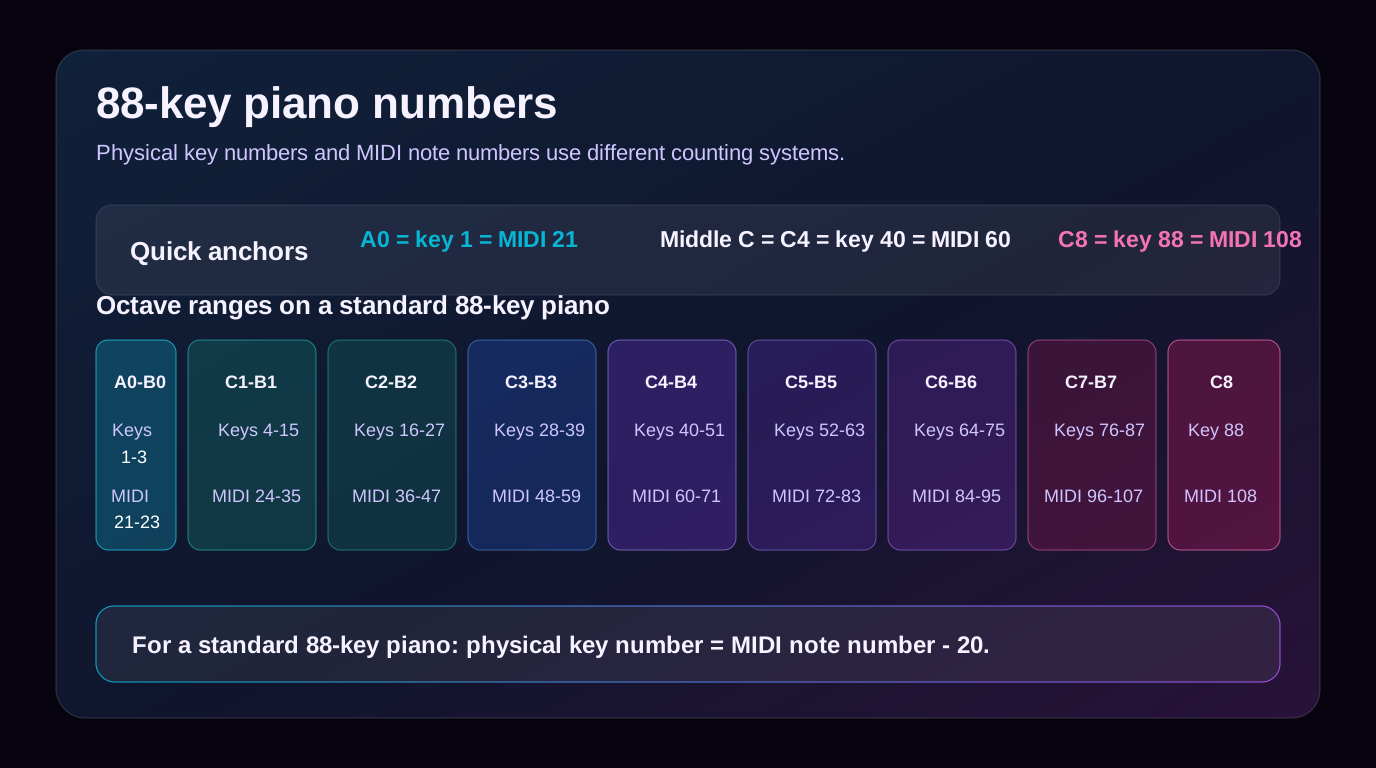
Use the map like this:
- Find the pitch name first: C, D, E, F, G, A, or B.
- Check the octave group: C3, C4, C5, and so on.
- Convert to the physical key number only when you need a keyboard-position check.
- Use the MIDI number when you are editing inside a DAW or piano-roll view.
If basic note names still feel unstable, start with the simpler keyboard map in Simple Piano Notes for Beginners before using full 88-key numbering.
Translate physical key numbers into MIDI note numbers
For a standard 88-key piano, the relationship is simple:
| What you know | Formula | Example |
|---|---|---|
| MIDI note number | physical key = MIDI note - 20 | MIDI 60 becomes key 40 |
| Physical key number | MIDI note = physical key + 20 | Key 49 becomes MIDI 69 |
| One octave higher | Add 12 MIDI notes | C4 MIDI 60 becomes C5 MIDI 72 |
| One octave lower | Subtract 12 MIDI notes | C4 MIDI 60 becomes C3 MIDI 48 |
The formula only works when you are talking about the standard 88-key piano range from A0 to C8. Smaller keyboards still use MIDI note numbers, but their first physical key may be C2, C3, or another manufacturer-specific start point.
Know which numbering system you are using
Confusion usually comes from mixing four systems:
| System | Example | Best use |
|---|---|---|
| Physical key number | Key 40 | Talking about the location on an 88-key piano |
| Pitch name | Middle C or C4 | Reading music, teaching, and rehearsal notes |
| MIDI note number | 60 | DAW editing, conversion cleanup, and data checks |
| Scale degree or number system | 1, 2, 3 in a key | Chord charts, Nashville-style analysis, and transposition |
If someone says "play key 40," they probably mean the physical piano key. If your DAW says "MIDI 60," it means the data value for Middle C. If a chord chart says "1-4-5," it is not talking about physical keyboard keys at all.
That distinction is also why a piano can sound right acoustically but still look confusing in MIDI. For more context on the difference between piano sound and digital note data, read How Does Piano Make Sound?.
Fix octave problems after sheet music conversion
Piano key numbers are especially useful after converting visible notation into MIDI. The wrong result is often not random. A phrase may be correct by note name but shifted by one octave.
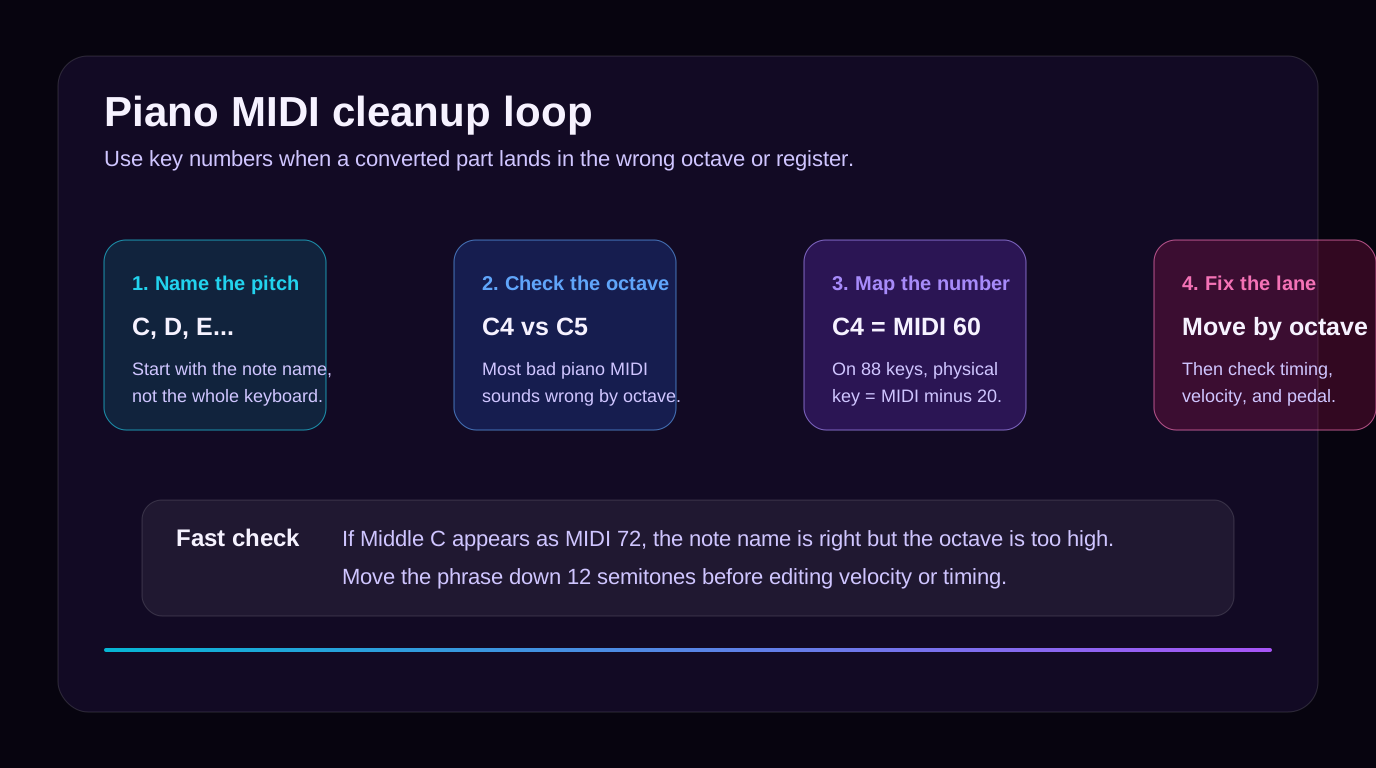
Use this cleanup order:
| Check | What to ask | Fast fix |
|---|---|---|
| Pitch name | Is the note C, D, E, and so on? | Correct individual wrong notes first |
| Octave | Is it C4 or C5? | Move the phrase by 12 semitones if the whole line is displaced |
| Register | Does the left hand sit below the right hand? | Check staff assignment and clef assumptions |
| Timing | Do notes start in the right beat? | Quantize carefully after pitch is correct |
| Velocity | Does the part feel too flat or too harsh? | Adjust touch only after pitch and timing pass |
This order saves time. If you edit velocity before fixing octave, you may polish a part that still sits in the wrong register.
Where Melogen fits
Melogen is useful when your starting point is visible piano notation: a PDF, a clean scan, or an image of sheet music. The Sheet2MIDI workflow supports PDF, JPG, and PNG score inputs and produces editable MIDI that you can inspect in a DAW.

Use key numbers after the first conversion pass:
- Convert the cleanest score source you have.
- Open the MIDI in a piano-roll editor.
- Check whether Middle C appears around MIDI 60.
- Move octave-shifted phrases before deeper cleanup.
- Then edit rhythm, note lengths, velocity, and pedal behavior.
If you want the complete source-to-output process, the sheet music to MIDI workflow explains scanning, conversion, review, and DAW handoff in more detail.
Check piano notation as editable MIDI
Use Melogen Sheet2MIDI for a first conversion pass, then use key numbers and MIDI note values to clean the piano part in your DAW.
The practical takeaway
Piano key numbers are not hard once you keep the systems separate. Physical key numbers count the 88 keys from A0 to C8. MIDI note numbers identify the digital notes your DAW uses. Pitch names help musicians talk and read. Scale-degree numbers explain harmony.
Keep these anchors close:
- A0 is physical key 1 and MIDI 21.
- Middle C is physical key 40 and MIDI 60 in the common DAW convention.
- A4 is physical key 49 and MIDI 69.
- C8 is physical key 88 and MIDI 108.
- On an 88-key piano, physical key number equals MIDI note number minus 20.
When a piano MIDI file sounds wrong, do not start by changing the instrument preset. Check the pitch name, octave, and MIDI number first. A one-octave shift is often a 12-semitone fix, not a musical mystery.
About the author
Zhang Guo
Composer - AI Product Manager
AI product manager and digital marketing consultant with a background in music. Creativity is the bridge between rhythm and logic, where musical intuition and mathematical precision can coexist in every meaningful product decision.
Follow on X