Sheet Music Repeat Signs Made Easier to Read
Learn how sheet music repeat signs, first and second endings, D.C., D.S., and coda marks change playback paths before MIDI cleanup.
 Zhang Guo
Turn a static score into editable MIDI
Contents
A sheet music repeat mark is not just a symbol at the end of a bar. It is a route instruction. It tells the performer, score software, or MIDI playback path where to go next, which ending to use, and when the printed page should become a longer musical form.
That is why repeat signs matter so much when you scan a score or turn notation into MIDI. The notes can be recognized correctly, but the playback can still feel wrong if the repeat, first ending, second ending, D.C., D.S., or coda path is missed. Start by reading the form, then judge the converted file.
Read repeat signs as a playback map
Repeat signs tell you where the music should travel. A backward repeat sign usually sends you back to the matching forward repeat sign or, if there is no forward sign, back to the beginning. First and second endings change what happens on each pass. D.C., D.S., segno, and coda marks create longer road maps through the same printed page.
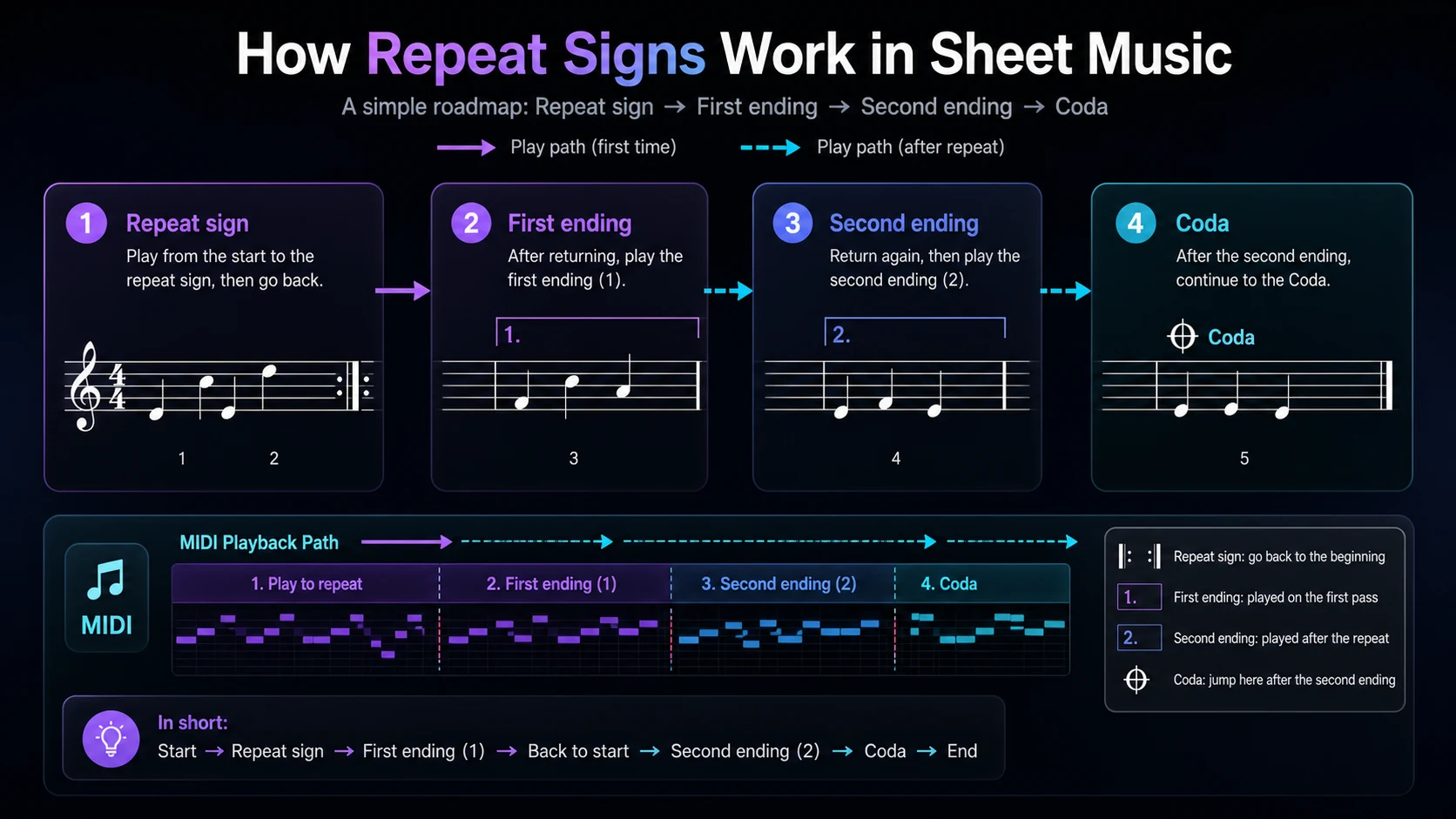
Use this first-pass checklist when a page has repeats:
| Mark | Plain meaning | What to check first |
|---|---|---|
| Forward repeat | Start of the section that may repeat | Find the matching backward repeat |
| Backward repeat | Go back and play the section again | Check whether there is a first ending |
| First ending | Play this ending on the first pass | Skip it on the repeated pass if a second ending exists |
| Second ending | Play this ending after the repeat | Make sure the jump lands cleanly |
| D.C. | Go back to the beginning | Look for al Fine or al Coda instructions |
| D.S. | Go back to the segno sign | Confirm where the segno mark sits |
| Coda | Jump to the closing section | Check the exact jump point |
If you are still learning the wider symbol system, use the broader guide to sheet music symbols and meanings first. This article focuses on the smaller but important job of repeat navigation.
Know which repeats change the form
Not every repeat creates the same editing problem. A simple repeated two-bar phrase is easy to understand. A page with first and second endings can be more fragile because the same printed measures do not play the same way on every pass.
Here is the useful distinction:
| Repeat type | Reading job | Conversion risk |
|---|---|---|
| Simple repeat | Play a section again | Playback may skip the repeat and sound too short |
| First and second ending | Use ending 1 first, ending 2 later | The second pass may choose the wrong ending |
| D.C. al Fine | Return to the beginning and stop at Fine | Playback may restart but not stop correctly |
| D.S. al Coda | Return to the sign, then jump to coda | The jump target may be missed |
| Multiple repeats | Repeat more than once | The exported form may need manual expansion |
When you are reading by hand, mark the route with a pencil before practicing the whole piece. When you are editing a converted file, listen for the same route. The wrong repeat path usually sounds like a missing phrase, an unexpected restart, or an ending that happens too early.
Choose flattened or preserved playback before conversion
The real decision is whether you need the printed form or the performed timeline.
Flattened playback expands the repeats into one linear sequence. That can be easier for DAW editing because bar 1, bar 2, and bar 3 happen only once on the timeline. Preserved form keeps the repeat logic closer to the printed score. That can be better when you need a notation-aware file, rehearsal copy, or MusicXML handoff.
Use this decision table:
| Goal | Better choice | Why |
|---|---|---|
| DAW editing | Flattened timeline | Easier to edit automation, MIDI notes, and arrangement sections |
| Practice playback | Usually flattened | The listener hears the piece in order without reading jumps |
| Notation editing | Preserved repeat logic | The score stays compact and closer to the printed page |
| Classroom handout | Preserved repeat logic | Students learn the same road map as the source score |
| Quick demo export | Flattened timeline | Less chance that a player ignores a jump instruction |
This is also where the MIDI vs MusicXML decision matters. MIDI is usually better for playback and DAW cleanup. MusicXML is usually better when the notation structure, endings, and page logic still need to be edited in score software.
Check repeats after a sheet music to MIDI pass
After conversion, do not inspect every note first. Listen for the form. Repeats and endings affect whole sections, so they can make a correct-looking MIDI file feel wrong at the arrangement level.
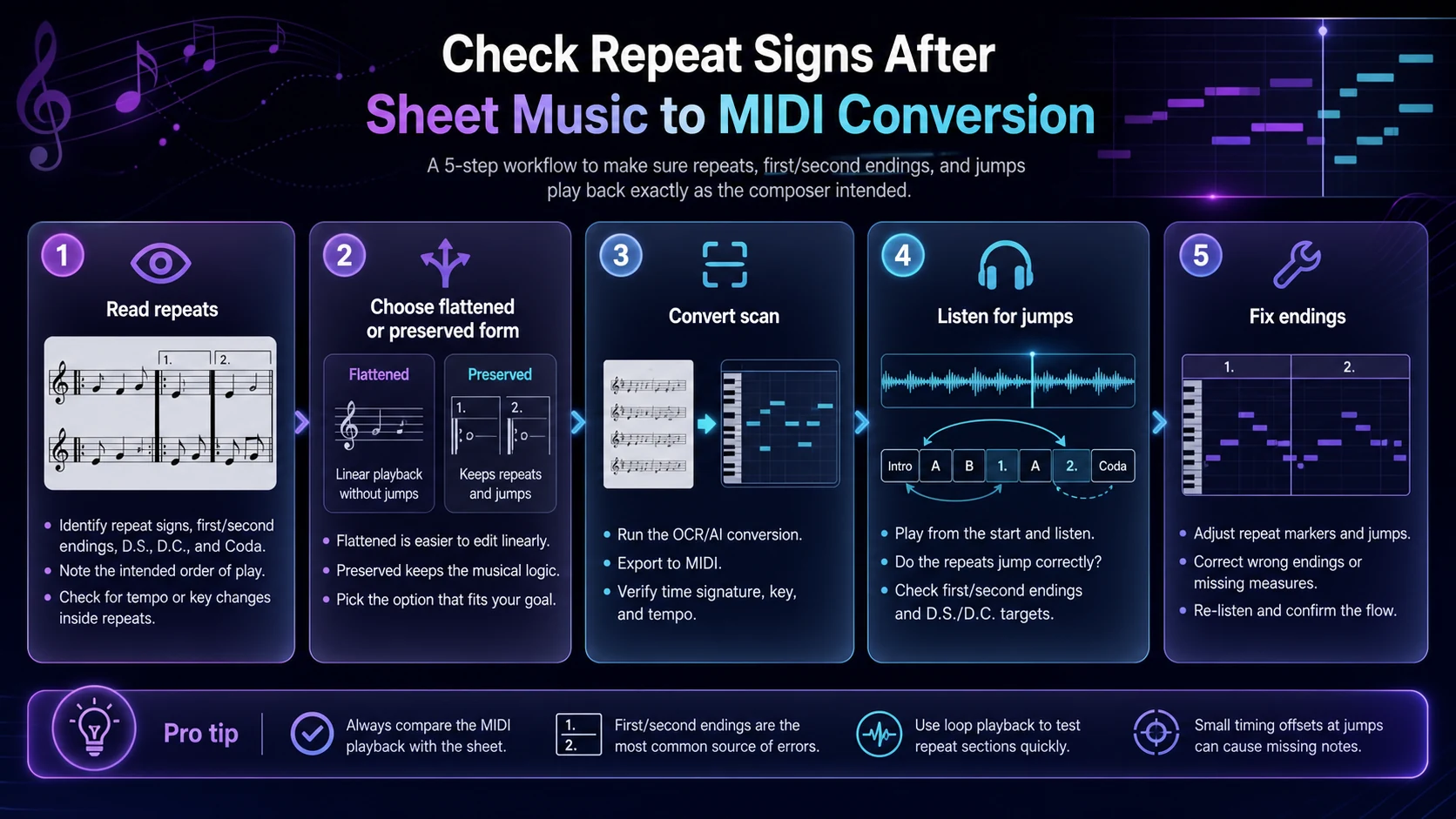
Use this workflow:
- Read the repeat signs on the original page.
- Decide whether the target file should be flattened or preserve repeat logic.
- Convert the cleanest scan or PDF you have.
- Listen from the beginning and follow the printed road map.
- Fix missing jumps, wrong endings, or extra repeated bars before note-level edits.
The most common mistake is editing individual notes while the form is still wrong. If the first ending repeats when it should be skipped, or if the coda never arrives, pitch cleanup will not solve the musical problem. Fix the route first.
Where Melogen fits
Melogen fits when your source is visible notation and you want a browser-based first pass into editable music data. The Sheet2MIDI page supports sheet music images and PDFs, including JPG, PNG, and PDF inputs, with MIDI output for playback review and DAW cleanup.

Use it as a bridge, not as a substitute for reading the page:
- Check repeat signs, endings, and coda marks before upload.
- Run the first conversion with a clean scan or PDF.
- Listen for the full playback path before editing notes.
- Compare the output against the original page.
- If notation structure matters more than playback, consider a MusicXML workflow.
The related sheet music to MIDI workflow covers source quality, upload checks, and cleanup order in more detail. For repeat-heavy scores, add one extra step at the start: trace the musical road map before you judge the MIDI.
Turn readable sheet music into editable MIDI
Use Melogen Sheet2MIDI for a browser-based first pass, then check repeats, endings, and jumps before polishing the notes.
FAQs
What does a repeat sign mean in sheet music?
A repeat sign means the performer should play a section again. A backward repeat sign sends you back to the matching forward repeat sign or to the beginning if no forward sign is shown.
What is the difference between first and second endings?
A first ending is played the first time through a repeated section. After the repeat, the performer skips the first ending and plays the second ending instead.
Should MIDI exports preserve repeat signs?
It depends on the goal. For DAW editing or simple playback, a flattened timeline is usually easier. For notation editing or score study, preserving repeat logic can be more useful.
Why does converted sheet music sometimes miss repeats?
Repeat signs, endings, D.C., D.S., and coda marks are navigation symbols. They sit around the notes rather than inside one pitch event, so they are easy to miss or flatten during conversion.
The practical takeaway
Repeat signs in sheet music are road-map instructions. They decide where the music goes, which ending happens on each pass, and whether a short printed page becomes a longer performance.
Read repeats before you edit notes. Decide whether you want a flattened timeline or preserved notation logic. After conversion, listen for jumps, endings, and coda paths first. Once the form is right, the smaller note and rhythm fixes become much easier to trust.
About the author
Zhang Guo
Composer - AI Product Manager
AI product manager and digital marketing consultant with a background in music. Creativity is the bridge between rhythm and logic, where musical intuition and mathematical precision can coexist in every meaningful product decision.
Follow on X