Black Notes on Piano Explained for Beginners
Learn what black notes on piano mean, how sharps and flats work, and when to use them in reading, chords, and MIDI practice.
 Zhang Guo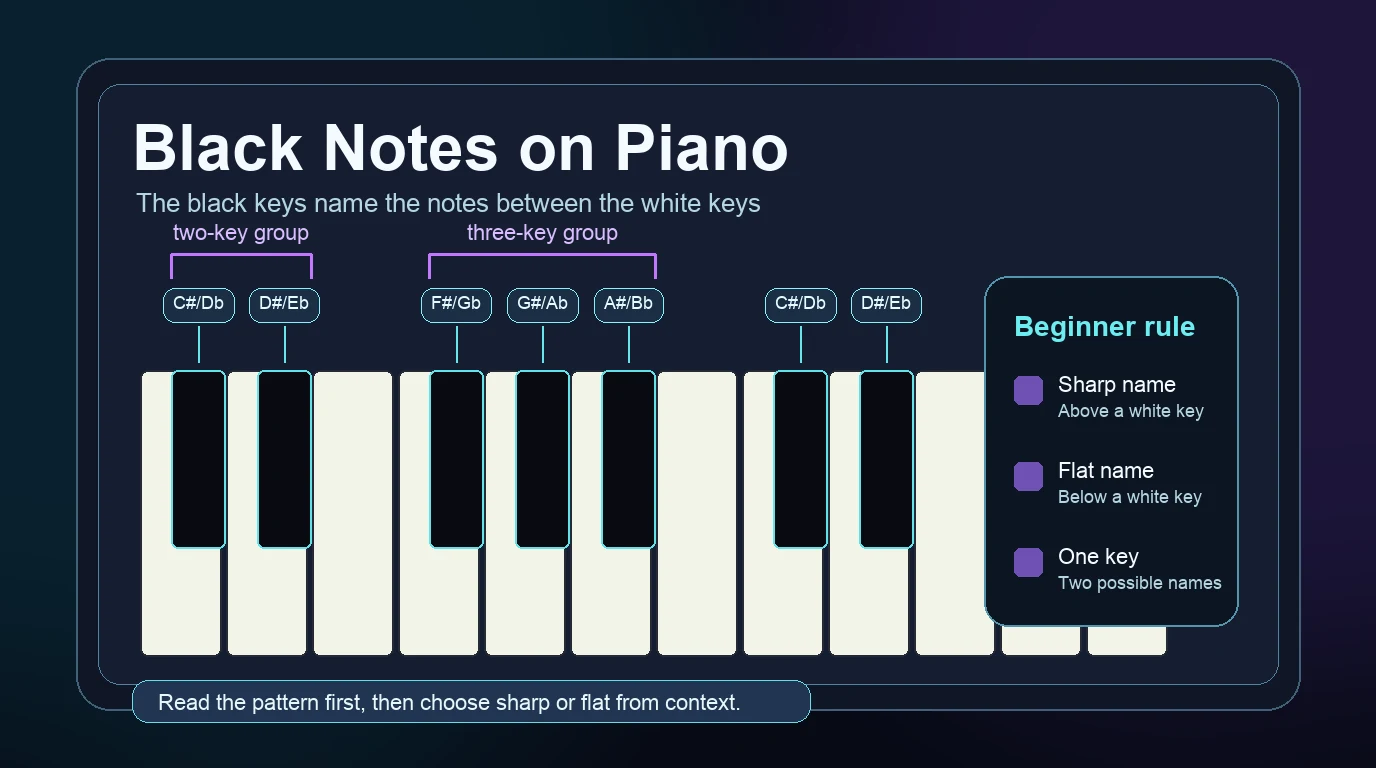
Turn a static score into editable MIDI
Contents
Black notes on piano are the raised keys between the white keys. They let you play the notes that sit between letter names, such as C and D or F and G. In notation and theory, the same black key can usually have two names: one sharp name and one flat name.
For a beginner, the useful move is simple: learn the black keys by their two-key and three-key pattern first, then use the score or chord name to decide whether the note should be called sharp or flat. You do not need to memorize every black key as a separate object. You need a repeatable map.
Start with the two black-key groups
The keyboard repeats in a visual pattern. First comes a group of two black keys. Then comes a group of three black keys. That pattern is the fastest way to find your place before you worry about note names.
In the two-key group:
| Black key | Sharp name | Flat name | Sits between |
|---|---|---|---|
| First black key | C# | Db | C and D |
| Second black key | D# | Eb | D and E |
In the three-key group:
| Black key | Sharp name | Flat name | Sits between |
|---|---|---|---|
| First black key | F# | Gb | F and G |
| Second black key | G# | Ab | G and A |
| Third black key | A# | Bb | A and B |
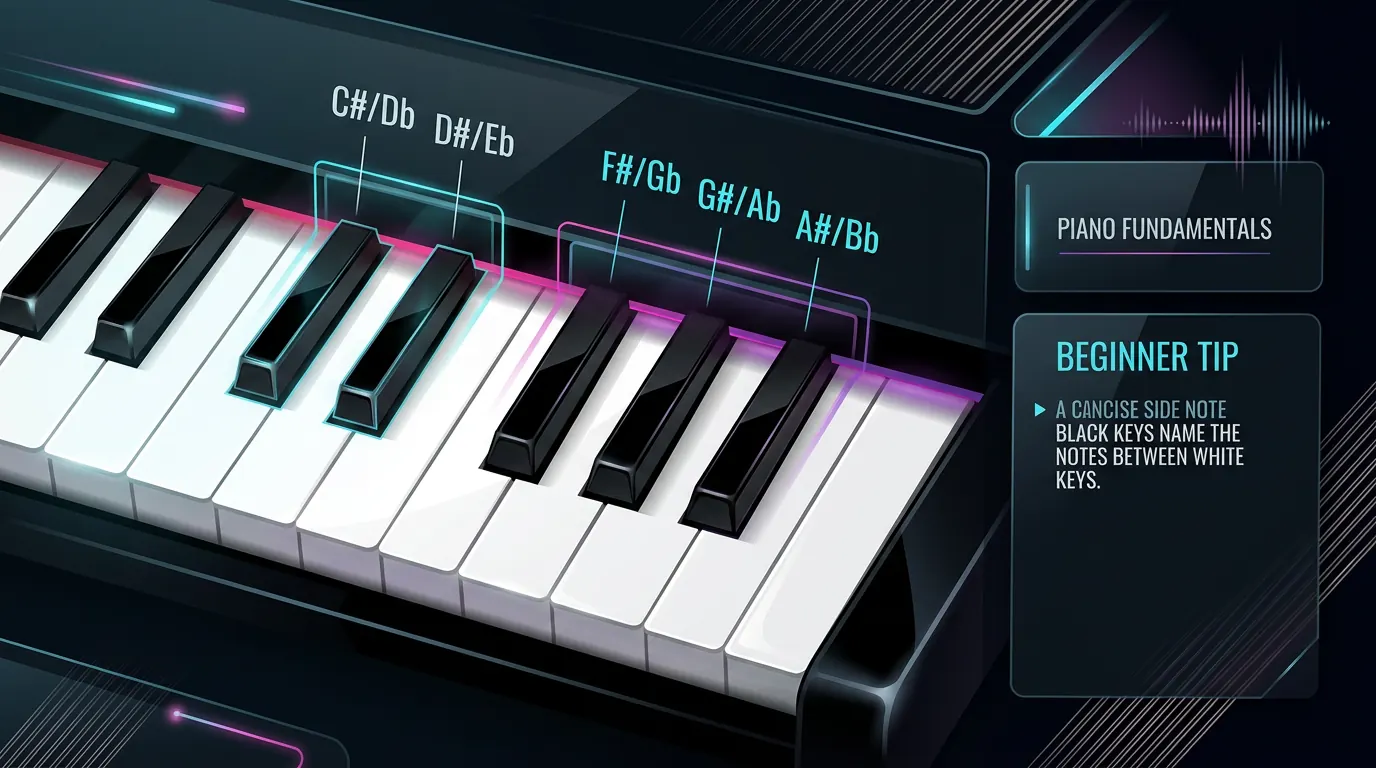
The names repeat in every octave. Once you can find C by looking left of the two black-key group, you can rebuild the whole map from there. If the white-key letters still feel unstable, start with simple piano notes for beginners before adding sharps and flats.
Understand sharp and flat names
A sharp raises a note by one half step. A flat lowers a note by one half step. On piano, a half step usually means moving to the very next key, whether that key is black or white.
That is why the black key between C and D has two valid names:
| If you start from | Move | Name the black key |
|---|---|---|
| C | one key higher | C# |
| D | one key lower | Db |
These two names describe the same physical key, but they do not always mean the same thing in music reading. The score chooses the spelling that makes the melody, scale, or chord easier to understand. In a D flat major passage, you expect to see flats. In an E major passage, you expect to see sharps.
That is the beginner version of enharmonic spelling. It sounds technical, but the practical meaning is friendly: one piano key can have two written names, and context tells you which name to use.
Read the black keys from context
Do not guess sharp or flat only from the keyboard. Look at the notation, chord symbol, or scale first. The black key might be the same, but the written name changes the way you read the phrase.
Use this quick context table:
| What you see | Better name to expect | Why |
|---|---|---|
| A melody moving up from C to the black key | C# | The note is raised from C |
| A melody moving down from D to the black key | Db | The note is lowered from D |
| A key signature with sharps | Sharp names | The scale spelling is probably sharp-based |
| A key signature with flats | Flat names | The scale spelling is probably flat-based |
A chord such as F# minor | F# | The chord root tells you the spelling |
A chord such as Bb major | Bb | The chord root tells you the spelling |
This is also why labeling every key with both names can be helpful at first but confusing later. A label can tell you what the key could be called. The music tells you what it should be called in that moment. For a broader keyboard-labeling routine, use the guide to labeling notes on a piano keyboard.
Avoid the common beginner mistakes
The first mistake is treating black keys as advanced notes. They are not. They are part of the normal keyboard map. Many beginner melodies and chords use them early, especially when you move beyond C major.
The second mistake is thinking every black key has one fixed name. A black key can be C# in one piece and Db in another. If you only memorize one label, you may read the correct key but misunderstand the notation.
The third mistake is ignoring the white-key half steps. Between E and F, there is no black key. Between B and C, there is no black key. Those pairs are already one half step apart. That is why E# can point to F in some theory contexts, and Cb can point to B, even though beginners usually meet those spellings later.
Keep this checklist nearby:
- Find the two-key or three-key group.
- Identify the white keys around the black key.
- Check whether the music is using sharps or flats.
- Say the note name out loud before playing.
- Play slowly enough that the name and finger stay connected.
Practice black notes in a small loop
Black notes become easier when you practice them as tiny movements, not as a giant chart. Pick one black key, name both possibilities, then choose one spelling from a short musical context.

Try this first-week loop:
| Day | Practice focus | Small win |
|---|---|---|
| 1 | Find every two-key group | You can locate C and D without counting from the edge |
| 2 | Name C# and Db | You know one key can have two names |
| 3 | Find every three-key group | You can locate F, G, A, and B around the group |
| 4 | Play one sharp scale fragment | You can move upward with sharp names |
| 5 | Play one flat scale fragment | You can move downward with flat names |
| 6 | Read a short score slowly | You check notation before guessing the name |
| 7 | Record or convert a clean example | You can listen back and catch wrong pitches |
If you are connecting note names to MIDI numbers, the piano key numbers guide can help you map written notes, keyboard location, and MIDI pitch values without mixing them up.
Where Melogen fits
Melogen is useful after you have a clean score, PDF, or image and want a playback reference. The Sheet2MIDI page supports PDF, JPG, and PNG sheet-music input and turns visible notation into editable MIDI, so you can hear whether the black notes in the score landed where you expected.

Use it as a checking step, not a shortcut around reading:
- Read the black notes yourself first.
- Convert a clean score with Sheet2MIDI.
- Listen for obvious pitch problems around accidentals.
- Compare the MIDI notes against the written sharps or flats.
- Return to the keyboard and fix the phrase by hand.
This workflow is especially helpful when a piece has many accidentals and you want to hear the phrase before practicing it repeatedly. If the source is a piano score, the companion guide on converting piano sheet music to MIDI gives more detail on scan quality and DAW handoff.
Check black-note passages with a MIDI reference
Use Melogen Sheet2MIDI to turn a clean score into editable MIDI, then compare the playback against the sharps and flats you read at the piano.
The practical takeaway
Black notes on piano are easiest when you read them by pattern and context. First, find the two-key and three-key groups. Next, identify the white keys around the black key. Then decide whether the score wants a sharp name or a flat name.
Remember the core map:
- between C and D:
C#orDb - between D and E:
D#orEb - between F and G:
F#orGb - between G and A:
G#orAb - between A and B:
A#orBb
If you can name the key, play it slowly, and explain why the score spells it that way, the black notes are no longer mysterious. They are just the notes between the white keys, used with a little more context.
About the author
Zhang Guo
Composer - AI Product Manager
AI product manager and digital marketing consultant with a background in music. Creativity is the bridge between rhythm and logic, where musical intuition and mathematical precision can coexist in every meaningful product decision.
Follow on X