How to Make BPM-Synced VJ Loops and Play Them in OBS
Build an eight-second VJ loop at 120 BPM. Set the bar count and motion speed, export a silent video, and verify three repeat passes in OBS.
 Zhang Guo
Make a VJ loop for your set
Contents
If you’re learning how to make BPM-synced VJ loops for a live set, build the clip around a musical phrase. At 120 BPM, four bars of 4/4 take eight seconds. Fit one complete motion cycle into that span, export a silent video, and play it on repeat in OBS.
Set up a four-bar loop at 120 BPM
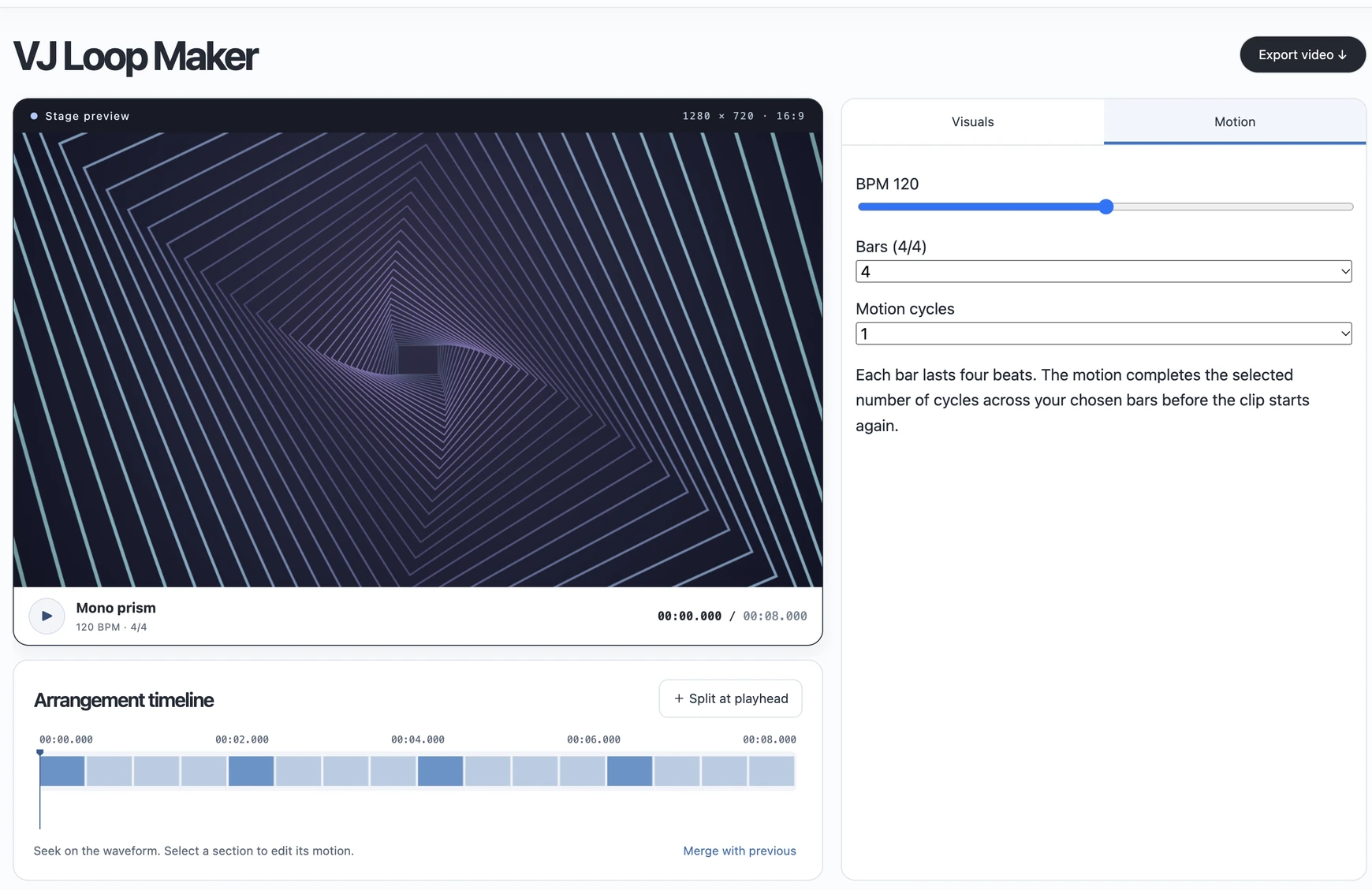
Choose Mono prism in the Visuals tab and set Aspect ratio to 16:9. You can preview the visual on the public page. Sign in with a Melogen account when you’re ready to export the free template. Open Melogen’s VJ Loop Maker
Go to Motion. Set BPM to 120, choose 4 in Bars (4/4), and set Motion cycles to 1. The Stage preview should end at 00:08.000. At this tempo, a beat takes half a second, and four bars contain 16 beats. The darker blocks in the Arrangement timeline mark the start of each bar. For any tempo in 4/4, multiply the number of bars by four and by 60, then divide by BPM to find the clip length in seconds.
Change the motion speed within the same clip length
Press Play and watch the visual complete one cycle across the eight-second preview. Then set Motion cycles to 2 and play it again. The pattern completes a cycle every four seconds, with a return at the halfway point and again at the file boundary.
| Motion cycles | Length of each cycle | Clip length |
|---|---|---|
| 1 | 8 seconds, or 16 beats | 8 seconds |
| 2 | 4 seconds, or 8 beats | 8 seconds |
Use one cycle for slower motion across the whole phrase. Use two if you want the motion to repeat at the two-bar mark. Keep the BPM and bar count at 120 and four while comparing both speeds.
Export a silent video file
Return Motion cycles to 1 and choose Export video. If the browser can encode H.264, choose Download MP4 when it appears. If encoding falls back to VP9 or VP8, save the WebM download. Check the downloaded file’s extension and dimensions before importing it.
Both the one-cycle and two-cycle test exports measured 8.000 seconds. Each was a 1280 × 720 H.264 MP4 with 240 video frames at 30 fps and no audio track. Play the one-cycle export below.
Loop it in the OBS scene preview
- Open an OBS scene for the visual. In Sources, click + and choose Media Source. Create a new source and give it a name.
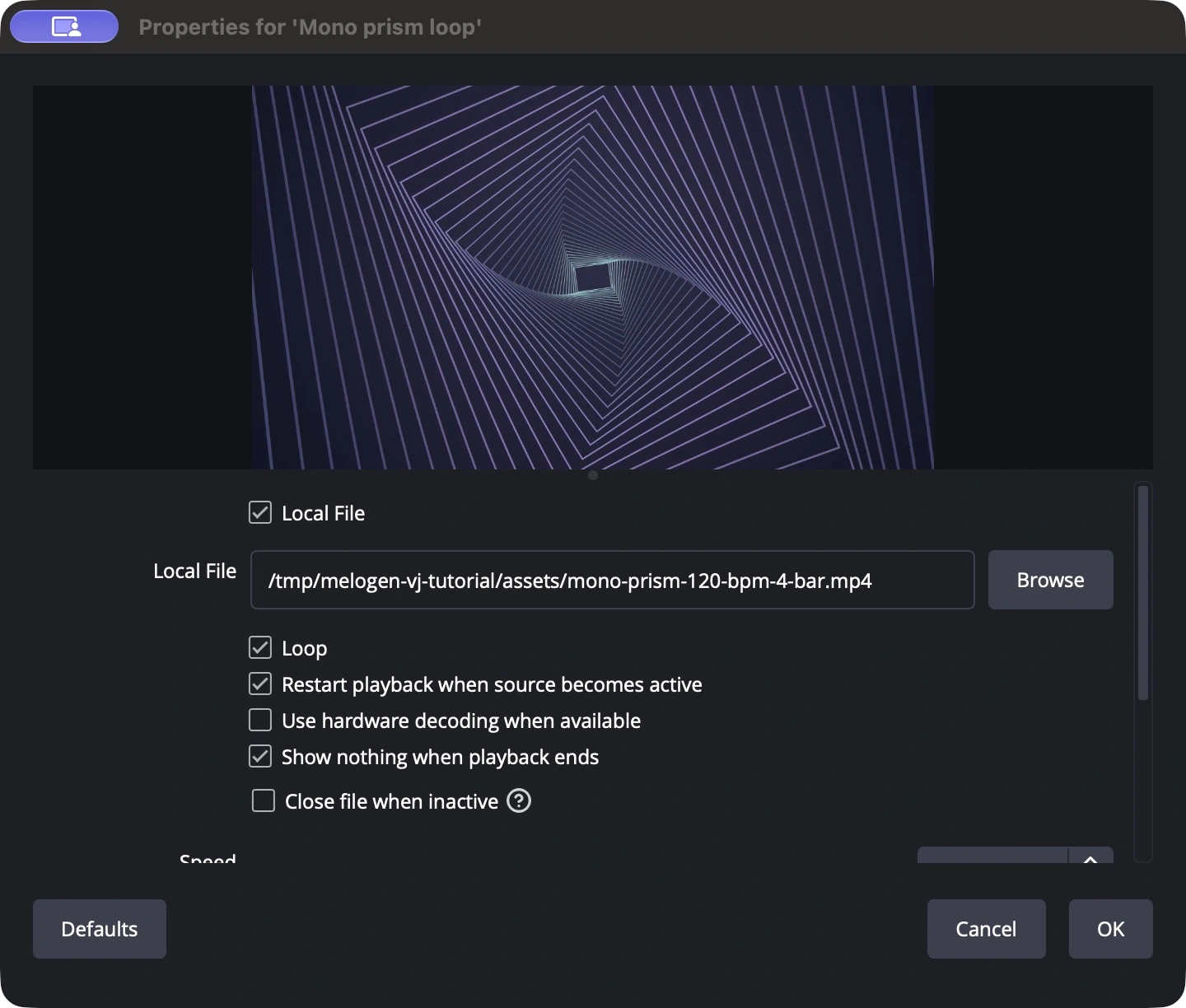
- In the source properties, enable Local File. Use Browse to select the exported video.
- Enable Loop, leave Speed at 100%, and choose OK. The source repeats the local file each time it reaches the end. OBS Media Source documentation
- Keep the source visible in the scene preview for three complete passes. This example takes about 24 seconds for three passes. Watch the end and next opening for a black flash, a freeze, or an unexpected jump in the motion.
In the local OBS Studio test, the eight-second source stayed in playback as it returned to the start three consecutive times.
For tempo-controlled playback in a VJ application, Resolume offers BPM Sync in the clip’s Transport controls. The four-bar file in this guide spans 16 beats. Resolume’s BPM Sync documentation
Frequently asked questions
How do I make a longer loop at the same visual speed?
At 120 BPM, set Bars (4/4) to 8 and Motion cycles to 2. The file lasts 16 seconds and each motion cycle still takes eight seconds.
Can I put music or lyrics behind the loop?
To use the silent clip in OBS, add your show audio through a separate source. For a video export that includes a song and timed lyrics, open the Lyric Video Maker.
Make a loop for your set’s tempo
Choose a visual, set the BPM and bar count, and export a clip to check in your scene preview.
About the author
Zhang Guo
Composer - AI Product Manager
AI product manager and digital marketing consultant with a background in music. Creativity is the bridge between rhythm and logic, where musical intuition and mathematical precision can coexist in every meaningful product decision.
Follow on X