Rhythm Notation for Better Music Reading
Learn rhythm notation with beat counting, note values, rests, ties, and a practical Sheet2MIDI cleanup workflow for cleaner MIDI review.
 Zhang Guo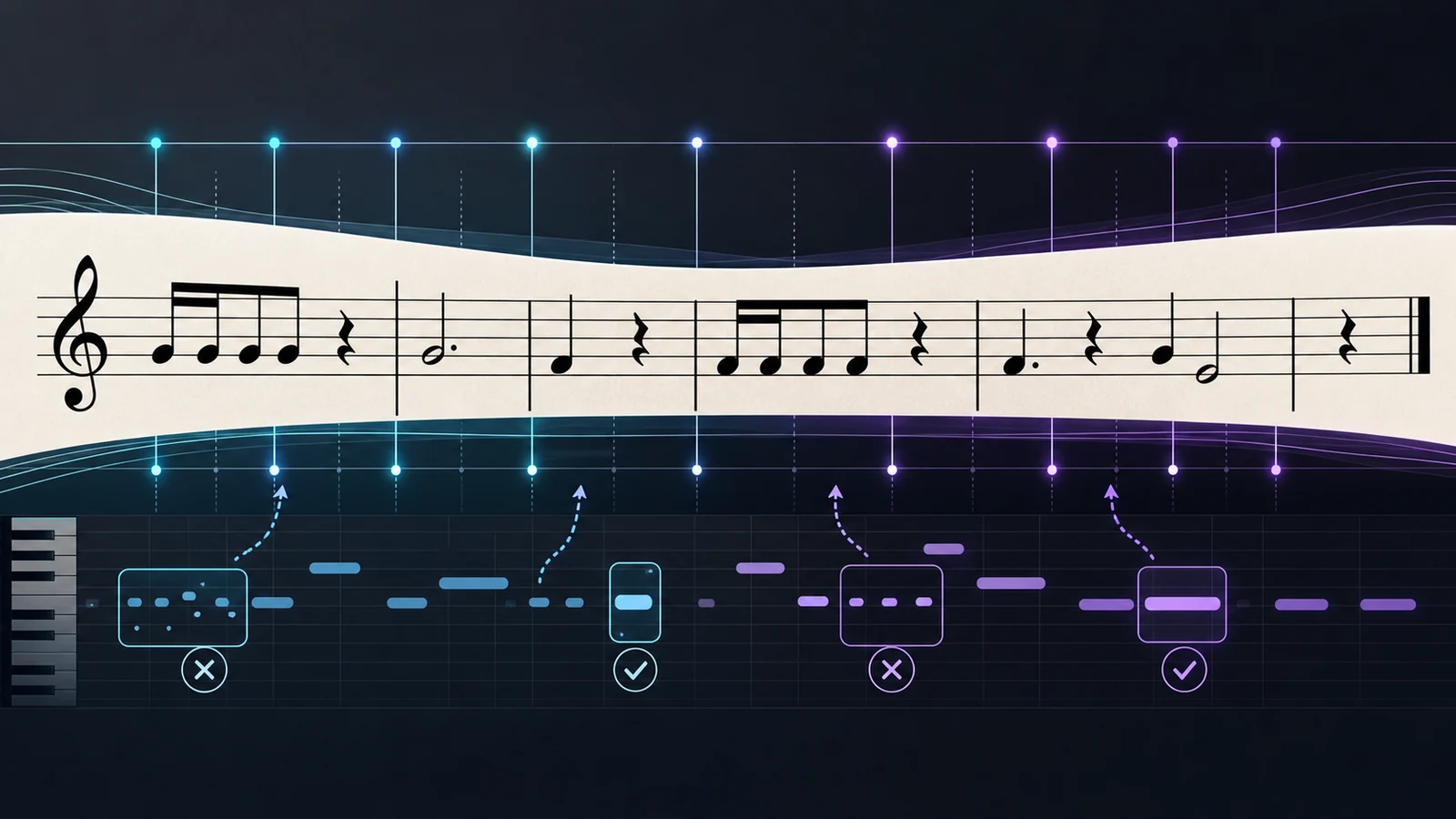
Turn a static score into editable MIDI
Contents
Rhythm notation tells you when music happens. Pitch tells you which note to play, but rhythm decides the spacing, pulse, silence, and hold length that make the phrase feel musical. If you can count the beat, read the note values, and respect rests, a page of notation becomes much easier to practice or clean up after conversion.
The useful approach is layered: find the pulse first, identify each note value, count rests as real time, then check ties, dots, and bar lines before you worry about speed. That same order works whether you are practicing from paper or reviewing a first-pass MIDI file from a scanned score.
Start with the beat grid before the symbols
Every rhythm sits on an invisible grid. The time signature tells you how that grid is grouped, and the bar lines show where each measure begins and ends. In common time, you can start by counting 1 2 3 4; if eighth notes appear, subdivide as 1 + 2 + 3 + 4 +.
Do this before naming every symbol. A beginner often tries to decode noteheads, flags, rests, and ties all at once. That is too many jobs. First ask, "Where are the strong beats, and how much time does this measure contain?"
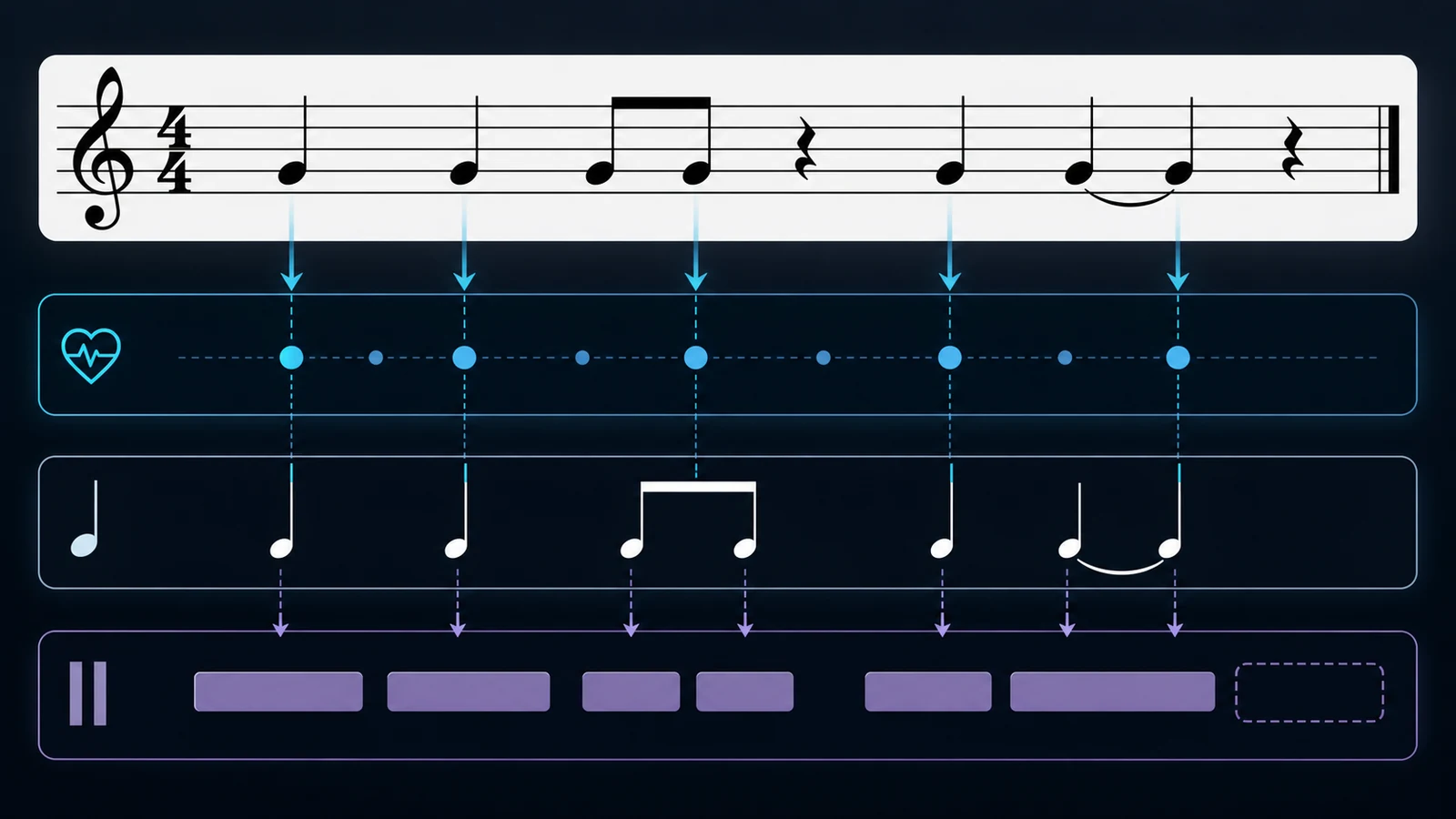
Use this first-pass scan:
| Signal | What it tells you | First action |
|---|---|---|
| Time signature | How beats are grouped | Count one full measure out loud |
| Bar line | Where the count resets | Mark the start of each measure |
| Beams and flags | How notes subdivide the beat | Say the smaller count before playing |
| Rests | Silence that still takes time | Count through the space |
| Ties and dots | Notes that continue or lengthen | Hold the sound instead of re-striking it |
If the staff itself still feels unfamiliar, the musical stave guide is the better starting point. If your bigger problem is symbol recognition, read sheet music symbols and meanings after you can keep a steady count.
Learn note values as durations, not shapes
Rhythm notation gets easier when you stop treating symbols as isolated drawings. Each note value is a duration. In 4/4, a whole note lasts four beats, a half note lasts two, a quarter note lasts one, and eighth notes split the beat into two equal parts. The shapes only matter because they tell you how long to hold or wait.
Here is the practical map:
| Symbol family | Plain meaning in 4/4 | Practice check |
|---|---|---|
| Whole note or whole rest | Four beats | Can you count all four beats without rushing? |
| Half note or half rest | Two beats | Does the note or silence cover half the measure? |
| Quarter note or quarter rest | One beat | Does each event land on the numbered count? |
| Eighth notes | Half a beat each | Can you count with + between the beats? |
| Dotted notes | Add half the note's value | Can you feel the longer hold before moving? |
| Ties | One sustained sound across written notes | Can you avoid re-attacking the second note? |
The trap is visual guessing. Two bars can look equally busy but feel completely different if one uses tied notes and the other uses rests. Always translate the shape into duration before you play.
Count rests as part of the rhythm
Rests are not empty space. They are written time. If you skip them, the next note arrives early and the whole phrase shifts. This is why rhythm mistakes often sound bigger than pitch mistakes.
Try this simple order when a measure contains rests:
- Count the full measure without playing.
- Tap only the notes.
- Speak "rest" or stay silent where the rest occurs.
- Repeat until the next note lands without guessing.
- Add pitch only after the silence feels stable.
That habit matters in MIDI cleanup too. When a converted score sounds rushed, the problem is sometimes not the note itself. It may be a missing rest, an over-shortened hold, or a tied note that became two separate attacks.
Check rhythm notation before MIDI cleanup
When you convert visible notation into MIDI, timing is the first thing to inspect. A pitch mistake is usually easy to see in a piano roll. A rhythm mistake can be subtler: a note starts slightly early, a rest disappears, or a tie becomes a repeated note.
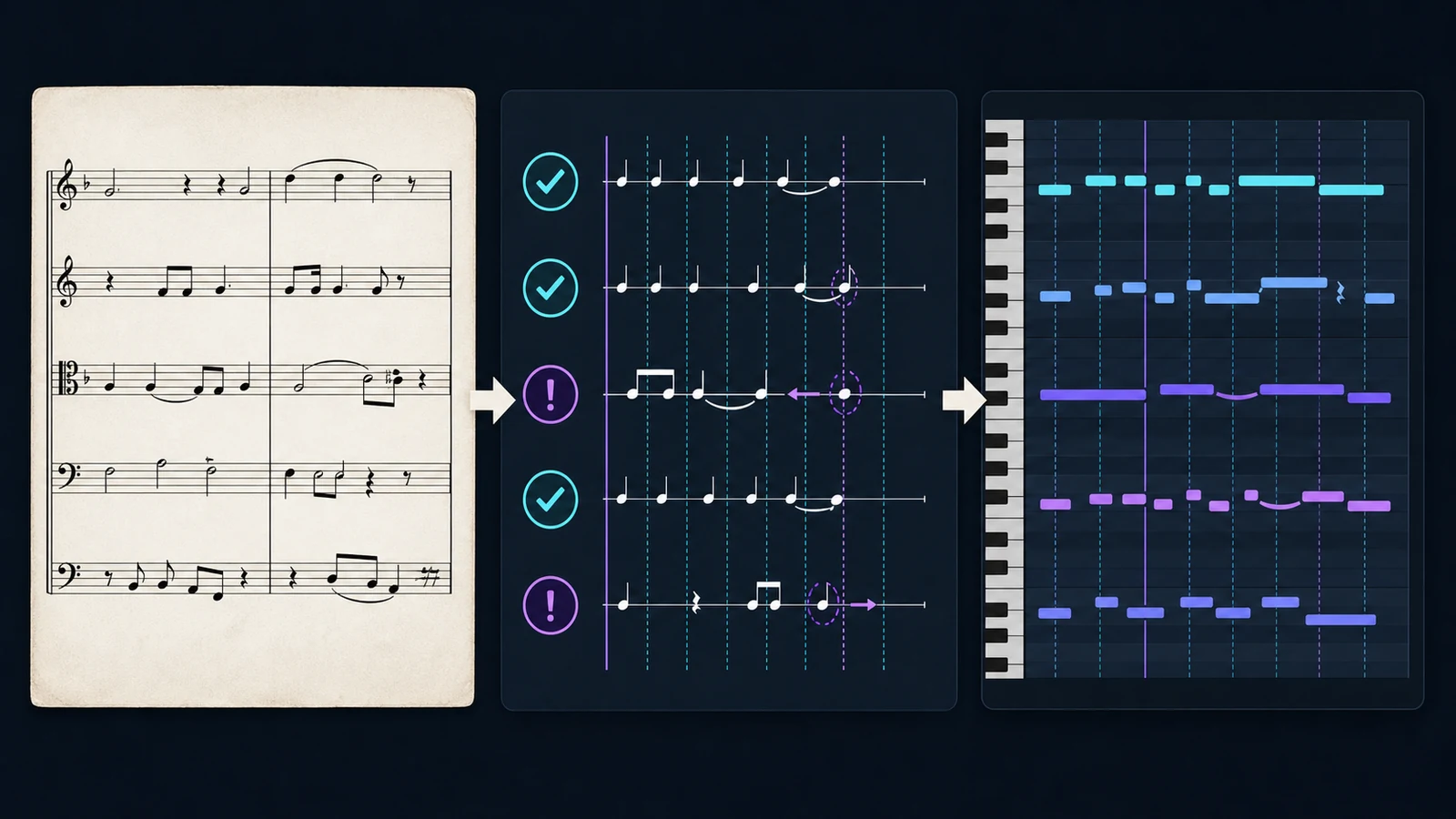
Use this cleanup order after a first pass:
| Cleanup question | What to inspect | Common fix |
|---|---|---|
| Does the bar still add up? | Total beats in the measure | Fix missing rests or shortened notes first |
| Are subdivisions even? | Eighth or sixteenth-note groups | Quantize only after confirming the written rhythm |
| Did ties survive? | Held notes across beats or bar lines | Merge repeated notes or extend duration |
| Are rests preserved? | Silent gaps before the next event | Shorten or move notes that fill the rest |
| Is the tempo stable? | Playback against the count | Fix timing before changing expression |
If the source is a scan, PDF, JPG, or PNG score, Sheet2MIDI is the natural Melogen bridge. The local tool page accepts image and PDF score inputs and outputs editable MIDI, so you can review the rhythm in a DAW or piano-roll view before doing deeper musical cleanup.
For the full conversion workflow, use the guide on how to convert sheet music to MIDI. For rhythm practice away from conversion, how to play tricky rhythms goes deeper into subdivision and slow-loop practice.
Use a short rhythm notation practice loop
You do not need to master every symbol at once. A small loop works better:
- Choose one short measure.
- Clap the pulse without naming pitches.
- Count the smallest subdivision you see.
- Speak rests and holds before playing.
- Tap the rhythm on one note.
- Add pitch after the timing is steady.
- Record or play back one pass and mark the bar that moved.
That loop keeps the work honest. If you cannot clap the rhythm on one pitch, adding an instrument will not fix it. If you can clap and count it, the pitch layer becomes much less intimidating.
Where Melogen fits
Melogen helps when your starting point is visible notation and you want a fast playback or editing reference. Use the browser workflow for a first pass, then review rhythm notation with your musician brain still switched on.
The useful division is simple:
- Use the page to read pulse, rests, ties, and bar structure.
- Use Melogen to create an editable MIDI reference from a clean score.
- Use a DAW or notation editor to inspect timing, duration, and register.
- Return to the score before making final musical decisions.
Turn readable notation into editable MIDI
Use Melogen Sheet2MIDI when you have a clean PDF, PNG, or JPG score and want a first-pass MIDI reference for rhythm and timing review.
The practical takeaway
Rhythm notation is not just a collection of note shapes. It is a timing map. Read the beat grid first, then note values, rests, ties, dots, and bar lines. Only after that should you add pitch, speed, or expression.
Keep this checklist nearby:
- Count the full measure before playing.
- Treat rests as written time.
- Hold ties instead of re-striking them.
- Check dotted rhythms with the smallest subdivision.
- Fix timing before polishing pitch or velocity in MIDI.
Once rhythm is stable, everything else gets easier. The page feels less crowded, playback makes more sense, and MIDI cleanup becomes a musical review instead of a guessing game.
About the author
Zhang Guo
Composer - AI Product Manager
AI product manager and digital marketing consultant with a background in music. Creativity is the bridge between rhythm and logic, where musical intuition and mathematical precision can coexist in every meaningful product decision.
Follow on X