Apple Music Annual Subscription Guide for 2026
Learn whether an Apple Music annual subscription is available, where to check your account, and how current monthly plans compare before you switch.
 Zhang Guo
Turn a static score into editable MIDI
Contents
An Apple Music annual subscription is not presented as a universal, public US plan on Apple's main pricing page. When checked on July 17, 2026, that page advertised Individual at $10.99 per month, Family at $16.99 per month, and Student at $5.99 per month. Apple One was also described as a monthly bundle.
That does not mean an annual option can never appear. Apple's subscription-management instructions explicitly cover switching between monthly, annual, and student plan types. The reliable answer is therefore account-specific: open See All Plans for your Apple Music subscription and use the price, currency, renewal date, and plan name shown there.
Is there an Apple Music annual subscription now?
There are two different Apple surfaces to understand.
The public Apple Music pricing page is the general offer shown to new US customers. At the time of this review, it listed these monthly prices:
| Public US plan | Advertised monthly price | Twelve monthly payments | Main use case |
|---|---|---|---|
| Individual | $10.99 | $131.88 | One listener with a personal library and recommendations |
| Family | $16.99 | $203.88 | Up to six people through Family Sharing |
| Student | $5.99 | $71.88 | One verified college student |
| Apple One | From $19.95 | From $239.40 | Apple Music bundled with other Apple services |
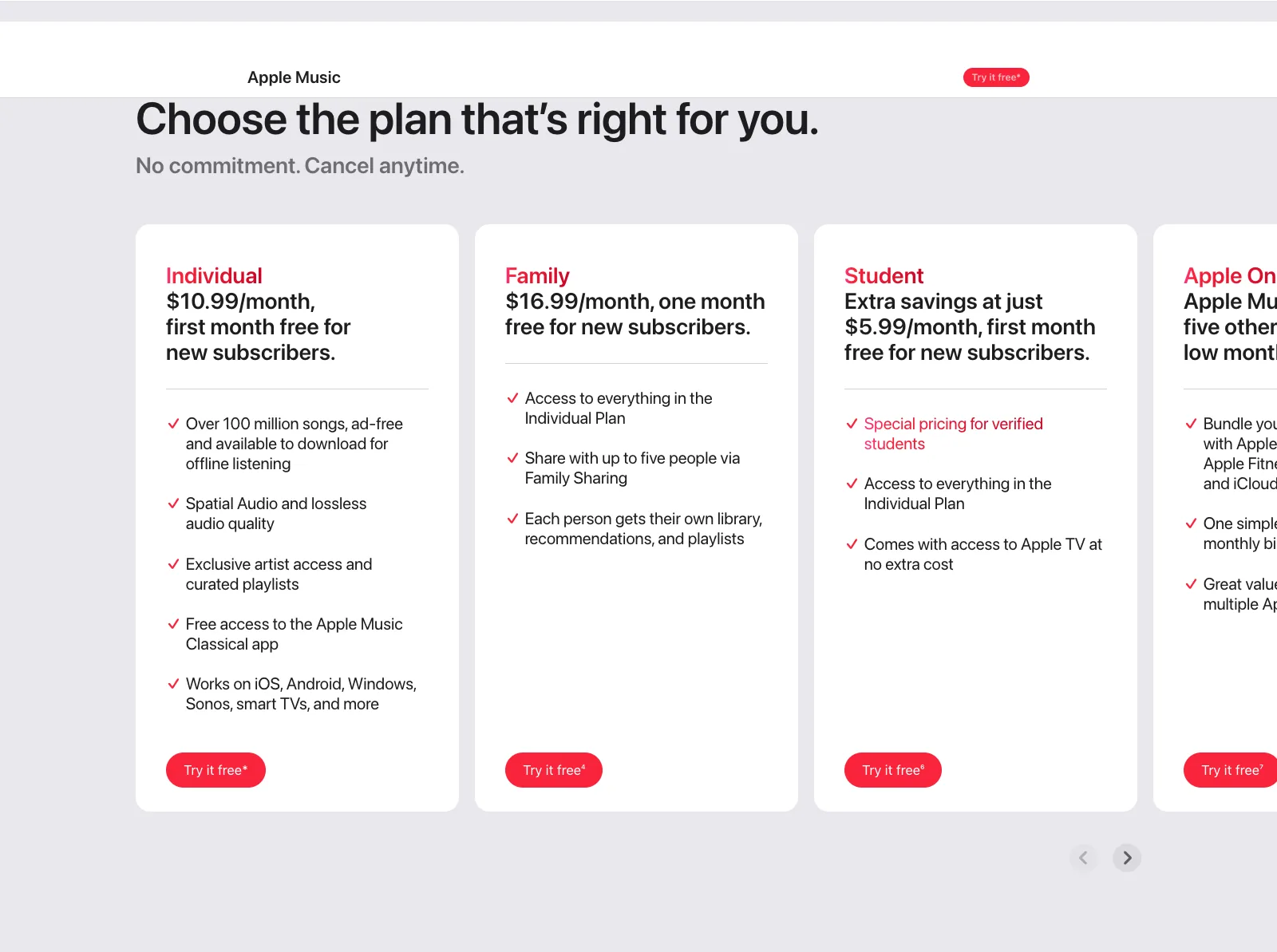
Apple's public US plan section captured July 17, 2026. It is useful for current monthly benchmarks, but your signed-in subscription screen is the final source for any annual option.
The second surface is your signed-in subscription manager. Apple's plan-switching support page says an Apple subscription can be changed to a different type, including a monthly plan, annual plan, or student plan. It tells iPhone and iPad users to open the subscription and tap See All Plans.
This wording matters. Apple documents annual plans as a supported subscription type, but it does not promise that every subscription, country, account, or plan family will show the same annual choice. Availability can be narrower than the public idea of “Apple Music has an annual plan.”
Articles that quote a hidden $99 or $109 Apple Music price usually capture a real offer from a particular time, account, or market and then present it as permanent. Use those numbers as historical context only. The amount on your purchase confirmation is the only price you are agreeing to now.
How to check every supported device
Use the account that is actually billed. A different Apple Account can show a different subscription state, especially in a family group.
On iPhone or iPad
- Open Settings.
- Tap your name.
- Tap Subscriptions.
- Select Apple Music.
- Tap See All Plans.
- Review every available plan before confirming a change.
Look for the exact billing period, total price, currency, next renewal date, and whether the plan is Individual, Family, or Student. If no annual plan is listed, there is no account-level evidence that you can buy it from that screen today.
On a Mac
- Open the App Store.
- Click your name in the sidebar and sign in if needed.
- Open Account Settings.
- Scroll to Subscriptions and click Manage.
- Open Apple Music and choose See All Plans.
On a Windows PC
- Open the Apple Music app or Apple TV app.
- Select your name at the bottom of the sidebar.
- Choose View My Account.
- Scroll to Subscriptions and click Manage.
- Click Edit next to Apple Music and review the available options.
On the web
Apple also directs subscribers to account.apple.com for plan changes. Sign in and follow the onscreen subscription instructions. The web route is useful when you do not have the original Apple device nearby, although the options shown are still tied to your Apple Account and storefront.
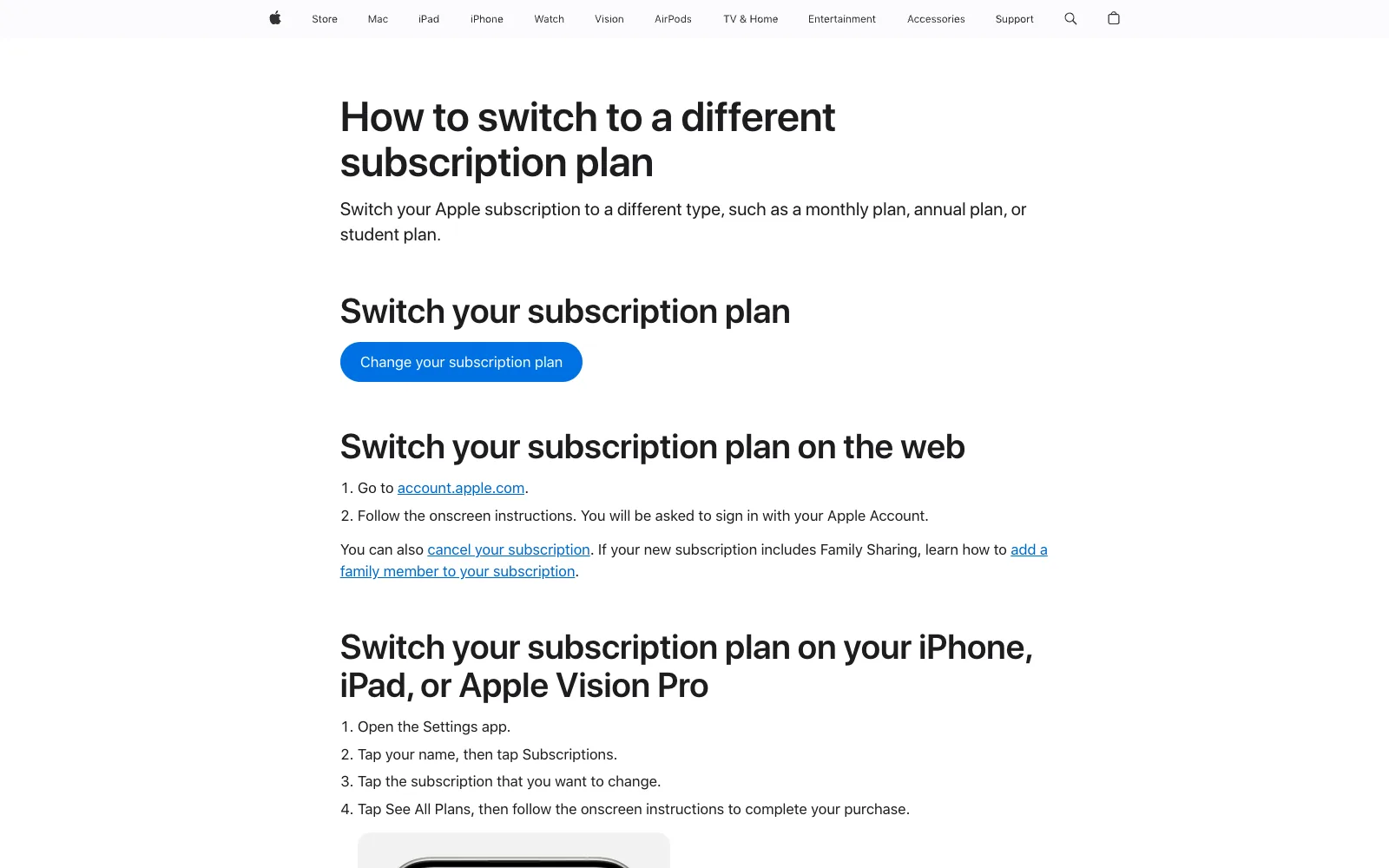
Apple's support page separates public marketing from the signed-in change flow. The See All Plans step is where an account-specific annual option would appear.
How to compare an annual offer with monthly billing
Do not compare an annual total with one monthly payment. Convert both choices to the same time period.
Use this calculation:
Monthly annualized cost = current monthly price × 12
Then calculate:
Annual savings = monthly annualized cost − displayed annual price
For example, the current public US Individual price annualizes to $131.88. If your signed-in screen offers an annual Individual plan, subtract its displayed total from $131.88. Divide the annual total by 12 if you also want an effective monthly cost.
| Compare this | Calculation | Why it matters |
|---|---|---|
| Annual cash saving | 12 monthly payments minus annual total | Shows the nominal discount |
| Break-even use | Annual total divided by monthly price | Estimates how many months make annual cheaper |
| Upfront commitment | Full annual charge versus one month | Measures the immediate budget impact |
| Plan suitability | Individual, Family, or Student features | A cheaper billing period cannot fix the wrong plan type |
Taxes, regional pricing, store credit, promotional trials, and an upcoming price change can alter the real comparison. Use the final confirmation screen rather than a calculator built from an old US price.
An annual plan is most sensible when you already know you will keep the same service and plan type beyond its break-even month. Monthly billing is safer when you are testing Apple Music, expect student eligibility to change, may join a family group, or are comparing Apple One.
Choose the plan type before the billing period
Billing period is the second decision. The first is who needs access and which eligibility rules apply.
Individual is the clean annual-plan check
The historical annual offers discussed online are usually Individual plans. That makes an Individual subscription the most relevant place to look for an account-specific annual option. If it appears, confirm that it says Apple Music Individual and not a different Apple service.
Family is about separate accounts, not a shared login
The public Family plan is $16.99 per month in the US and supports up to six people through Family Sharing. Each person keeps a separate library and recommendations. Read our Apple Music Family Sharing setup guide before switching, because an annual Individual discount would not replace the access structure a household needs.
Do not assume an Individual annual offer can be shared. Do not assume a Family annual offer exists merely because an Individual one appears. Check the exact plan label.
Student depends on continuing verification
The Student plan has its own eligibility and verification process. Its lower monthly price may already beat an annual Individual offer, so compare total cost without discarding the eligibility value. Apple says student pricing is available for up to four years while the subscriber remains verified, after which the membership continues at the Individual price.
Apple One solves a different problem
Apple One bundles Apple Music with other Apple services and is publicly sold as a monthly subscription. Compare it only when you would otherwise pay for enough included services separately. A lower Apple Music-only annual total can still be poor value if Apple One replaces several bills you already have; the reverse is also true if you only want music.
What to verify before you switch
A low annual price is not the entire contract. Read the confirmation screen and take a private screenshot for your own records before approving the purchase.
Check these items:
- Plan name: Individual, Family, Student, or an Apple One bundle.
- Billing period: monthly or annual, stated explicitly.
- Immediate charge: whether Apple charges now or at the current period's end.
- Renewal price and date: not just a first-year promotion.
- Storefront and currency: especially after a country or region change.
- Family impact: whether other listeners will gain or lose shared access.
- Trial treatment: whether changing plans ends or replaces an active offer.
Apple's onscreen flow is the authority for when the switch takes effect. Do not infer timing from an unrelated subscription or an old forum answer. If the confirmation page is unclear, exit without confirming and contact Apple Support with the plan names and date visible on your account.
After a change, verify the subscription in Settings and keep the receipt email. If playback or account access fails, work through the checks in our Apple Music problems guide before canceling and rebuilding a library.
Keep owned audio separate from subscription access
Apple Music is a streaming subscription, not proof that every track in the Music app is an owned local file. Changing the billing period should not be treated as a backup workflow.
Before a major account, Sync Library, or Family Sharing change, preserve copies of audio you own or created: purchased downloads, imported CDs, demos, rehearsals, voice recordings, and masters. Our guide to stopping Apple Music from deleting songs explains the difference between cloud access, Sync Library, and a real backup.
If you need to trim an owned MP3, WAV, M4A, OGG, FLAC, or AAC file after saving it locally, Melogen Music Trimmer provides a browser-based cut, preview, and export workflow. It does not download Apple Music catalog tracks, unlock a subscription, or convert protected streaming audio.
Trim a local audio file in your browser
Use Melogen for audio you own or are authorized to edit. Subscription management stays with Apple.
Apple Music annual subscription FAQs
How much is an Apple Music annual subscription?
There is no universal current price that can be quoted for every account and region. Apple's public US page advertised monthly plans when checked July 17, 2026. Open Apple Music under Subscriptions and select See All Plans. If an annual option appears, its displayed total is the relevant price.
Is the old $109 annual price still available?
Do not assume so. A quoted $109 price may describe a past, regional, or account-specific offer. Compare it with the plan selection and confirmation screens available to your Apple Account now.
Why can I not see an annual plan?
The option may not be available for your account, storefront, current plan type, or device flow. First confirm that you are signed in with the billed Apple Account and that you opened See All Plans. If it is still absent, treat the visible choices as the currently available plans.
Can I get an annual Apple Music Family plan?
Only rely on an annual Family option if the signed-in plan screen explicitly offers one. An Individual annual option does not prove that Family uses the same billing choices.
Does an annual plan include Apple Music Classical?
Apple says Apple Music Classical is included with Student, Individual, Family, and Apple One plans. The benefit follows the qualifying plan type; verify the exact subscription you are purchasing rather than assuming every annual Apple subscription is Apple Music.
Will switching plans delete my library?
A normal plan change is not a library-deletion instruction, but account, Sync Library, and family changes can make content appear differently. Back up owned audio first, sign in with the correct Apple Account, and verify the library after the switch.
The practical takeaway
The safest 2026 answer is not “Apple Music costs $109 per year.” It is: Apple publicly advertises monthly US plans, while its account-management system supports plan changes that can include annual options. Availability and price must be confirmed on the billed account.
Open See All Plans, compare the exact annual total with 12 current monthly payments, and confirm the plan type before purchase. If no annual option appears, a stale competitor page is not a substitute for a live offer. Keep your subscription decision separate from backups and edits for audio you actually own.
About the author
Zhang Guo
Composer - AI Product Manager
AI product manager and digital marketing consultant with a background in music. Creativity is the bridge between rhythm and logic, where musical intuition and mathematical precision can coexist in every meaningful product decision.
Follow on X