How to Delete Spotify Account Safely Without Losing Data
Delete Spotify account safely with official closure steps, data and playlist checks, a 7-day recovery window, and clear cancellation differences.
 Zhang Guo
Turn a static score into editable MIDI
Contents
If your goal is to delete Spotify account access and data permanently, use Spotify's official account-closure page while signed in to the exact account you want to remove. Before you continue, cancel or verify any paid plan, request the account data you want to keep, and confirm that you can still access the account email.
Deleting the account is not the same as canceling Spotify Premium. Cancellation normally keeps the account, playlists, and saved music on Spotify Free. Account closure permanently removes the Spotify identity and starts the data-deletion process. Melogen is not Spotify support and cannot close, reopen, or recover a Spotify account.
Choose the right Spotify account action
The most important step happens before deletion: make sure account closure is the action you actually need.
| Your goal | Correct action | What remains |
|---|---|---|
| Stop paying for Premium | Cancel Premium and switch to Spotify Free | Account, playlists, saved music, followers, and login remain |
| Leave a Family or Duo plan | Ask the plan manager or use the available member controls | Your Spotify account remains |
| Remove an old device or suspicious session | Sign out everywhere, change the password, and review linked access | Account and library remain |
| Take a break from Spotify | Cancel Premium, sign out, or remove the app | Account and library remain available for later use |
| Permanently remove the account and begin data deletion | Close the account through Spotify's official flow | Account access, playlists, followers, purchases, and other account-linked items may be lost |
If stopping charges is your real goal, follow the separate guide to cancel Spotify Premium. Do not delete the account just because a cancellation button is hard to find. The subscription may be billed by Apple, Google Play, a mobile carrier, or another partner that controls the recurring payment.
Prepare your data before account closure
Treat Spotify account deletion like deleting a project workspace, not uninstalling an app. Make a short inventory before you start.
Record or request what matters:
- the account email, username, and login method
- playlists you created, saved, or use for work
- artists, albums, podcasts, and audiobooks saved to the library
- playlist descriptions, collaborators, and public share links
- receipts, billing source, and the next payment date
- purchased audiobooks and live tickets connected to the account
- local-file references that point to audio stored on your own devices
Spotify's Understanding your data page explains that its automated data download can include playlist names, modification dates, song and artist names, album or episode names, local-track names, descriptions, followers, library records, and listening history in JSON files.
Request that export before deletion and allow time for it to arrive. The data package is a record of account information. It is not an export of Spotify catalog audio and does not turn subscription streams or offline downloads into files you own.
Delete Spotify account through the official flow
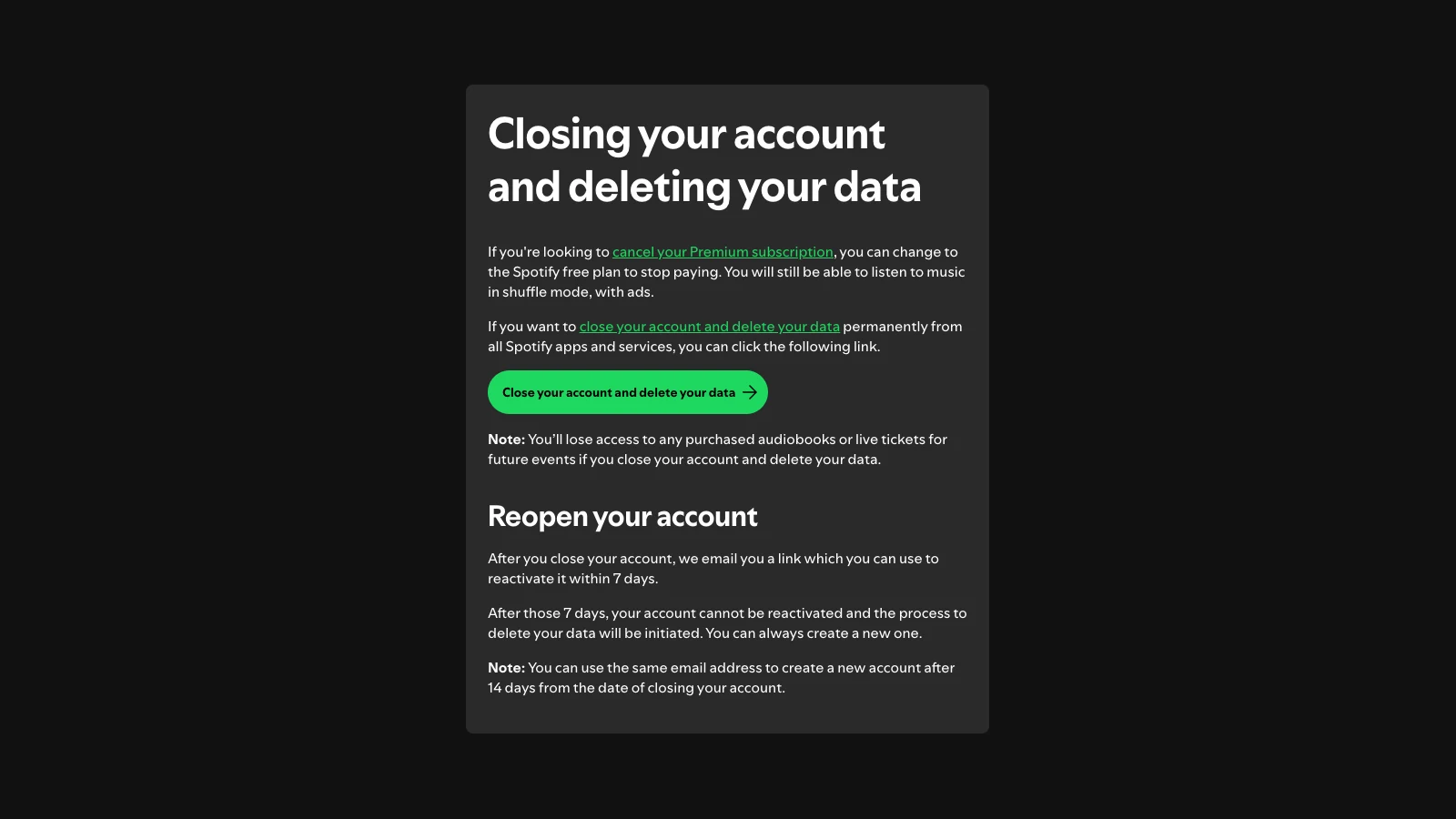
Spotify's current account closure support page separates Premium cancellation from permanent account closure. Use the closure link on that page rather than a third-party form or instructions that ask for your Spotify password.
- Sign in to the Spotify account you intend to close.
- Open Spotify's official Closing your account and deleting your data page.
- Confirm that the displayed account is the correct one.
- Read the loss and recovery information on the page.
- Follow Close your account and delete your data into Spotify's authenticated flow.
- Complete every confirmation Spotify presents.
- Keep the closure email and recovery link until the recovery period ends.
Do not share a password, one-time code, or account recovery link with a tutorial site. The TuneFab competitor page proves that this is a real support query, but the final action belongs on Spotify's official account and support surfaces.
Know what deletion removes and what can be reopened
Spotify says account closure deletes data permanently from its apps and services. The official page also warns that closing the account removes access to purchased audiobooks and live tickets for future events.
The current recovery timing is specific:
- Spotify emails a link that can reopen the account within 7 days after closure.
- After those 7 days, the account cannot be reactivated and Spotify starts the data-deletion process.
- Spotify says the same email address can be used to create a new account after 14 days from the closure date.
Those windows should not be treated as a backup strategy. A reopened account may save you from a mistaken closure, but the safer approach is to confirm the account, billing, playlists, purchases, and email access before clicking the final button.
| Item | Before deletion | After the recovery window |
|---|---|---|
| Spotify login | Verify the exact email and login method | The old account cannot be reactivated |
| Playlists and saved music | Request data and save useful references | They should not be assumed recoverable from the deleted account |
| Followers and profile | Record only what you genuinely need | The old profile identity is gone |
| Purchased audiobooks and future-event tickets | Check access and receipts | Spotify warns that access is lost with account closure |
| Email address | Keep access to receive the recovery link | Spotify says it can be reused for a new account after 14 days |
If a playlist was deleted accidentally but the account is still open, use the narrower workflow to recover a deleted Spotify playlist. Do not close the whole account to fix one missing playlist.
Check billing, plan roles, and account security
Permanent closure has several edge cases that a short how-to often misses.
Confirm who controls the payment
Check whether Spotify, Apple, Google Play, a carrier, or another partner owns the subscription. If a partner bills you, verify the cancellation on that partner's side. Do not assume that removing the Spotify app, deleting a saved card, or closing a different Spotify account stops the charge.
Separate plan manager and member roles
Family and Duo managers control the shared payment. Members participate in the plan but do not necessarily control its billing. Tell the manager or members what is changing, and verify that you are closing the intended account rather than the payer's or another household member's account.
Secure a compromised account first
If the deletion request follows suspicious activity, first regain control of the account, change the password, sign out everywhere, and secure the connected email account. Closing an account you cannot reliably identify may leave the real billing or security problem unresolved.
Preserve access to the account email
Spotify sends the recovery link by email. Confirm that the email address works and that you can receive Spotify messages before closing the account. Do not rely on an inbox you are about to lose through an employer, school, or expired domain.
Keep playlist information without ripping music
The competitor article recommends downloading Spotify catalog music before deletion. That is not required to preserve playlist structure, and it blurs playlist metadata with audio ownership.
Use a rights-safe distinction:
- Playlist metadata is a list of titles, artists, albums, descriptions, and ordering. Request Spotify account data or keep authorized playlist references.
- Spotify offline downloads are subscription-controlled playback data inside Spotify. They are not ordinary MP3, WAV, or FLAC files.
- Local Files are audio files already stored on your device. Keep the original files in your own folders and back them up separately.
- Owned or authorized audio includes your recordings, DAW exports, purchased DRM-free tracks, and files you have permission to edit.
If you are moving to another service, transfer playlist references through a reputable migration tool or rebuild the list from your Spotify data. A playlist transfer should move metadata and matching references, not promise permanent ownership of catalog streams.
Use Melogen only for audio files you own
Deleting a Spotify account does not create local copies of streaming music. Melogen does not close Spotify accounts, export Spotify playlists, unlock offline downloads, remove access controls, or convert Spotify catalog tracks.
Use Melogen Music Trimmer only when you already have a permitted local file and the next task is to trim a section, preview the result, add fades, or export a new audio clip. This can help with your own demos, voice memos, rehearsal recordings, podcast files, and purchased DRM-free audio. It is not a Spotify backup tool.
Prepare local audio before changing services
Keep Spotify account closure separate from audio editing. Use Melogen only for recordings, exports, purchases, and other files you are allowed to process.
Run this pre-deletion checklist
- Confirm that permanent account deletion is the goal, not Premium cancellation.
- Sign in to the exact Spotify account you want to close.
- Check the billing source and next payment date.
- Identify any Family or Duo manager/member role.
- Request Spotify account data and wait for the useful export.
- Save playlist references, receipts, purchased-audiobook details, and ticket information you need.
- Back up original local audio files from your own device.
- Confirm that the account email works and is secure.
- Use Spotify's official account-closure page.
- Keep the emailed recovery link private during the 7-day window.
- Do not use a converter or downloader as a substitute for account-data preparation.
- Recheck billing after closure so a partner-managed subscription does not surprise you.
Spotify account deletion FAQs
Does deleting Spotify account cancel Premium?
Do not rely on account deletion as your only billing check. If your goal is to stop paying, cancel Premium through the company that controls the subscription and save the confirmation. Partner-billed plans may require action outside Spotify.
Can I recover a deleted Spotify account?
Spotify says the closure email contains a link that can reactivate the account within 7 days. After that period, the account cannot be reactivated and the data-deletion process begins.
When can I reuse the same email address?
Spotify's current support page says the same email address can be used to create a new account 14 days after the closure date.
Will I lose purchased audiobooks or Spotify live-event tickets?
Spotify explicitly warns that closing the account and deleting its data removes access to purchased audiobooks and live tickets for future events. Review those items before closure.
Does Spotify's data download include MP3 files?
No. Spotify describes the export as account information delivered in JSON files. It can include playlist and library records, but it is not an audio-file export and does not convert catalog streams into owned files.
Can Melogen back up my Spotify library?
No. Melogen does not copy Spotify playlists, download catalog tracks, or unlock offline data. It can trim and export local audio files you created, bought in an editable format, or have permission to process.
The practical takeaway
Delete Spotify account only when you intend to remove the account and begin permanent data deletion. Use Spotify's official closure page, request the data you need first, verify billing and plan roles, and keep the emailed recovery link private during the 7-day reopening window.
If the goal is only to stop paying, cancel Premium and keep the account. If the goal is to preserve playlist knowledge, save metadata rather than ripping streams. Use Melogen only after the source is a local audio file you own or are authorized to edit.
About the author
Zhang Guo
Composer - AI Product Manager
AI product manager and digital marketing consultant with a background in music. Creativity is the bridge between rhythm and logic, where musical intuition and mathematical precision can coexist in every meaningful product decision.
Follow on X