How to Transcribe Guitar Into Tabs With AI
Learn how to transcribe guitar into tabs with an AI-assisted workflow, including source checks, tuning choices, bar-by-bar review, and cleanup.
 Zhang Guo
Turn a static score into editable MIDI
Contents
To transcribe guitar into tabs, start with the cleanest audio you are allowed to use, create a playable first draft, then check the bars that matter before you keep it. AI can shorten the listening and note-finding stage, but it cannot know your preferred fingering, capture every articulation in a busy mix, or turn a copyrighted recording into a tab you are free to republish.
For an original demo, lesson recording, licensed source, or other audio you have permission to work with, an AI guitar-tab workflow is a practical way to find chords, riffs, repeated sections, and a first fretboard route. Treat the output as a musician's reference, not a final authority.
Choose the right source before you transcribe
The source determines whether the result will be a helpful practice draft or a frustrating pile of corrections. A close guitar recording, isolated stem, or your own multi-track is easier to hear than a mastered mix where guitar competes with cymbals, synths, and vocals.
| Source you have | Best first move | What to check before trusting the tab |
|---|---|---|
| Your own recording or a permitted stem | Upload the clearest file | Tuning, double-tracked parts, and whether there is more than one guitar |
| A sparse guitar recording | Create a full-song draft | Tempo changes, pickup notes, and note length |
| A dense mix | Identify the target guitar part first | Bass, drums, vocals, and effects can obscure note starts |
| A score or scan | Use notation rather than audio transcription | Convert the score with Sheet2MIDI when you need MIDI as a listening reference |
| A copyrighted commercial release | Check the use case and rights | Keep personal practice drafts private unless you have permission to share them |
If you are working from a written score instead of audio, this is a different task. The guide to converting sheet music to MIDI explains the score-first route, while this article focuses on hearing and arranging a guitar part from audio.
Create a guitar-first draft
Melogen's AI Guitar Tab Generator is the appropriate starting point when the goal is a guitar view rather than a generic MIDI piano roll. Its current public page supports MP3, WAV, M4A, FLAC, and supported video links, and gives you controls for tuning, capo, focus, and complexity.

Start with settings that make your later review easier:
- Set the tuning you expect before running the first draft. Standard tuning is a safe baseline only when the recording actually uses it.
- Add a capo position when the part is clearly voiced around one; otherwise leave it at zero and compare the first output by ear.
- Choose the focus that matches the job. Chord-and-tab work is useful for rhythm guitar, while lead or riff focus is better when one melodic part is the goal.
- Run the first pass without assuming it is the finished arrangement. Use it to locate sections, likely chord movement, and the bars that need listening.
For a broad orientation to tab lines, fret numbers, slides, and other markings, keep the how to read guitar tabs guide nearby. Reading the notation is part of checking the transcription, not a separate afterthought.
Check the musical details before export
The most common mistake is treating detected pitch as the same thing as a playable guitar part. The same notes can be voiced in different positions, and a plausible note sequence can still miss the groove, a slide, a bend, or the most comfortable string choice.
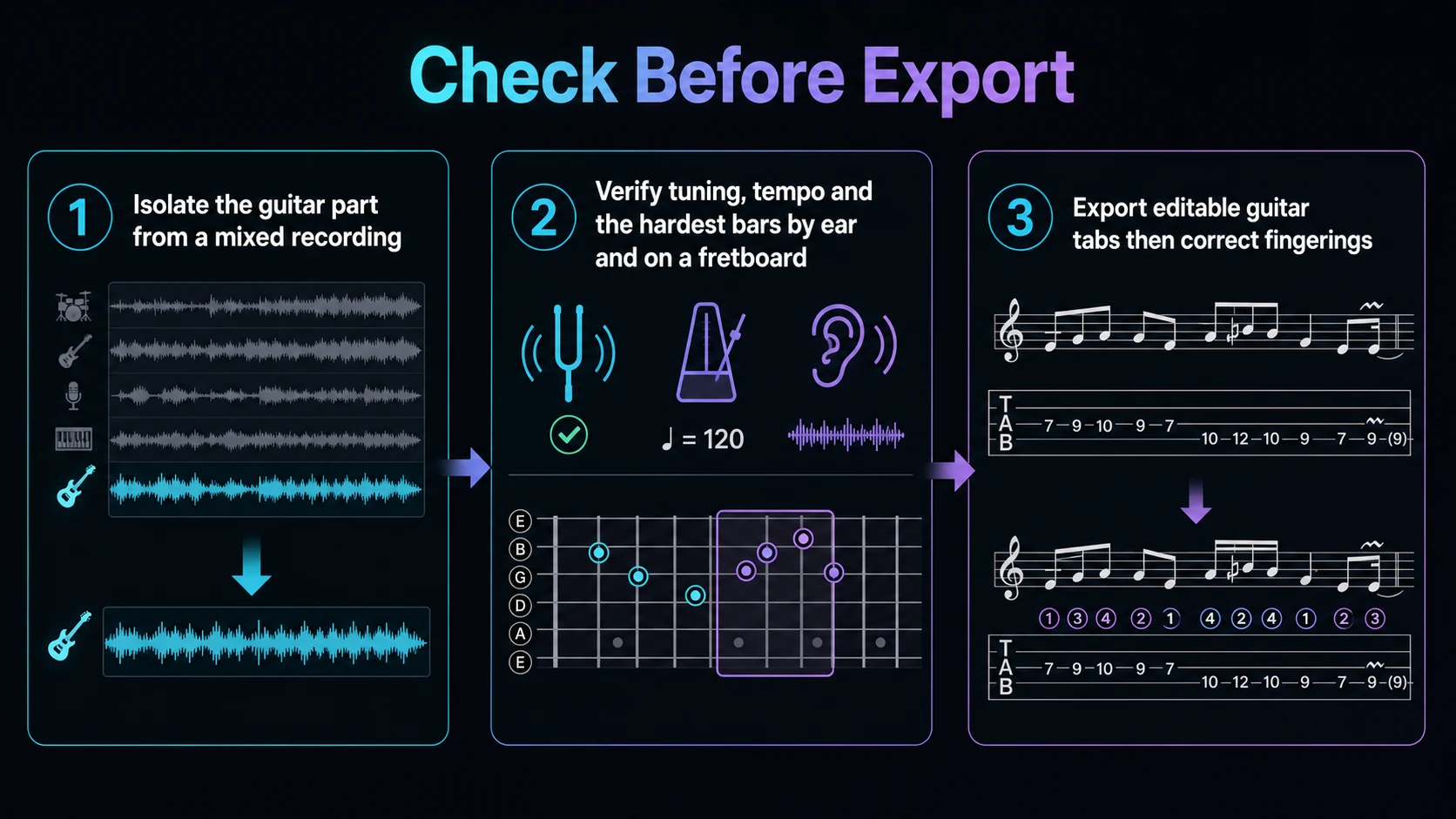
Use this quick review loop:
| Check | Listen or look for | Fix when it is wrong |
|---|---|---|
| Tuning and capo | Open-string color and familiar chord shapes | Change setup before changing individual notes |
| Tempo and bar lines | Pickup notes, rests, and repeated phrases | Rebuild the rhythm first, then refine pitch |
| Voicing | Whether the chord works in a real hand position | Move notes to a different string or position |
| Lead details | Slides, bends, muted notes, and sustain | Mark only details you can hear confidently |
| Section structure | Intro, verse, chorus, bridge, and repeats | Split the practice loop into playable chunks |
The real payoff is that you can concentrate on the two or three bars that break when you play along. That is faster and more musical than polishing a full page of data that you have not listened back to.
Turn the draft into a playable practice tab
Once the draft identifies the part, make the tab serve the player. Start with a slow loop of one phrase, play it in more than one position, and choose the version that makes the next phrase possible. A technically correct note on the wrong string can make an otherwise simple riff impossible to play at tempo.
Use these cleanup priorities in order:
- Rhythm before ornament. Lock down where notes start and stop before adding slides or bends.
- Position before convenience. Choose a fretboard area that supports the next bar, not only the current note.
- Repeat sections consistently. If a chorus repeats, reuse the same clear labeling and fingering logic.
- Keep uncertainty visible. When the mix masks a note, leave a practice note for yourself instead of inventing a precise articulation.
- Play against the source. The tab is ready for your use when it survives a slow play-through, not when it merely looks tidy on screen.
If your target is bass rather than guitar, use the separate bass tab workflow. Bass lines need their own range, groove, and string-choice decisions.
Where Melogen fits in the workflow
Melogen is useful for the first-pass transcription and organization stage: turn permitted audio or a supported link into a guitar-oriented draft, choose the tuning and focus, then review the results as a player. It is not a replacement for permission checks, musical judgment, or final arrangement choices.
Create a guitar tab reference before you refine the part
Use Melogen AI Guitar Tab Generator to make a first pass from audio or a supported link, then verify tuning, rhythm, and fingering on the guitar.
The practical takeaway
The fastest dependable way to transcribe guitar into tabs is not a one-click export. Choose a clean, permitted source, make a guitar-first draft, set the tuning and capo, then check the rhythm and difficult bars by ear and on the fretboard. That leaves you with a tab you can actually practice and improve.
About the author
Zhang Guo
Composer - AI Product Manager
AI product manager and digital marketing consultant with a background in music. Creativity is the bridge between rhythm and logic, where musical intuition and mathematical precision can coexist in every meaningful product decision.
Follow on X