Most Popular Spotify Playlists to Try in 2026
Compare popular Spotify playlists for new hits, rap, Latin music, decade favorites, driving, and workouts, with practical tips for choosing well.
 Zhang Guo
Turn a static score into editable MIDI
Contents
The most popular Spotify playlists are useful because they solve different listening jobs. Today's Top Hits is the obvious place for a broad current-pop snapshot. RapCaviar narrows the focus to hip-hop. Viva Latino tracks major Latin releases, while All Out 2000s and All Out 2010s trade freshness for familiarity.
This guide compares eight Spotify-curated playlists that were publicly available when checked on August 8, 2026. Spotify changes artwork, track order, save counts, and sometimes regional availability, so treat every number as a dated snapshot rather than a permanent ranking.
Quick comparison of popular Spotify playlists
| Playlist | Best for | Main lane | Refresh pattern | Check before saving |
|---|---|---|---|---|
| Today's Top Hits | A broad current-pop snapshot | Global hits | Frequent editorial updates | Explicit tracks and regional changes |
| New Music Friday | Finding releases while they are new | Multi-genre discovery | Friday-led release cycle | High novelty and fast turnover |
| RapCaviar | Current mainstream hip-hop | Rap and hip-hop | Frequent editorial updates | Explicit content and stylistic range |
| Viva Latino | Current Latin hits | Latin pop and urbano | Frequent editorial updates | Regional catalog differences |
| All Out 2010s | Familiar songs from the 2010s | Decade nostalgia | More stable catalog | Length and genre mix |
| All Out 2000s | Millennium-era favorites | Decade nostalgia | More stable catalog | Clean vs explicit versions |
| Songs to Sing in the Car | Easy group singalongs | Driving and social listening | Editorial rotation | Distraction and volume level |
| Beast Mode | High-energy training | Workout | Editorial rotation | Intensity, explicit tracks, warm-up fit |
There is no single official, permanently sorted Spotify leaderboard for every editorial playlist. Spotify's own newsroom nevertheless describes Today’s Top Hits, RapCaviar, and New Music Friday as some of its most popular playlist destinations. Public save counts add another signal, but they move over time and should not be compared as if they were audited lifetime listening totals.
Today's Top Hits for the broadest current snapshot
Start with Today's Top Hits when you want one compact view of songs moving through mainstream pop culture. Its public Spotify page showed roughly 34 million saves and 50 tracks when checked for this article, which makes it the clearest large-scale starting point in this shortlist.
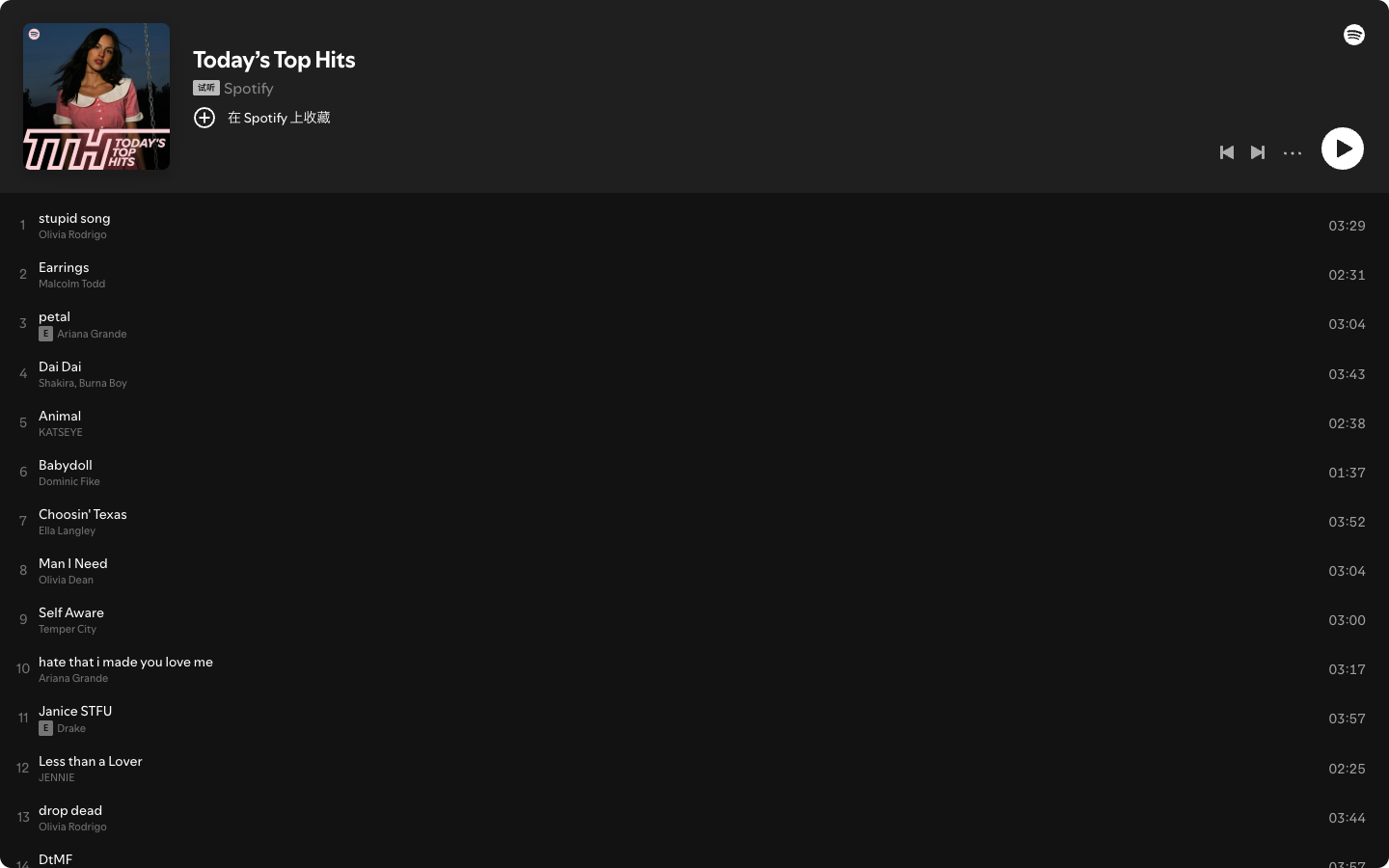
The strength is breadth. The tradeoff is that breadth can make the list feel uneven if your taste is narrow. Before saving it for a party, commute, or shared space, scan the first ten tracks for explicit labels, energy shifts, and artists that dominate the current rotation.
Use Today's Top Hits when:
- You want current songs without choosing a genre first.
- You need a quick reference for mainstream releases.
- You are comfortable with frequent track turnover.
- You plan to save individual discoveries into a more personal playlist.
New Music Friday for release-day discovery
Choose New Music Friday when novelty matters more than familiarity. It is better for scanning releases than for creating a stable soundtrack you can memorize over several weeks.
The useful workflow is selective. Listen to a short section, save the tracks that deserve a second play, and move those songs into a personal discovery list. If you simply follow the editorial playlist and return later, the release cycle may have replaced the tracks you meant to revisit.
New Music Friday fits listeners who want:
- A wide release-day sample across multiple genres.
- New artists alongside established names.
- A source list for a smaller weekly favorites playlist.
- High turnover rather than a fixed catalog.
RapCaviar for current hip-hop
RapCaviar is the strongest specialist choice here for mainstream hip-hop discovery. Spotify has repeatedly treated it as an influential editorial franchise, and its current public page keeps the job clear: a concentrated view of rap records the editorial team wants listeners to notice now.
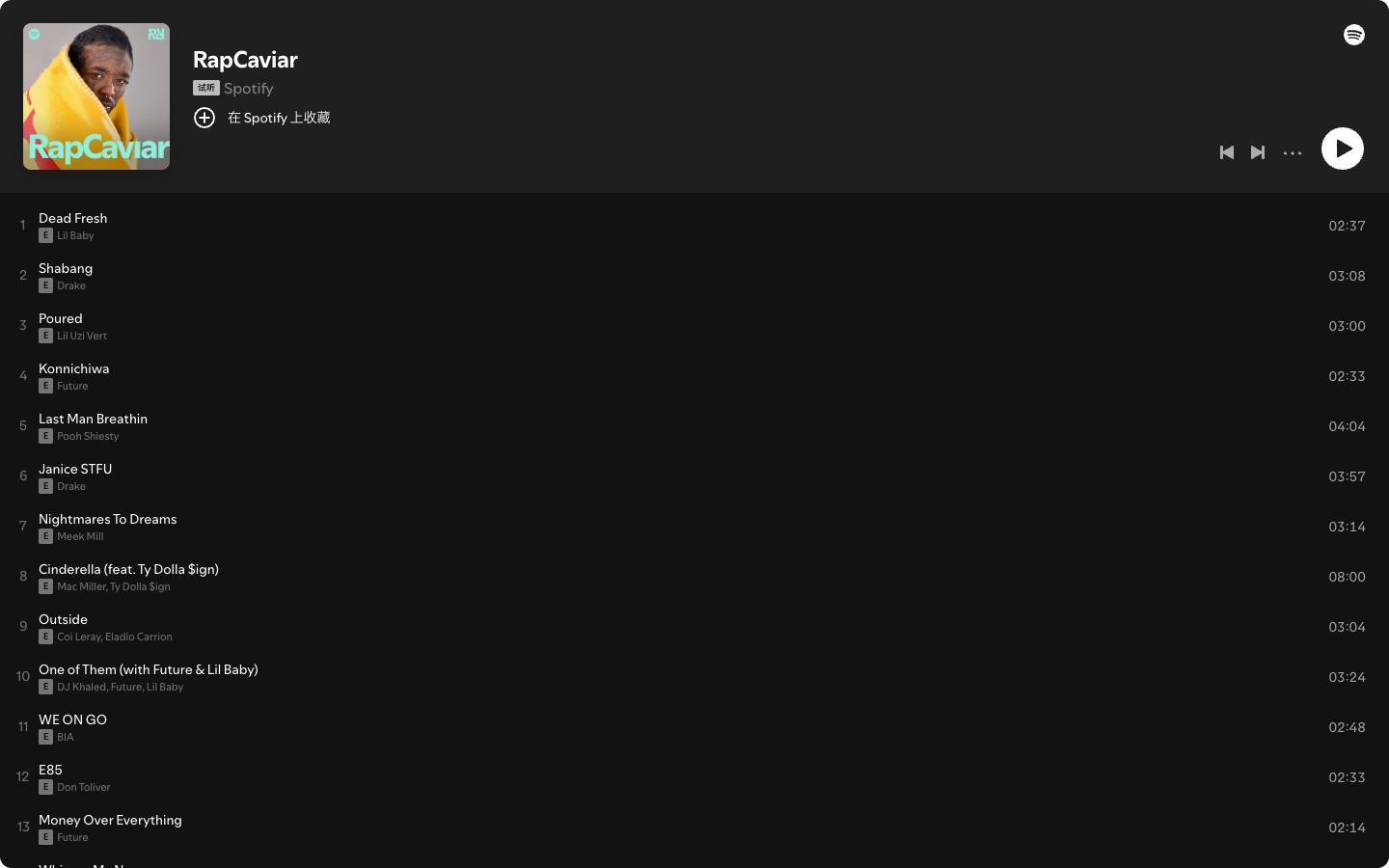
Do not assume every track will suit a gym, classroom, family drive, or shared office. Explicit labels are common, and the energy can move from aggressive records to slower melodic rap. That range is useful for discovery but less predictable as background music.
RapCaviar is a good fit when you want current hip-hop without building the first shortlist yourself. If you want a broader training soundtrack rather than a genre-specific feed, Beast Mode is the better lane.
Viva Latino for Latin hits
Use Viva Latino for current Latin pop and urbano discovery. Spotify has described it as a flagship playlist for today's top Latin hits, which is more useful than treating it as a generic Latin-music archive.
The distinction matters. A flagship current-hits playlist will rotate with releases and regional momentum. It is not the same job as a classics list, a salsa-only playlist, or a quiet Spanish-language background mix.
Choose Viva Latino when:
- You want current Latin hits rather than a historical survey.
- You are comfortable with reggaetón and urbano forming a major part of the mix.
- You want a starting point for artist or genre exploration.
- You will verify availability in your own country before relying on a specific track order.
All Out 2010s and All Out 2000s for familiar decades
The All Out 2010s and All Out 2000s playlists are better when recognition matters more than release-day novelty.
Decade playlists work well for casual parties, long drives, housework, and shared listening because the audience usually knows more of the material. They also tend to be longer and more stylistically mixed than a tightly defined genre playlist.
Pick the decade first, then check the actual sequence. A 2000s playlist can jump from pop and R&B into rock, dance, or hip-hop. That is part of the appeal, but it can also make the mood less consistent than a genre-first list.
The practical rule is simple:
- Choose All Out 2010s for more recent nostalgia and artists still active in current-pop playlists.
- Choose All Out 2000s for a wider millennium-era throwback.
- Create a smaller personal playlist if you need a consistent genre, clean version, or event-specific mood.
Songs to Sing in the Car for social listening
Songs to Sing in the Car is built around recognition and participation. That makes it a better social-listening choice than a cutting-edge discovery list when several people need to enjoy the same drive.
Test the playlist before a long trip. Check explicit labels, quiet intros, sudden volume changes, and whether the first section fits the passengers. Keep the phone mounted or hand playlist control to a passenger; a popular playlist is not worth adding distraction behind the wheel.
If you want smoother transitions between familiar songs, the Spotify crossfade guide explains how to adjust playback without editing the tracks themselves.
Beast Mode for hard workouts
Beast Mode is the high-intensity option in this group. It fits strength sessions, intervals, and hard cardio better than easy warm-ups or recovery days.
The mistake is choosing workout music only by maximum energy. Listen to the opening five tracks and check whether the intensity arrives too early. A playlist that makes the warm-up feel like the main set can work against the session.
For running, use the more specific Spotify running playlist guide. That child guide organizes the decision by run type and BPM, so it serves a different job from this broad discovery roundup.
How to choose and keep the useful tracks
Use this five-step check instead of following every popular playlist:
- Name the job. Decide whether you need discovery, familiarity, genre depth, driving, or workout energy.
- Test the first five tracks. The playlist title may fit while the current rotation does not.
- Check the curator. Confirm the public page identifies Spotify when you want an official editorial list.
- Save the tracks, not just the promise. Move important discoveries into a personal playlist before the editorial list rotates.
- Verify before an event. Region, licensing, artwork, track order, and offline availability can change.
Spotify playlist links point to catalog access; they do not transfer ownership of the recordings. Use Spotify's supported save and offline features for Spotify playback. Do not treat an editorial playlist as a folder of downloadable audio files.
Where Melogen fits with owned local audio
Melogen does not download Spotify catalog songs, export Spotify playlist audio, or manage a Spotify account. It fits only when you already have a local file you created, recorded, purchased DRM-free, or have permission to edit.
In that separate lane, Melogen Music Trimmer can shorten a rehearsal cue, remove silence from an original recording, or prepare a clean local clip. You can then decide whether that permitted local file belongs in your own playback workflow.
Trim local audio you are allowed to edit
Use Melogen Music Trimmer for recordings, demos, cues, and DRM-free files you control. Keep Spotify editorial playlists inside Spotify.
FAQs
What is the most popular Spotify playlist?
Today's Top Hits is the clearest large-scale candidate in this comparison. Its public page showed roughly 34 million saves when checked on August 8, 2026. Save counts change, and Spotify does not provide one permanent audited ranking for every editorial playlist.
Which Spotify playlist is best for finding new music?
Use New Music Friday for release-day breadth, Today's Top Hits for mainstream momentum, RapCaviar for current hip-hop, and Viva Latino for current Latin hits. Save individual discoveries because editorial lists rotate.
Are Spotify playlist rankings the same in every country?
No. Availability, track order, artwork, and editorial emphasis can vary by country and licensing region. Open the playlist in your own account and verify the curator and current tracks.
Can I keep a Spotify editorial playlist forever?
You can follow the playlist, but Spotify can update its tracks. Move important songs into a personal playlist and use Spotify's supported offline feature when your plan and device allow it.
Can Melogen download songs from a Spotify playlist?
No. Melogen does not download Spotify catalog audio. It can trim or prepare local audio that you own or have permission to edit.
The practical takeaway
Choose popular Spotify playlists by job. Today's Top Hits is the broad current snapshot. New Music Friday prioritizes novelty. RapCaviar and Viva Latino go deeper by genre, the All Out lists favor familiarity, Songs to Sing in the Car supports social listening, and Beast Mode brings workout intensity.
Public rankings will change. The durable workflow is to verify the official page, test the first tracks, save the discoveries that matter, and keep Spotify catalog playback separate from local audio you control.
About the author
Zhang Guo
Composer - AI Product Manager
AI product manager and digital marketing consultant with a background in music. Creativity is the bridge between rhythm and logic, where musical intuition and mathematical precision can coexist in every meaningful product decision.
Follow on X